ServiceTitan Alternative
BrickByClick is a ServiceTitan alternative for owner-run service businesses that want one provider for the front office: an AI receptionist on its own local number, a CRM with job tracking, estimates, invoices and card payments, a website, and local SEO. ServiceTitan is a deep field service platform with per-technician pricing and many Pro add-ons, including its own AI Virtual Agent. BrickByClick costs $399 to $999 a month, month to month, and our team sets it up and runs the website and SEO for you.
At a glance
- Who it is for: owner-operated and small service businesses in 30+ industries that miss calls and do not want to run marketing themselves.
- What you get: AI receptionist (French, English and Spanish) with its own local number, CRM, Job tracker, estimates, invoices, payments, crew app and a 10+ page website. Local SEO from Growth.
- What it costs: Front Office $399, Growth $599, Total Growth $999 a month, no setup fees. Starter $99 is the CRM on its own, without the receptionist.
- ServiceTitan’s pricing: per technician, by request. Its pricing page shows no dollar amounts, so we do not quote any.
- How fast: about two weeks from the demo to live, set up with you.
- The honest part: ServiceTitan has far more depth in dispatch, payroll, memberships, pricebooks and call-center tools. If you need those, stay with it.
What is a ServiceTitan alternative for small business?
It is software that covers what a smaller shop actually uses every day, without the parts built for big call centers and large fleets.
For most owner-run businesses that means four things: answer every call, keep every job moving to paid, get paid on site, and get found on Google.
What ServiceTitan is, in its own words
- It calls itself “Home and Commercial Software for the Trades”, “built for home and commercial contractors” (servicetitan.com).
- It lists Starter, Essentials and The Works packages, each with a “Request Pricing” button, and says “Our per-technician pricing is designed to fit your business and goals, at any size” (pricing).
- On top of the packages it sells Pro products: AI Virtual Agent, Marketing Pro, Contact Center Pro, Pricebook Pro, Fleet Pro, Scheduling Pro, Dispatch Pro and Field Pro (pricing).
- It has Enterprise, Franchise and Private Equity solution pages (servicetitan.com).
ServiceTitan says it fits any size. Our view is narrower: its depth pays off most when you have dispatchers, CSRs and many technicians. A one-truck or five-person business often wants less software and more done for it.
What BrickByClick is
One monthly plan that combines the software and the service. The software is the CRM, the Job tracker, estimates and invoices, the crew app and job costing. The service is our team building your website and, from Growth, doing your local SEO.
Why do small businesses look for ServiceTitan alternatives?
Usually it is not that ServiceTitan is weak. It is that the business is small and wants a different shape of product.
Pricing you have to ask for
ServiceTitan prices per technician and asks you to request pricing (pricing). The AI Virtual Agent and Marketing Pro are listed separately as Pro products. Ask its sales team which ones your quote includes.
BrickByClick publishes every plan price on its plan comparison. The receptionist and the website are inside the plan, not sold separately.
You need the phone answered more than a dispatch board
In a small shop the owner is often the dispatcher, the estimator and a tech. The most expensive moment is a call that rings out while you are under a sink or on a roof.
That is why the AI receptionist sits at the center of BrickByClick: it answers in your business name, day or night, and puts the call in your Inbox with a summary.
Marketing is a second vendor
ServiceTitan’s Marketing Pro covers email, SMS and direct mail campaigns (Marketing Pro overview) and review tools through Marketing Pro Reputation (Reputation). Its pricing page does not list a website or SEO service.
With BrickByClick a 10+ page website on your domain comes from Front Office up, and monthly local SEO by our team from Growth.
How does BrickByClick compare to ServiceTitan?
Feature by feature, from what each company publishes. “Not stated” means ServiceTitan’s pages we read do not say; ask its sales team. ServiceTitan pages checked October 27, 2026.
| Feature | ServiceTitan (from its public pages) | BrickByClick |
|---|---|---|
| Published prices | No. Per-technician pricing, “Request Pricing” on each package | Yes. $99 Starter, $399, $599, $999 a month |
| AI phone answering | AI Virtual Agent, a Pro product: answers, books, confirms and reschedules, transfers to a live CSR | AI receptionist on every plan from Front Office up; not on Starter |
| AI answering price | Not stated. Help center: billing starts once you use the voice agent | Inside the plan: 500 minutes of AI talk time a month, 1,000 on Total Growth |
| Languages on calls | English and Spanish (a Spanish toggle in the help center) | French, English and Spanish |
| AI texting | An SMS agent on ServiceTitan tracking numbers | Missed-call text-back and two-way texts from Front Office up, once your number is registered with the carriers |
| Scheduling and dispatch | Yes, in every package, with Scheduling Pro and Dispatch Pro add-ons | Calendar, crew week view, drag to reassign; no route optimization |
| Estimates and invoices | Invoicing in every package; mobile estimates from Essentials | Every plan, Starter included |
| Payroll and commissions | Payroll from Essentials; commission tracking on The Works | Timesheets and a time clock; no payroll |
| Memberships | Customizable memberships on The Works | Yearly service reminder emails; no membership billing |
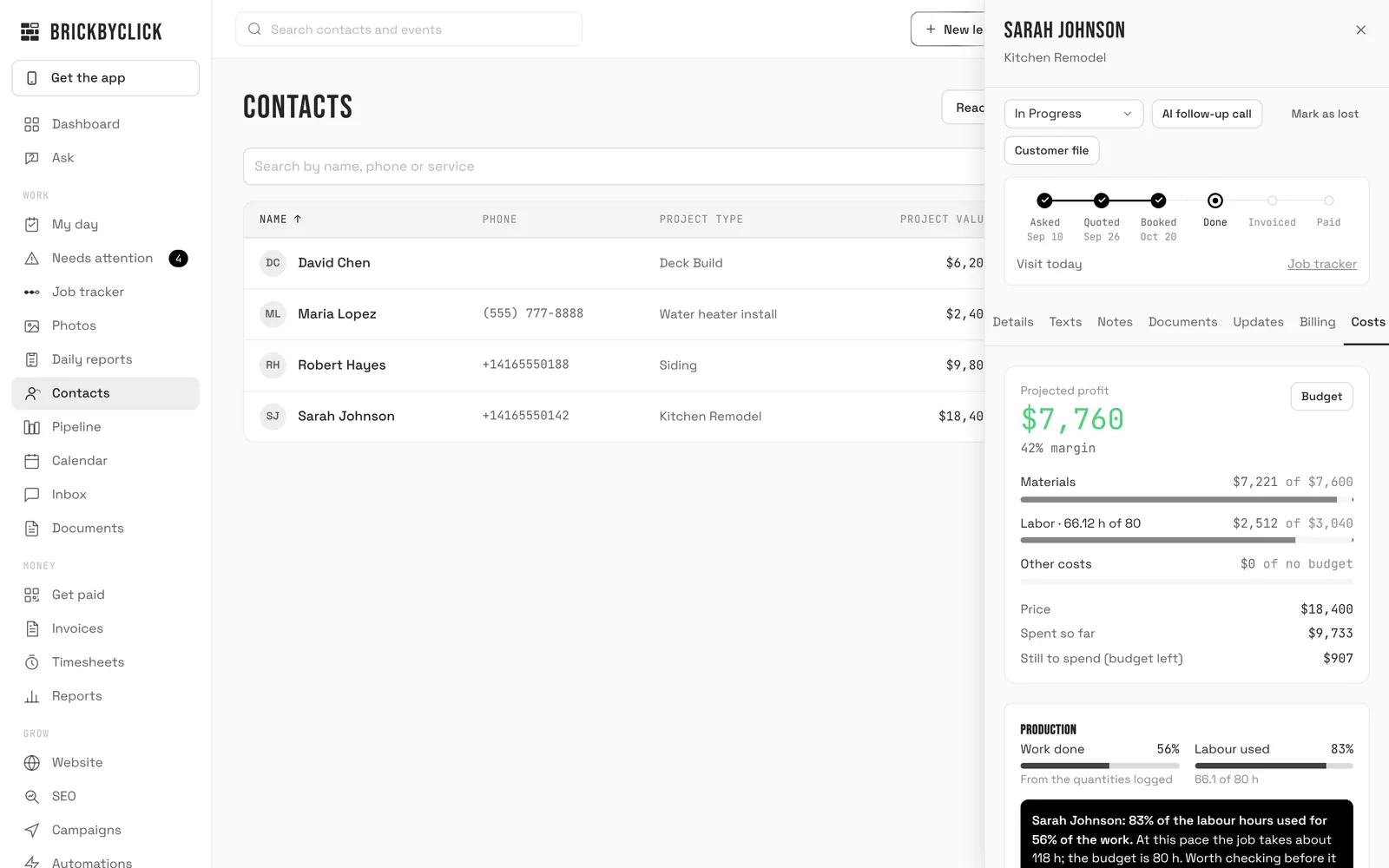
| Job costing | Not stated on the pricing page | Every plan: budget from the estimate, costs, margin and a pace warning |
| Website | Not listed on the pricing page | 10+ page website on your domain, built and hosted, from Front Office up |
| Local SEO | Not listed on the pricing page | Google profile management, 25 citations and a blog post a month from Growth |
| Marketing campaigns | Marketing Pro: email, SMS and direct mail | Email campaigns by our team from Growth; no SMS campaigns |
| Review requests | Marketing Pro Reputation, review survey by text | By email after each finished job, every plan |
| Contract and setup fee | Not stated on the pages we read | Month to month, no setup fees |
Sources: pricing, AI Virtual Agent, voice agent settings, Marketing Pro, Reputation. Ours: plan comparison.
ServiceTitan virtual agent alternatives
If you searched for an alternative to the ServiceTitan virtual agent, this is the section for you. Here is what ServiceTitan publishes, then what ours does.
What ServiceTitan’s AI Virtual Agent does
- Answers inbound calls, gathers information and books jobs in real time from ServiceTitan data, using Adaptive Capacity (AI Virtual Agent).
- Confirms and reschedules appointments, and recognizes when a live human is needed and transfers the call.
- An SMS agent handles inbound and outbound texts on ServiceTitan tracking numbers.
- The help center says the voice agent is in Early Access for specific accounts, applies to Basic Phones and Phones Pro accounts, and that “Billing starts after you start using the voice agent” (settings).
- It can text a payment link, book membership recurring services, and has a Spanish toggle for English and Spanish callers.
That is a strong agent, built into ServiceTitan. If you already run ServiceTitan and its phones, it is the natural choice.
What the BrickByClick AI receptionist does
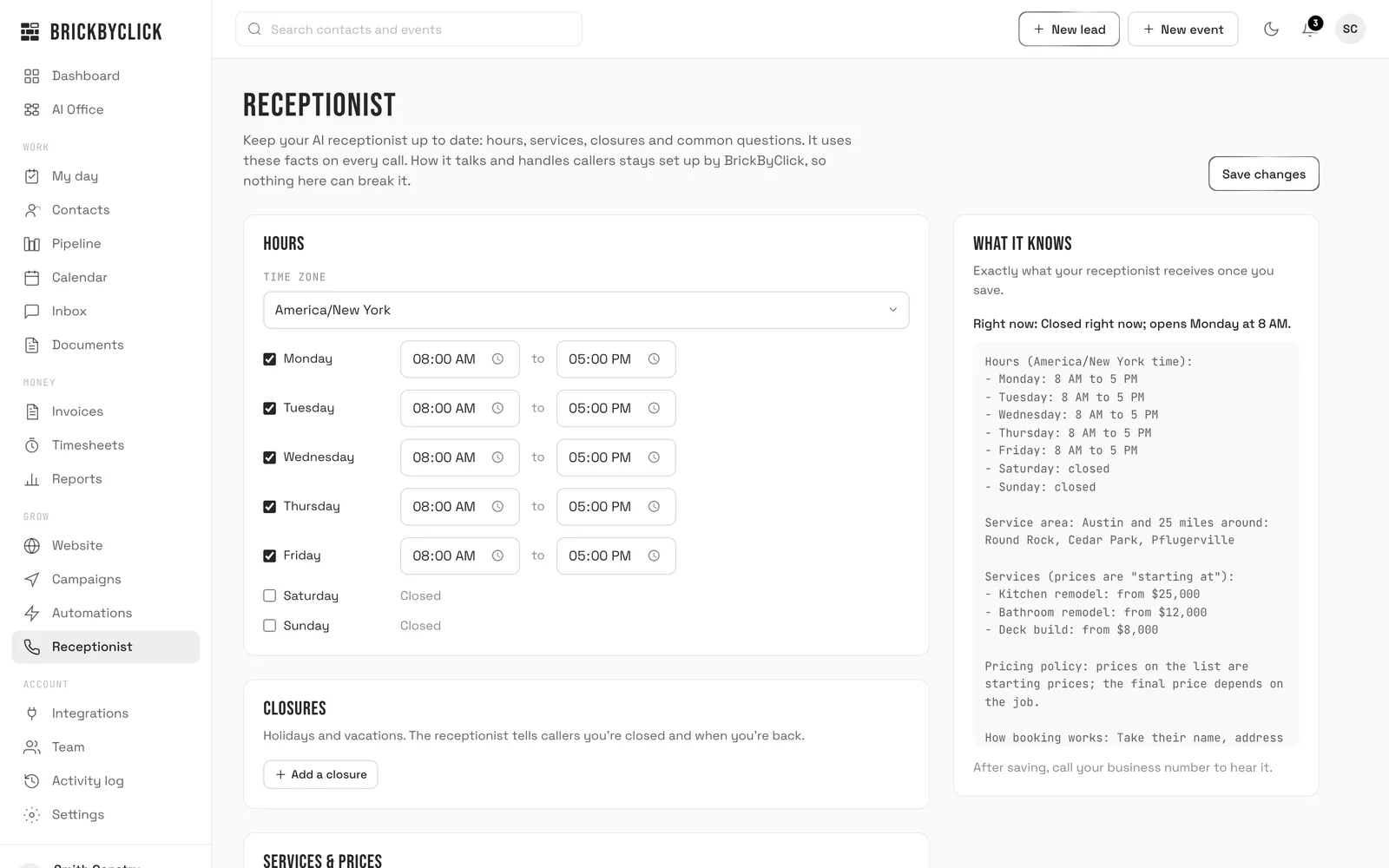
- It has its own local phone number. Forward your line to it for every call or only missed ones, or give the number out directly.
- It answers in your business name from the hours, services, service area and price rules you set on the Receptionist page.
- It speaks French, English and Spanish.
- It books into your calendar at real open times when you turn on Live Booking, or takes the details for a callback.
- It knows returning callers by their number and sees their past jobs and visits.
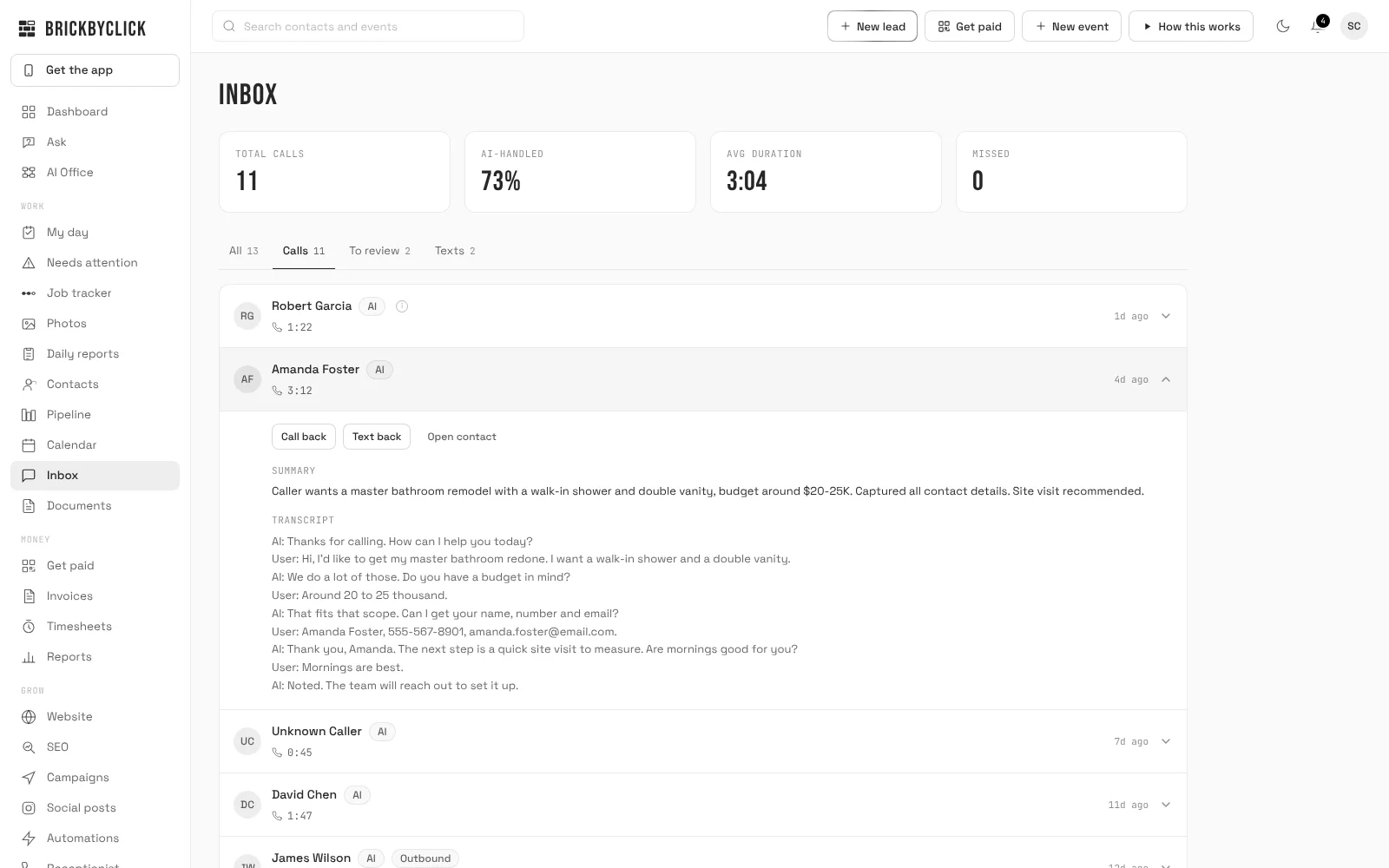
- Every call lands in your Inbox with a summary, the transcript and the recording, and you get an alert for a new lead.
- It does not quote a price unless your price setting allows it, and then only your “starting at” price.
The real difference
ServiceTitan’s agent is an add-on to a large platform, with live transfer and texting built in. Ours comes inside a flat plan with a set number of minutes, together with the CRM, the website and the follow-ups, for businesses that are not on ServiceTitan.
ServiceTitan AI alternative: Atlas vs the BrickByClick CRM
ServiceTitan’s AI assistant is called Atlas. Its help center calls it “your team’s AI sidekick”, powered by Titan Intelligence, and says “Atlas is a Core product available to all ServiceTitan customers” (Atlas).
- Atlas looks up job details and customer history, answers questions about ServiceTitan features, and helps technicians with equipment and parts in Field Pro.
- Some Atlas features need a Field Pro subscription; the Atlas mobile app needs ServiceTitan Max; several features are Private Preview for select accounts.
Where AI does the work in BrickByClick
- On the phone: the AI receptionist answers and books.
- On the job: the Job tracker flags finished work that is not invoiced after 2 days, and Needs attention lists jobs going over budget.
- On the money: Ask answers questions like “which jobs made the most profit last month?” from your own data.
- On follow-up: quote follow-up emails at 2, 5 and 10 days, and a Google review request by email after a finished job.
When ServiceTitan is the better choice
Be honest with yourself here. Switching software is work, and ServiceTitan does things we do not. The left column is when BrickByClick fits; the right column is when ServiceTitan is likely the better choice.
A good fit if
- You run the business yourself, with a small crew, and calls get missed when you are on a job.
- You want the website and local SEO handled by the same team as your CRM.
- You want published prices, month to month, with no setup fee.
- You serve one area from one location.
- You want job costing and stuck-job warnings without buying a higher tier.
Not the right fit if
- You have a call center of CSRs and need call-center tooling. ServiceTitan sells Contact Center Pro for that.
- You need payroll, commission tracking or membership billing inside the field software.
- You need route optimization, fleet tracking or inventory tools.
- You run several locations or a franchise. ServiceTitan has solution pages for those.
- You are already live on ServiceTitan and it works. Moving is rarely worth it just for a cheaper bill.
Can I use both?
You can, but we would not recommend paying for two CRMs. The cleaner path is to pick one system for jobs and money.
ServiceTitan alternatives by type of business
ServiceTitan lists many trades on its home page. BrickByClick serves local service businesses in 30+ industries. What changes by trade is what your receptionist must know and which pages your website needs.
- Plumbing: emergency calls answered at night, with your emergency rule on the receptionist. See AI receptionist for plumbers.
- HVAC: seasonal furnace and AC calls, and yearly service reminder emails.
- Electrical: panel, EV charger and repair pages, and estimate visits booked into real open times.
- Roofing and general contracting: long jobs where the job costing budget and the pace warning matter most.
- Cleaning, landscaping, pest control and lawn care: recurring visits on the calendar and a crew app that works with no signal.
What does BrickByClick cost compared with ServiceTitan?
We cannot compare prices fairly, because ServiceTitan does not publish them (pricing). Ask it for a written quote with the Pro products you need, then compare it to the table below.
| Plan | Price | What it adds |
|---|---|---|
| Starter | $99 a month | The CRM on its own, set up by you: Job tracker, estimates, invoices, card payments, booking page, crew app, email follow-ups and a free website on a brickbyclick address. No receptionist or texting. |
| Front Office | $399 a month | AI receptionist with 500 minutes, texting once registered, a 10+ page website on your domain, set up with you. |
| Growth | $599 a month | Local SEO, Google profile management, 25 citations, a blog post a month, email campaigns and a monthly strategy call. |
| Total Growth | $999 a month | 1,000 receptionist minutes, 2 blog posts a month, link building, unlimited website pages, an account manager. |
Plans are month to month with no setup fees. Card payments carry Stripe’s processing plus 0.5% per card payment (max $25), with no BrickByClick fee on bank payments.
What BrickByClick does not do
This list matters most if you are coming from ServiceTitan, because it is where you would feel the gap.
- No payroll, commissions or membership billing. There are timesheets and a time clock.
- No route optimization, GPS or fleet tracking.
- No card reader or tap to pay. The customer scans a QR code and pays on their own phone. Bank payments are US only.
- No QuickBooks invoice or payment sync. You connect QuickBooks Online and send job receipts to it as expenses, photo attached, and “Download for your accountant” gives one spreadsheet.
- No texting on day one. It turns on once your business number is registered with the phone carriers; we handle that during setup.
- No SMS campaigns. Campaigns, quote follow-ups and review requests are email.
- No receptionist on Starter, and no SEO on Front Office. SEO starts at Growth.
- No ranking promises. Search results are Google’s decision and take months.
- No app-store app. The crew app opens from the phone’s home screen.
How to switch from ServiceTitan
- Check your ServiceTitan agreement for its end date and notice terms.
- Export your customers to a spreadsheet and import them; they come over with their real dates.
- Bring in your upcoming appointments and past payments; every row is checked so nothing is counted twice.
- Forward your business line to your receptionist’s local number, for every call or only missed ones.
- Go live in about two weeks; our team builds the website while you check the receptionist’s answers.
See how switching works for the details.
Questions people ask
What is the best ServiceTitan alternative for a small business?
What are the alternatives to the ServiceTitan virtual agent?
Does ServiceTitan have an AI receptionist?
How much does ServiceTitan cost?
Is ServiceTitan too much for a small business?
Is BrickByClick cheaper than ServiceTitan?
Does BrickByClick do what ServiceTitan does?
Does BrickByClick sync with QuickBooks?
Which languages does the BrickByClick AI receptionist speak?
Can the BrickByClick receptionist text customers?
Is there a contract with BrickByClick?
How long does it take to switch from ServiceTitan to BrickByClick?
Is BrickByClick only for HVAC and plumbing?
See if it fits your business
Fifteen minutes. Tell us what you use ServiceTitan for today, and we will tell you straight whether BrickByClick covers it.