AI Receptionist for Plumbers
An AI receptionist for plumbers answers your business phone in your company's name, day and night, while you are under a sink or in a crawl space. BrickByClick's answers from your own services, service area and price rules, gives callers your emergency number when something is flooding, books drain, water heater and estimate visits into your calendar if you allow it, and saves every call in your CRM with a summary. It comes with the Front Office plan ($399 a month) and up, and you can hear ours on (888) 533-5784.
At a glance
- What you get: an AI answering service for plumbers that picks up every call, knows returning customers by name, books visits within your rules and files each call with a summary, transcript and recording.
- Who it is for: plumbing companies from one truck to several crews that miss calls on jobs, at night or on weekends.
- Cost: included from Front Office ($399 a month), with 500 receptionist minutes a month on Front Office and Growth and 1,000 on Total Growth. Not on Starter.
- Emergencies: you tick "We take emergency calls", say what counts as one and give the number that gets them.
- What it needs: your business line forwarded to its own local number, and your hours, services and prices filled in. Set up with you in about two weeks.
What is an AI receptionist for plumbers?
A phone answerer that talks, not a recording
It is a virtual receptionist for plumbing companies that holds a real conversation in a natural-sounding voice. There is no "press 1" menu and no voicemail beep.
It does the front-desk job a plumbing office needs: find out what is wrong, where the caller is, whether it is urgent, then book the visit or pass it on.
What makes it a plumbing receptionist and not a generic one
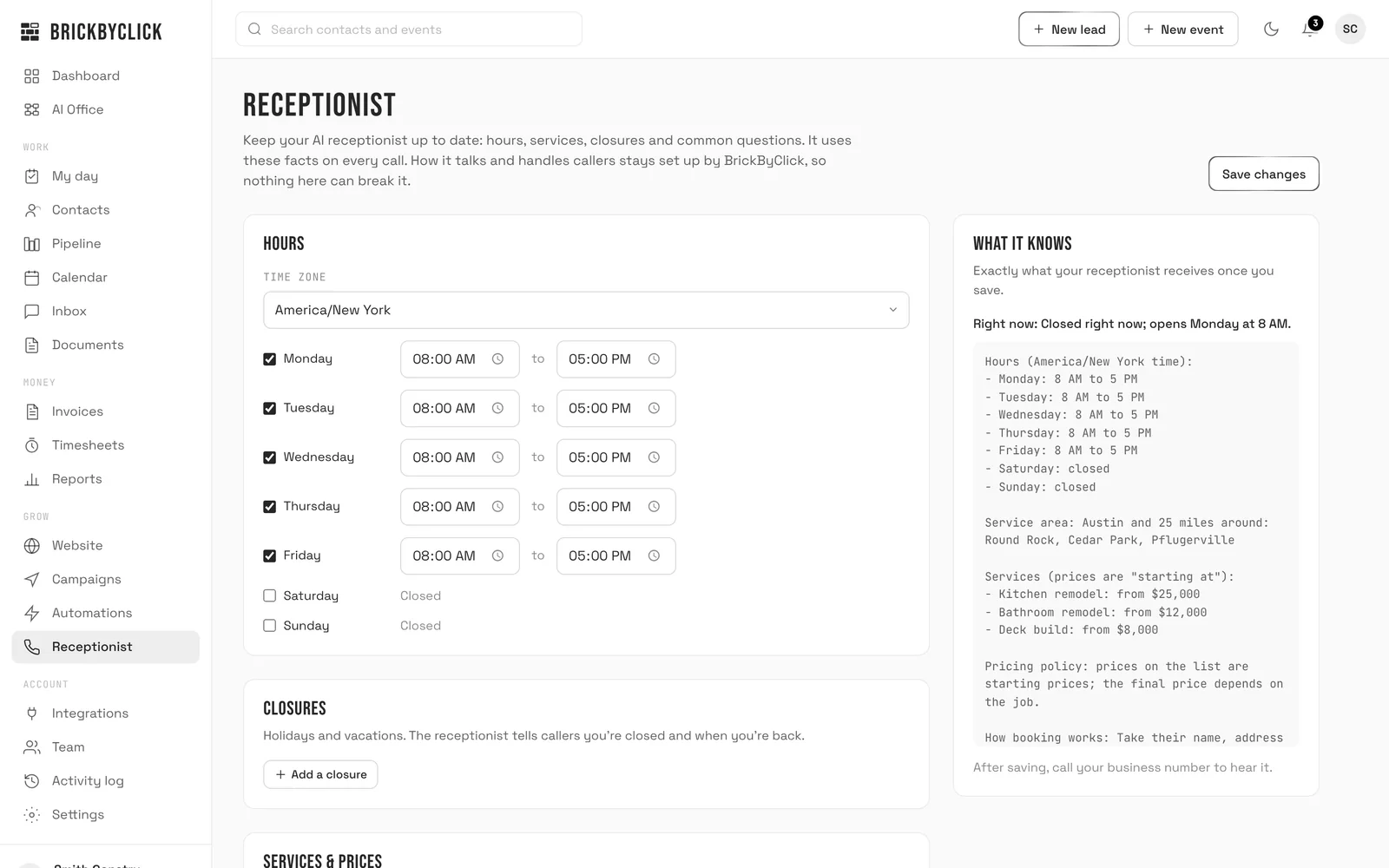
- Your services list: drain cleaning, water heater repair and replacement, leak repair, sewer line work, fixture installs, whatever you actually do (up to 30 services).
- Your service area in your own words, such as the towns and the distance you cover.
- Your definition of an emergency, and the number those calls should go to.
- Your rule for price questions, so it never quotes a water heater over the phone unless you want it to.
- Your common questions, like "Do you charge for estimates?" or "Do you work on tankless heaters?"
The system is the same one BrickByClick runs for 30+ industries. If you want the general version, read the AI virtual receptionist page. This page is about plumbing calls.
Why do plumbing companies use an AI answering service?
Your hands are busy when the phone rings
Plumbing work rarely happens next to a desk. You are cutting pipe, soldering a joint or on your back under a vanity when a new customer calls.
People with a leak or no hot water usually want someone now. If nobody answers, many simply call the next plumber they find. We do not publish a percentage for this; you know your own missed calls better than any statistic.
What a missed plumbing call actually costs you
- The job itself, if the caller books someone else.
- The follow-on work: the customer whose drain you clear today is the one who calls you for a water heater later.
- Your evening, spent calling back voicemails that are hard to hear, with no address and no description of the problem.
Nights and weekends are when pipes fail
The receptionist knows whether you are open right now from your hours and closures. Outside your hours it still answers, tells routine callers when you are back and, for real emergencies, gives them your emergency number.
How does an AI receptionist answer plumbing calls?
Step 1: calls reach it
You get a local phone number for your receptionist. Forward your plumbing line to it, either every call or only the ones you do not pick up, or put the number on your truck and website. Setup shows the forwarding code for your phone company.
Step 2: it looks up the caller before it speaks
It checks the number against your contacts. For a customer it sees their name, up to five jobs on file, recent call summaries and notes, upcoming visits and equipment on file, such as the water heater you installed.
Step 3: it greets them
A new caller hears your greeting (up to 200 characters, your words) and the notice "Just so you know, calls are recorded for quality." A returning customer hears "Hey" and their first name, then "thanks for calling" your business "back!"
Step 4: it answers only from your information
It answers from your saved facts, the caller's file and a search of your own website, if your website is connected to our system. If none of those has the answer, it says someone will get back to them. It does not make up an answer.
Step 5: it books, routes or takes a message
- Routine job, Live Booking on: it offers two or three real open times and books the one the caller picks.
- Routine job, Live Booking off: it takes name, number and the problem, and says the team will call back.
- Emergency: it gives the caller your emergency number, following what you said counts as an emergency.
Step 6: you see the result
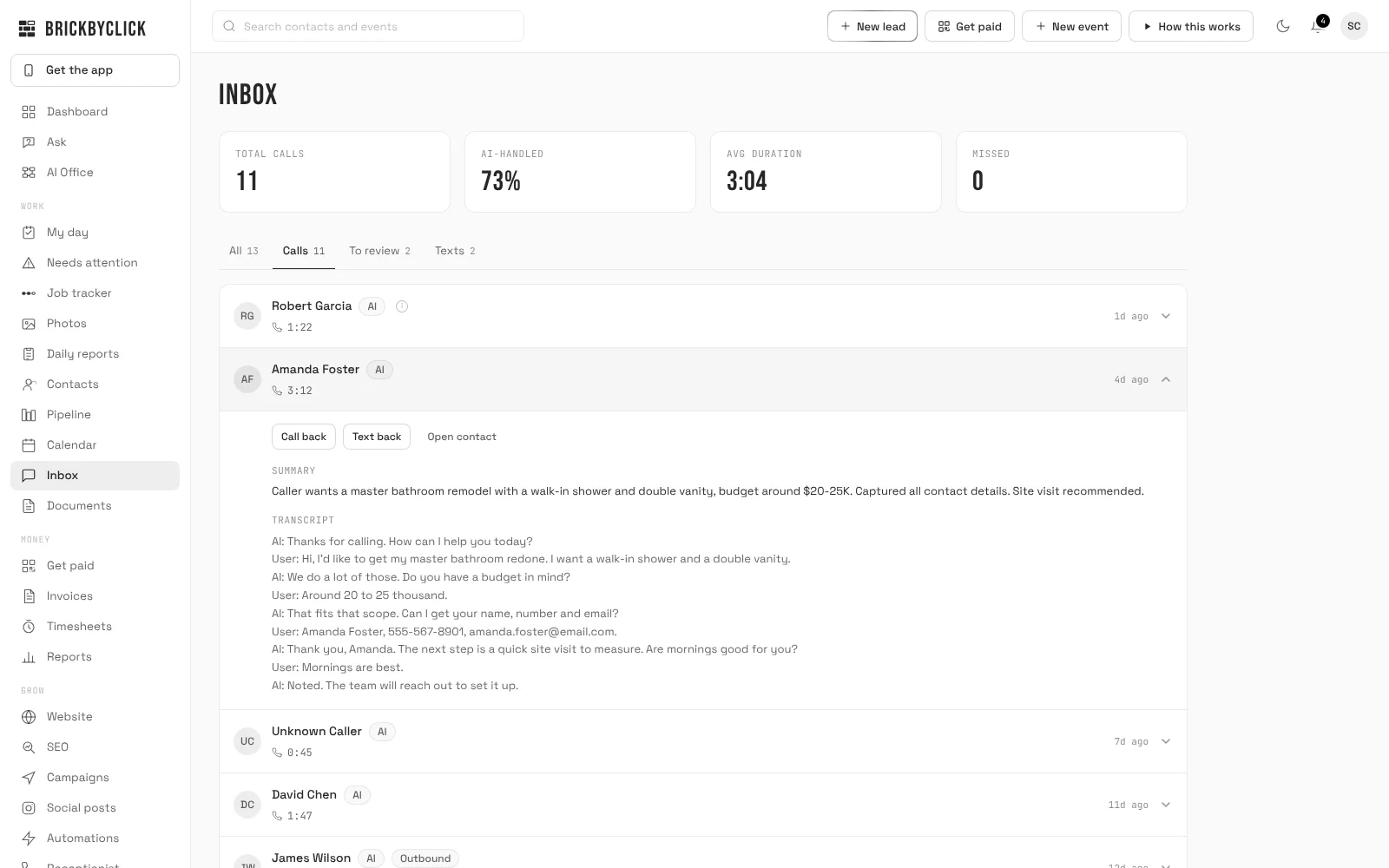
The call lands in your Inbox with a summary and transcript, a note goes on the contact, and you get a phone notification plus an email ("New lead from a call") unless you turn Instant lead alerts off.
Five real plumbing calls, and what the AI receptionist does with each
These are the calls plumbers get every week. For each one: what the caller gets, and what lands in your CRM.
1. Burst pipe at 2 AM
A homeowner calls in a panic: water is coming through the kitchen ceiling. You are closed, but the receptionist still answers.
- What the caller gets: a voice that picks up straight away, in your company's name, and your emergency number because a burst pipe matches what you wrote under "What counts as an emergency".
- What you get: the call in your Inbox with a summary and transcript, a new contact if they are new, and a phone notification.
- Your choice: the emergency number can be your own cell or whoever is on call that night.
If you do not take emergency calls, leave the box unticked. It will then treat the call like any other after-hours call and take the details for the morning.
2. No hot water
A returning customer calls: the water heater you installed three years ago is out. The receptionist recognises the number and greets them by first name.
- It can see the equipment on their file and their past jobs, so it knows who it is talking to.
- Whether "no hot water" is an emergency is your call. Many plumbers book it as the first open time rather than a night call-out; write your rule in plain words.
- With Live Booking on, it books a repair visit at a real open time and you get "Booked:" with the name and time.
3. Clogged drain
A routine, quick job. This is where Live Booking pays off: the caller wants a time, not a callback.
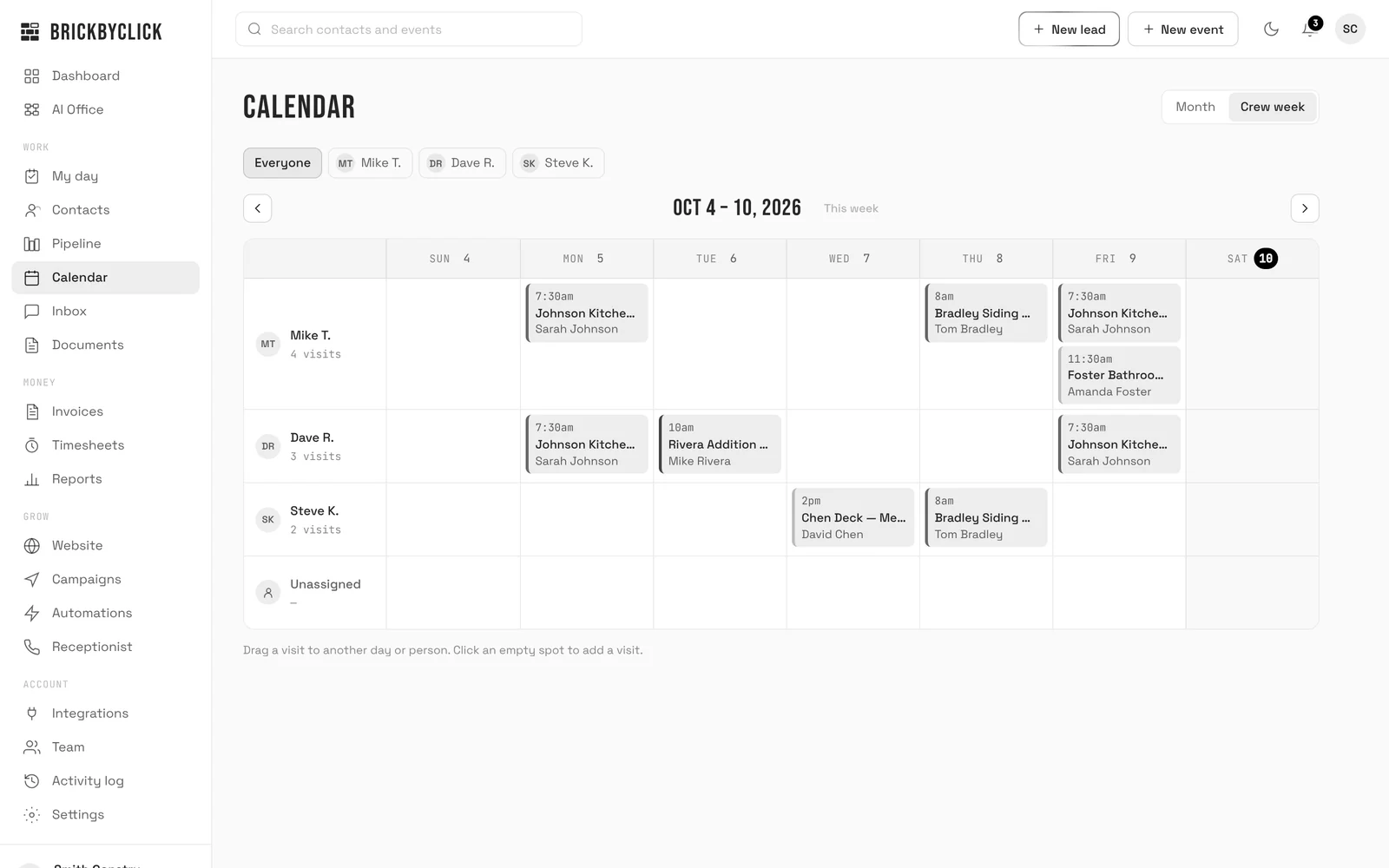
- It offers open times inside your hours, around visits already on your calendar and your travel time between jobs.
- It asks for their name before it books, and adds a crew note if they give one, such as "side door, dog in the yard".
- The note shows on the visit in the crew app, so the plumber who goes sees it.
4. "How much for a new water heater?"
Price shoppers call plumbers all day. What it says depends on the price setting you choose (more on that below).
- Default: it does not quote and offers an estimate visit instead.
- If you allow it: it gives your "starting at" price from your services list, or the listed price.
- It never makes up a number that is not on your list.
5. Sewer line problem
Sewer work usually needs a look before a price. Set "What gets booked on calls" to an inspection visit with a 90 or 120 minute slot.
If a sewage backup counts as an emergency for you, say so in your emergency description, and those callers get your emergency number instead.
Can an AI receptionist handle emergency plumbing calls?
Yes, by your rules. On the Receptionist page, under Booking & Emergencies, you tick We take emergency calls, type the emergency number and describe What counts as an emergency in up to 300 characters.
Write the emergency rule the way you would tell a new office hire
- Burst or leaking pipes, water coming through a ceiling, a sewage backup, no water at all.
- Not emergencies: a dripping tap, a slow drain, a running toilet, a quote for a remodel.
You cannot save the page with emergencies on and no number: it asks you to "Add the emergency phone number, or turn emergency service off."
Emergency vs routine, side by side
| Emergency call | Routine call | |
|---|---|---|
| Who decides it is an emergency | Your written description | Anything that does not match it |
| What the caller gets | Your emergency number | A booked visit (Live Booking on) or a callback promise |
| After hours | Still gets your emergency number | Told when you open; offered your next open times if booking is on |
| What you get | Call summary, transcript, notification | The same, plus "Booked:" and an email if it booked |
Can it book plumbing jobs into my calendar?
Yes, once you tick Book appointments on calls. It is off until you turn it on, so nothing gets booked before you are ready.
Booking rules that fit a plumbing day
- What gets booked (default "Estimate visit") and How long: 15, 30, 45, 60, 90 or 120 minutes.
- Travel time between visits: none, 15, 30, 45 or 60 minutes, so you are not booked across town back to back.
- Earliest booking: 1, 2, 4, 12, 24 or 48 hours from now.
- How far ahead: 3, 7, 14, 21 or 30 days.
- Most per day: 1 to 20 bookings by the receptionist, so it leaves room for emergencies.
The panel "Next openings your receptionist would offer" lists the real times it would give callers, so you can check your rules before a customer hears them.
What it checks before booking
Your hours and closures, visits already on the calendar plus the travel buffer, and busy times from a connected Google calendar if you let it block booking. Just before booking it checks the time is still free; if not, it offers another.
Returning customers and their visits
A caller can ask when their plumber is coming, and it tells them, but only to the number actually calling. By default, a request to move or cancel is emailed to you and nothing changes. You can let it move or cancel on the call, with a notice limit you set from 2 to 48 hours.
What does it say when callers ask about plumbing prices?
You choose one of three answers on the Receptionist page, under Services & Prices.
- Don't quote prices: offer an estimate instead (the default). Good for water heater replacements, repipes and sewer work.
- Give "starting at" prices from the list. Good if you advertise a starting price for drain cleaning or a service call.
- Give the prices on the list. Only if your prices are fixed.
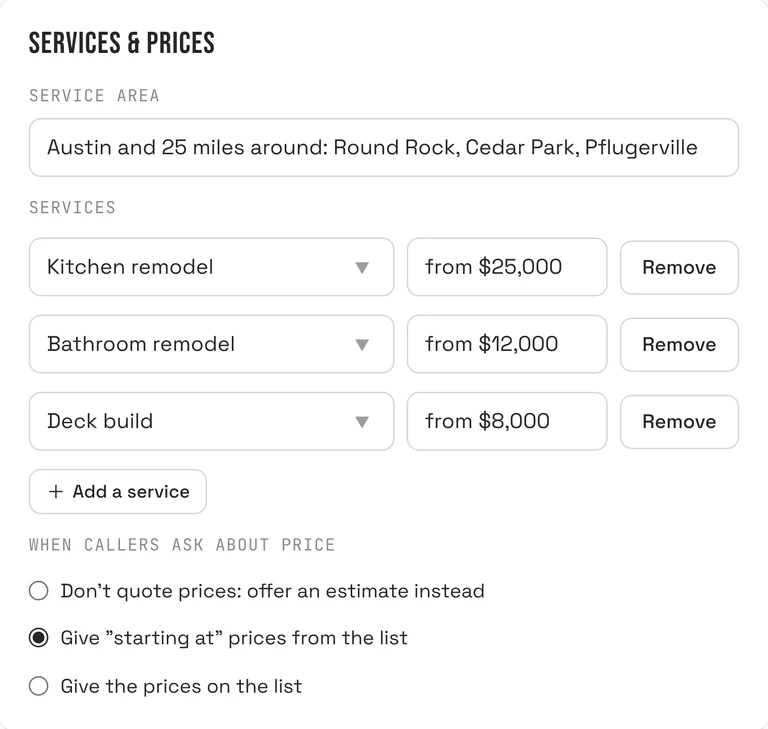
Each service can have its own price note of up to 60 characters, such as "from $X, plus parts". Put trip or after-hours charges in your common questions so the answer is yours, word for word.
What lands in my CRM after each plumbing call?
In the Inbox
Each call shows the caller, its length, a summary and the full transcript, with Call back, Text back and Open contact buttons. Most calls also have a recording you can play.
On the contact
- New callers are created as contacts and placed in the first stage of your pipeline.
- A note is added: "AI call", the length and the summary.
- New callers are asked how they heard about you, and the answer is saved, so business reports show which sources bring work.
Robocalls and sales pitches from unknown numbers are marked as spam, with no contact and no alert.
If the call moved a job forward, it suggests a pipeline move; you tap to accept. Nothing moves on its own.
Does it text plumbing customers?
The receptionist does not text during a call. Texting is included from Front Office up and turns on once your business number is registered with the phone carriers. We handle that during setup, so it is not on from day one.
- Missed-call text-back, never between 9 PM and 8 AM your time.
- Visit reminders the day before, and "On my way" texts from the crew app.
- Two-way texts from the Inbox.
There are no text campaigns, text quote follow-ups or text review requests; those go by email.
Call (888) 533-5784 and hear it answer
Reading about a receptionist is not the same as talking to one. Call (888) 533-5784: that is BrickByClick's own AI receptionist, on the same system your plumbing customers would reach.
Ask what it costs, ask something it should not know and listen to how it handles it, or ask to book a demo.
Hear it answer as your plumbing company
Got a preview website from us? Enter the Website ID from your email and call your receptionist right here in your browser. It picks up in your plumbing company's name and answers from your preview website.
Things to try
- What do you charge for a typical job?
- Can someone come out this week?
- Do you work in my area?
- What are your hours?
Your browser will ask to use your microphone.
Demo calls end after 3 minutes.
- 1Enter the Website ID from your email.
- 2Press Call and allow your microphone.
- 3Ask it what your callers ask: "Do you fix water heaters?", "Do you come out to my town?", "What does a drain cleaning cost?"
The demo answers from your preview website and takes a message. Your real receptionist answers from the information you give it and can book the visit into your calendar.
No Website ID yet? Call (888) 533-5784 to hear ours, answering for BrickByClick.
How do I set up an AI receptionist for my plumbing business?
We set it up with you in about two weeks. Your part is short.
- Book a call with us and pick a plan from Front Office up.
- We set up your receptionist's local number and link it to your account.
- Fill in the Receptionist page: hours and time zone, closures, service area, services and prices, emergency rule and number, common questions.
- Pick one of six voices and type your greeting.
- Decide on Live Booking: what gets booked, how long, travel time and the daily cap.
- Forward your business line to the receptionist, all calls or only missed ones, using the code for your phone company.
- Press Save changes, then call your own number to hear it.
Until you save the page for the first time, it is given no hours and booking stays off. Every later save is used on the next call, and the last 20 saves can be restored.
Keep answering calls yourself if you want
With Ring my phone first, calls during your hours ring your own phone for 15 to 30 seconds first. Press 1 to take it; if you are on a job and cannot, the receptionist answers. We switch this on for your number during setup.
AI receptionist vs answering service, voicemail, hiring or call forwarding for plumbers
Plumbing answering service: AI or human?
Plumbers usually weigh these five options. Here is how they compare on the things that matter on a plumbing call.
| Voicemail | Forward to your cell | Human answering service | Hiring an office person | BrickByClick AI receptionist | |
|---|---|---|---|---|---|
| Answers while you are on a job | No | Only if you can pick up | Yes, in their hours | Yes, in their shifts | Yes, at any hour |
| Knows your services and price rules | No | You do | What you brief them on | Yes, once trained | Yes, from your Receptionist page |
| Emergency calls | Message waits | Wakes you for every call | Follows their script | Only during shifts | Gives your emergency number, by your rule |
| Books into your calendar | No | You do, later | Depends on the service | Yes, by hand | Yes, with Live Booking, inside your rules |
| Knows returning customers | No | If you remember | Rarely | If they look it up | Yes, by the number calling |
| Record of the call | Audio message | None | A message, often by email | Their notes | Summary, transcript, recording, note on contact |
| Judgment on odd calls | None | Yours | Script | Yes | Limited: passes unknowns to you |
| Cost shape | Free | Free, but your time | Usually per call or per minute | Wage and payroll | Included in plans from $399 a month |
Many plumbers combine two: ring-first to their own phone during the day, and the AI receptionist for everything they miss and everything after hours.
Is an AI receptionist worth it for a small plumbing business?
A good fit if
- You miss calls because you are on jobs, driving or after hours.
- You get the same questions all day: area, hours, "do you do water heaters", price range.
- You want drain and repair visits booked without phone tag.
- You want every call written up and tied to a customer without typing.
Not the right fit if
- You get a handful of calls a month. Voicemail and a quick call back may do.
- You want it to take payment for a call-out over the phone. It does not.
- You want it to be your on-call plumber. It gives the emergency number; a person still has to answer.
- You are on Starter ($99, self-serve). The receptionist is from Front Office up.
- You want to write its instructions yourself. You supply the facts; we set how it behaves.
How much does an AI receptionist cost for a plumbing business?
It is not sold on its own. It comes in the full-service plans with the CRM, estimates and invoices, the crew app, online payments and your website. Month to month, no setup fees.
| Plan | Price | Receptionist minutes |
|---|---|---|
| Front Office | $399 a month | 500 a month |
| Growth | $599 a month | 500 a month |
| Total Growth | $999 a month | 1,000 a month |
Minutes count the time the AI receptionist spends talking on calls. Starter does not include it. Compare every plan, and if you invoice by hand today, the free plumbing invoice template is a start.
What the AI receptionist does not do for plumbers
- It does not diagnose. It takes down the problem; your plumber decides what is wrong.
- It does not take payments on the call or send invoices.
- It does not quote prices unless your price setting allows it, and never invents one.
- It does not text or email the caller during the call. A phone booking sends the confirmation to you.
- It does not move or cancel visits unless you choose that, and never inside your notice limit.
- It does not call people back by itself. AI follow-up calls start only when you press the button on a contact, between 8 AM and 8 PM your time.
- It does not know your website unless it is connected to our system.
- It is not on Starter.
We do not publish uptime, language or call-volume guarantees. Ask in the demo what applies to your setup.
Questions people ask
How much does an AI receptionist cost for a plumbing business?
Can an AI answer emergency plumbing calls?
Will customers know it's AI?
Can an AI receptionist book plumbing jobs into my calendar?
Does an AI receptionist work after hours for plumbers?
AI receptionist vs answering service for plumbers: which is better?
What is the best virtual receptionist for a plumbing company?
Will the AI quote prices for water heaters or drain cleaning?
Can I keep my plumbing business phone number?
Can I still answer calls myself?
Does it recognise my returning plumbing customers?
What happens if a caller asks something it does not know?
Can the AI receptionist send text messages to plumbing customers?
Hear it answer before you decide
Call (888) 533-5784 and talk to ours. Then take fifteen minutes with us and we will show you how it would answer for your plumbing company.