AI Receptionist for Small Business
An AI receptionist is software that answers your business phone in a natural-sounding voice, day and night. BrickByClick's comes with its own local phone number: you forward your business line to it or give the number out. It answers in your business's name from your hours, services, prices and common questions, books visits into your calendar inside your rules, and saves every call in your CRM with a summary and recording. It is included from the Front Office plan ($399 a month) up, and you can hear ours now on (888) 533-5784.
At a glance
- What it does: answers every call, knows returning customers by name, answers from your own information, books visits and files each call with a summary, transcript and recording.
- Its number: its own local number. Forward your line to it (every call, or only the ones you miss) or give it out directly.
- Who it is for: local service businesses in 30+ industries, from plumbing and HVAC to cleaning, landscaping and lawn care.
- Cost: included from Front Office ($399 a month) up, with 500 minutes a month on Front Office and Growth and 1,000 on Total Growth. Not on Starter.
- How fast: live in about two weeks, set up with you. Change what it knows any time; the next call uses it.
- What it does not do: transfer calls, take payments or text the caller during a call. [Full list](#limits).
What is an AI receptionist?
An AI receptionist (also called an AI answering service or AI virtual receptionist) is a phone answerer that talks with callers in full sentences instead of playing a recording or a "press 1" menu. It does the front-desk job: greet, answer, take down the details and book the visit.
For a small business, that means the call that comes in while you are on a job, driving or with a customer still gets handled, and you can read exactly what was said.
What BrickByClick's AI receptionist does on a call
- Answers in your business's name at any hour, with a voice and greeting you pick.
- Answers questions from your hours, service area, services, prices, closures and common questions.
- Offers real open times and books the visit, if you switch on Live Booking.
- Recognises returning customers by the number they call from and greets them by first name.
- Asks new callers how they heard about you and saves the answer on the contact.
- Answers in English, French or Spanish.
- Saves every call to your Inbox with a summary, the transcript and a recording.
What it is not
- Not voicemail. Voicemail records a message and waits. The receptionist answers, asks questions and can book.
- Not a phone menu. There is nothing for the caller to press or navigate.
- Not a person. It is an AI, and the greeting can say so. For a human virtual receptionist or answering service, see [the comparison](#compare).
- Not a separate app. It runs inside your CRM, so a call becomes a contact, a note and, if booked, a visit on your calendar.
Why do small businesses use an AI receptionist?
You cannot answer the phone and do the work
Most service work happens away from a desk. A call that goes to voicemail is often a caller who dials the next business on the list.
A receptionist that picks up every call captures the lead with a name, a number and what they need, before they hang up.
Nights, weekends and busy days are covered
The receptionist knows whether you are open right now. When you are closed it still answers, tells callers when you open and, with Live Booking on, offers your next open times.
Your records stay clean
- Every call is saved with a summary, so you are not working from a voicemail list or scribbled notes.
- New callers become contacts in your pipeline. Existing customers get the call added to their history.
- Robocalls and sales pitches from unknown numbers are filtered out, so they do not clutter your contacts or your reports.
You find out where work comes from
The receptionist asks new callers where they found you and who sent them if it was a referral. The answer sits on the contact, so your business reports can show which sources bring work.
How does an AI receptionist work, step by step?
Step 1: the call reaches its local number
Your receptionist has its own local phone number. Forward your business line to it, either every call or only the calls you do not pick up, or give the number out directly. Setup shows the exact forwarding code for your phone company.
Step 2: it answers in your business's name
Before it speaks, it works out which business was called and checks the caller's number against your contacts. A new caller hears your greeting and the recording notice. A customer hears their first name: "Hey Dana, thanks for calling [your business] back!"
Step 3: it answers from your information only
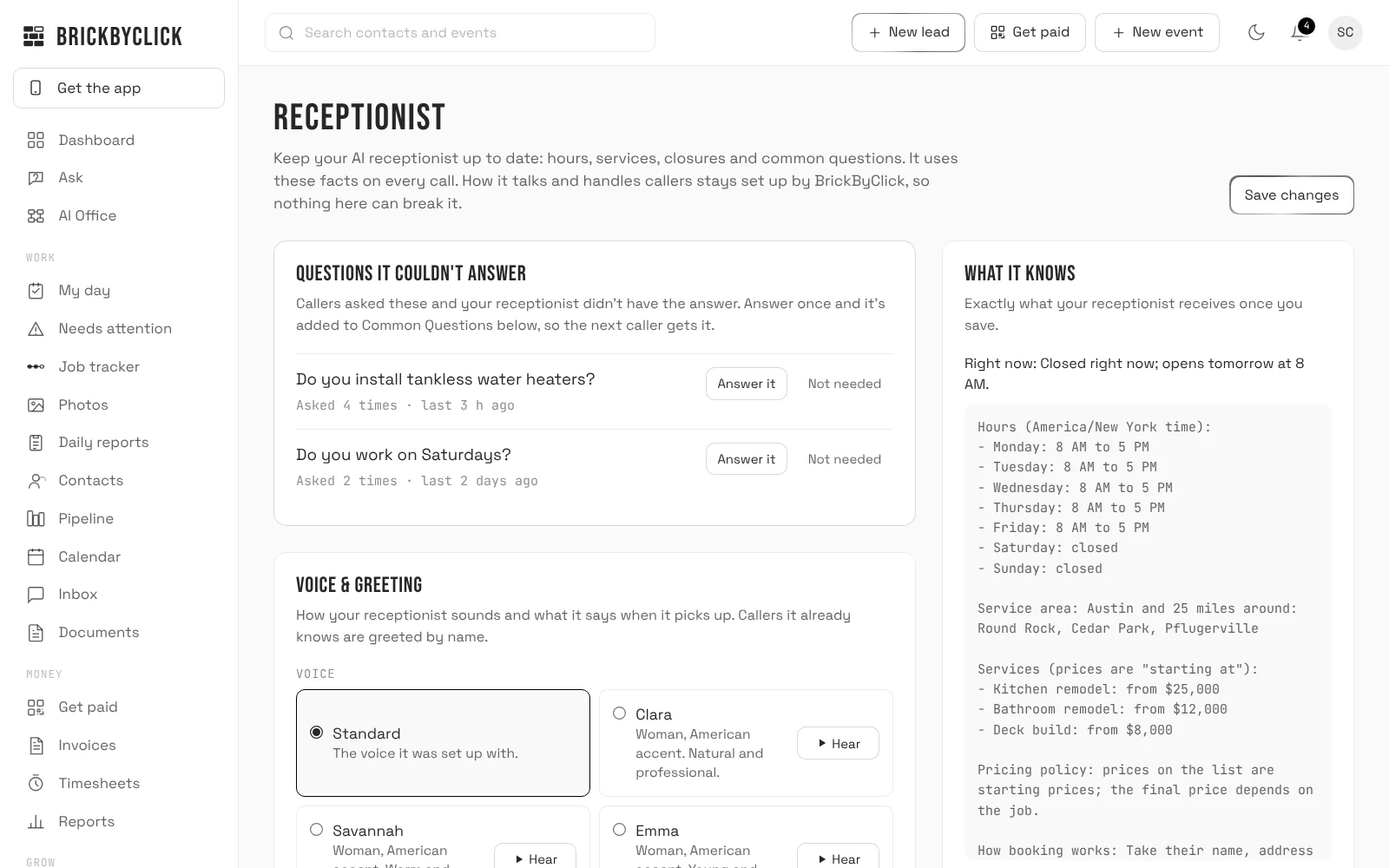
It answers from your hours, services, prices and common questions on the Receptionist page, the caller's own file and a search of your website. If none of those has the answer, it says someone will get back to them instead of guessing.
Step 4: it books inside your hours, or takes a message
With Live Booking on, it offers two or three real open times inside your hours and around the visits already on your calendar, takes the caller's name and books the visit. With it off, it takes name, number and need and says the team will call back.
Step 5: the summary and recording land in your Inbox
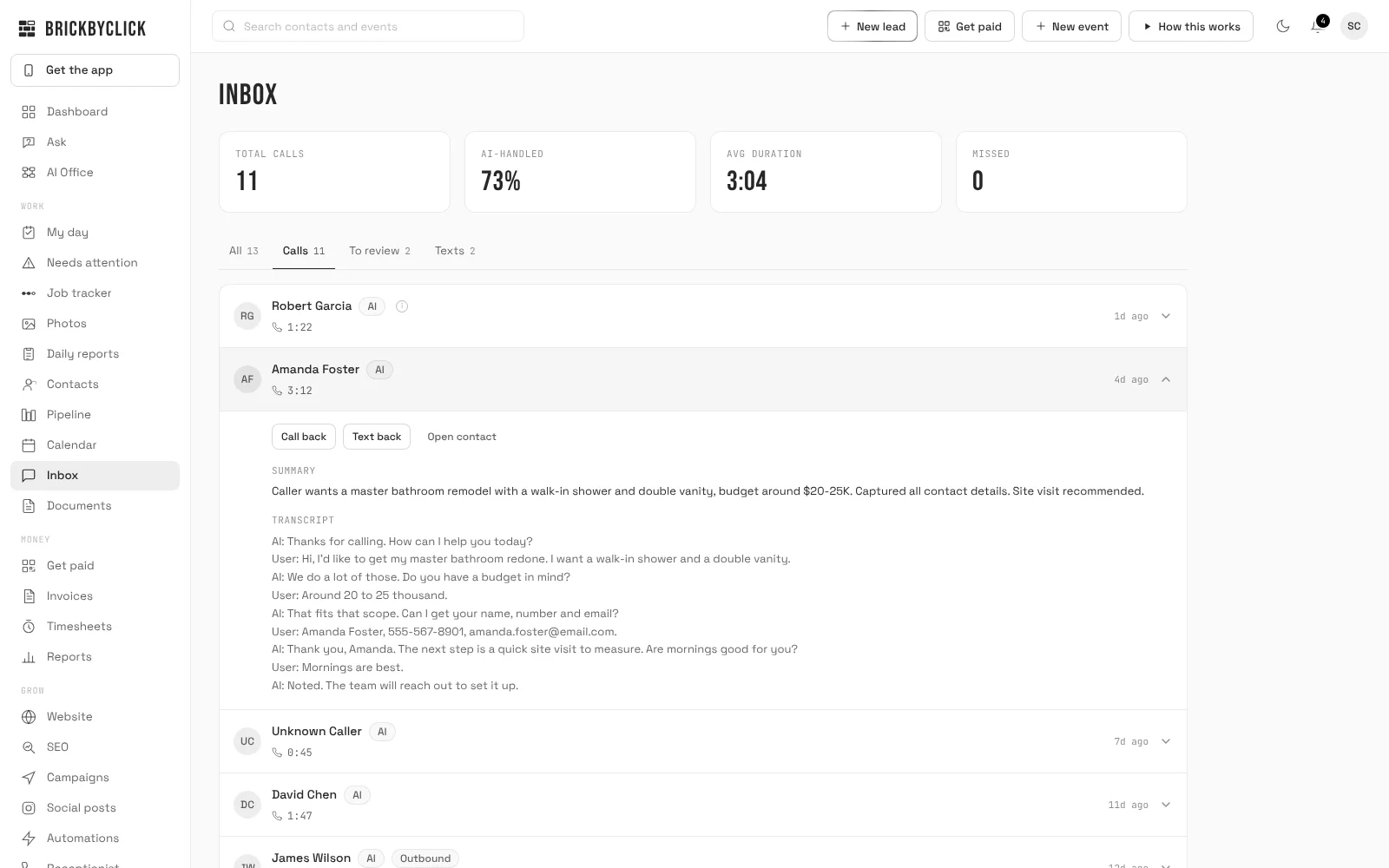
When the call ends, it is saved in your Inbox with a short summary, the full transcript and the recording. A note is added to the contact: "AI call", the length and the summary.
Step 6: you get an email for each lead
- Each answered call sends an email ("New lead from a call" or "Call from") and a notification, unless you switch Instant lead alerts off.
- A booking sends "Booked: name, when" and an email, and the visit is on the calendar.
- A missed call sends "Missed call: who".
What do callers hear when the AI receptionist answers?
The greeting
Your own greeting of up to 200 characters, or the standard one, then the recording notice: "Just so you know, calls are recorded for quality." It ends with a question, such as "How can I help you today?", so the caller just talks.
The voice
Choose from six voices on the Receptionist page and play a sample of each, or keep the one it was set up with. It answers in English, French or Spanish.
An example call
This is an example written for this page, not a real recording. It shows a typical booking with Live Booking on, for a made-up cleaning company:
- Receptionist: "Thanks for calling Bright Home Cleaning. Just so you know, calls are recorded for quality. How can I help you today?"
- Caller: "Do you do move-out cleans, and how much are they?"
- Receptionist: answers from your services list and your price setting, for example a "starting at" price or an offer of an estimate.
- Caller: "Can someone come next week?"
- Receptionist: offers two or three open times from your calendar, takes the caller's name and books the one they pick.
- After the call: you get "Booked: name, when" and an email; the visit, summary and recording are in the CRM.
Call ours now
Call (888) 533-5784. That is BrickByClick's own AI receptionist answering for BrickByClick, on the same system your customers would talk to. Ask what we do, what it costs or whether you can book a demo.
Hear it answer as your business
Got a preview website from us? Enter the Website ID from your email and call your receptionist right here in your browser. It picks up in your business's name and answers from your preview website.
Things to try
- What do you charge for a typical job?
- Can someone come out this week?
- Do you work in my area?
- What are your hours?
Your browser will ask to use your microphone.
Demo calls end after 3 minutes.
- 1Enter the Website ID from your email.
- 2Press Call and allow your microphone.
- 3Ask what your customers ask you: prices, timing, your area, your hours.
The demo answers from your preview website and takes a message. Your real receptionist answers from the information you give it and can book the visit into your calendar.
No Website ID yet? Call (888) 533-5784 to hear ours, answering for BrickByClick.
How do you set up an AI receptionist?
Setup is done with you, and the plan is live in about two weeks. These are the steps in order.
- Book a 15-minute demo and pick a plan from Front Office up.
- We set up your receptionist's local number and link it to your account.
- Fill in the Receptionist page: hours and time zone, closures, service area, services and prices, how to answer price questions, common questions, and your emergency number if you take emergency calls.
- Pick a voice and type your greeting. The page shows exactly what callers will hear.
- Decide on booking: switch on Live Booking and set what gets booked, how long, travel time, earliest booking, how far ahead and the most per day. Or leave it off and it takes messages.
- Press Save changes. The next call uses it. Until the first save, it has no hours and booking is off.
- Send calls to it: forward your business line (every call or only missed ones) using the code for your phone company, or give the new number out.
- Call your business number and test it like a customer would.
Texting (missed-call text-back, visit reminders) is part of the same plan but turns on once your business number is registered with the phone carriers. We handle that registration during setup, so it is not on day one.
What does the AI receptionist know about my business?
Everything it says about your business comes from one page in your CRM, the Receptionist page. Change something, press Save changes, and the next call uses it.
Hours, closures and time zone
- Pick your time zone from 12 North American choices and set open and close times per day.
- Add up to 20 closures with dates and an optional reason, such as a holiday or vacation.
- It knows whether you are open right now and tells callers when you are back.
Services, service area and prices
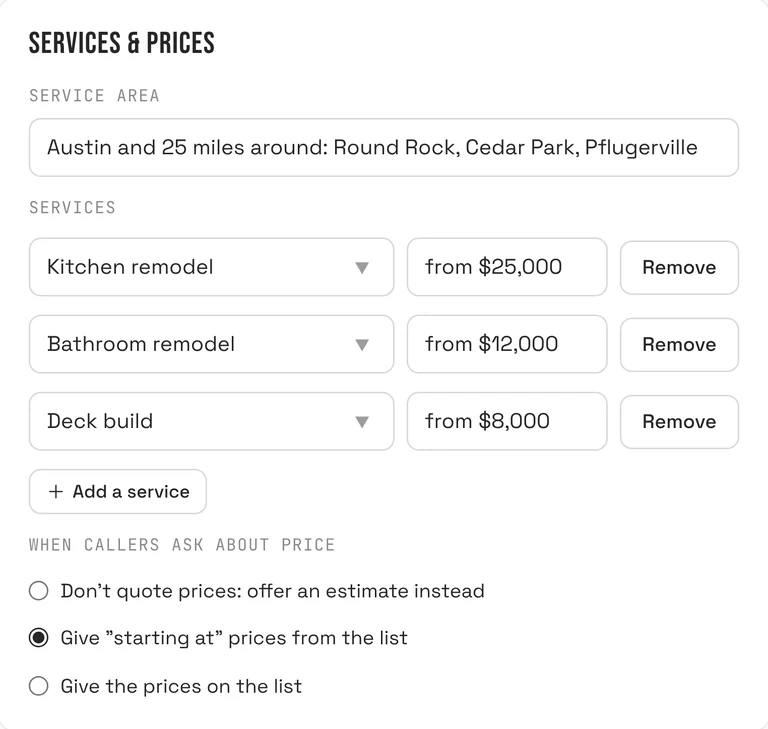
List up to 30 services with an optional price each, and describe your service area. Then choose how it handles price questions:
- Don't quote prices: offer an estimate instead (the default).
- Give "starting at" prices from the list.
- Give the prices on the list.
Common questions and "anything else"
Add up to 15 question and answer pairs, such as "Do you offer free estimates?" Add a free-text note for anything else, like "we don't do commercial work."
Safe by design
You supply facts, not instructions. How it talks and handles callers stays set up by us, so nothing you type can break it. Every save is kept: the history lists your last 20 saves and you can restore an earlier one.
Can an AI receptionist book appointments?
Yes, once you switch on Book appointments on calls on the Receptionist page. It is off until you turn it on.
The rules you set
- What gets booked (the default is "Estimate visit") and how long: 15, 30, 45, 60, 90 or 120 minutes.
- Travel time between visits: none, 15, 30, 45 or 60 minutes.
- Earliest booking: from 1 hour to 48 hours from now.
- How far ahead: 3, 7, 14, 21 or 30 days.
- Most per day: from 1 to 20.
A panel on the page, "Next openings your receptionist would offer", lists the real open times so you can check the rules before a customer hears them.
What it checks before it books
Open times follow your hours and closures, the visits already on your calendar plus the travel buffer, and busy times from a connected Google calendar if you let it block booking. It rechecks that the time is still free just before booking.
What happens after it books
- The visit appears on the calendar as "what: name", marked as booked by the AI receptionist.
- You get a notification and an email, and a note is added to the contact.
- If saving the booking fails, the caller is told the team will call to confirm, and an item appears in Needs attention.
The caller hears the confirmation on the call. A phone booking does not send the caller a text or email; the confirmation email goes to you. Online booking-link bookings do email the customer.
What if a caller wants to move or cancel a visit?
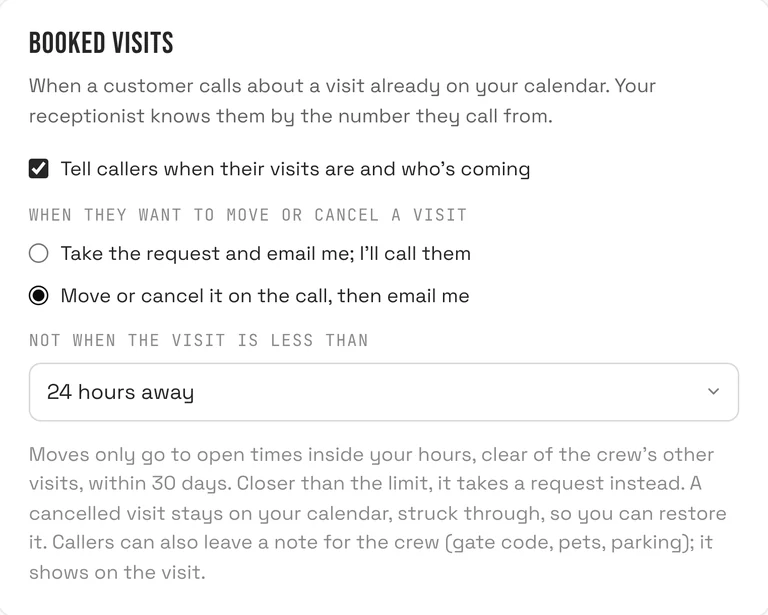
You choose. The default is that the receptionist takes the request and emails you, and nothing on the calendar changes.
- Take the request and email me; I'll call them (default).
- Move or cancel it on the call, then email me. You set a limit: not when the visit is less than 2, 4, 12, 24 or 48 hours away (default 24).
Built-in limits when it moves or cancels
- It only moves a visit to open times inside your hours, for the same crew and within 30 days.
- It only cancels after offering to move the visit instead.
- It never changes a visit inside your notice limit or a visit with no set time. Those become requests.
- After four changes by the same caller in 24 hours, further changes become requests too.
- It only ever changes visits that belong to the number that is calling.
Each change emails you, adds a note to the contact and tells the crew on their phones. A cancelled visit stays on the calendar, crossed out, and can be restored. Callers can also leave a note for the crew, such as a gate code; it is added to the visit and shows in the crew app.
What happens to every call after it ends?
The Inbox
Each call is saved with its summary, transcript and recording. Open a call to play it back, call or text the person back, or open their contact.
Spam filter
On by default. Robocalls and sales pitches from unknown numbers are marked as spam: no contact, no alert and not counted in your reports. A customer you already have is never filtered.
Short hang-ups
A caller who hangs up within 15 seconds, is not already a contact, gives no name or need and says fewer than three real words counts as a missed call. No contact and no "new lead" email.
Suggestions, never silent changes
If a call moved a job forward, the receptionist suggests a pipeline move, and you tap to accept. If a caller asks not to be called again, the contact is marked "Do not call" and the AI never calls them.
Questions it couldn't answer
Questions callers asked that it could not answer show at the top of the Receptionist page, with how many times each was asked. Click Answer it, type what it should say, and the next caller gets it. The AI never writes the answer for you. A question asked three times also sends you a notification suggesting you put it on your website, which feeds your local SEO.
Can I answer some calls myself?
Yes. Calls you answer is a ring-first option on the Receptionist page. During your open hours, a call to your business number rings your own phone first, and the receptionist takes it if you do not answer.
- You hear who is calling, then press 1 to take the call.
- If you do not answer, decline, or it is after hours, the receptionist answers as usual. The caller is not dropped.
- Pick how long your phone rings: 15, 20, 25 or 30 seconds.
- Calls you take can be recorded and written up, but nothing goes into your CRM until you approve it in the Inbox.
- Add family and friends to a Personal list: their calls ring your phone, are never recorded and never become contacts.
This option is switched on for your number by BrickByClick during setup, so ask us if you want it.
Does the AI receptionist send text messages?
The receptionist does not text people during a call. Texting is a separate part of your plan that works alongside it, and it turns on once your business number is registered with the phone carriers. We handle that registration during setup, so texting is not available on day one.
- Missed-call text-back: if a call goes unanswered, the caller gets a text from your business asking how you can help. One per number per day, none between 9 PM and 8 AM your time.
- Visit reminders: customers get a text the day before a visit.
- "On my way": your crew sends one in a tap from the crew app.
- Two-way texting: write to a customer from your Inbox or their contact. Replies are saved on the contact.
Texting is one customer at a time. We do not send text campaigns, text quote follow-ups or text review requests; those go by email.
AI receptionist vs answering service vs virtual receptionist
Three things get called a "virtual receptionist". An answering service for small business is usually a call center whose agents answer from a script and pass you a message. A human virtual receptionist is a remote person or small team answering for you. An AI receptionist is software. This is how they differ in practice; what a human service offers varies by provider, so ask each one for a written quote.
| BrickByClick AI receptionist | Human answering service | Human virtual receptionist | Voicemail | |
|---|---|---|---|---|
| Answers when you are busy | Yes, at any hour. | Yes, within the service's hours. | Yes, during their working hours. | No. Records a message. |
| Knows your prices and services | Yes, from your Receptionist page, the same on every call. | Only what you brief them on; varies by agent. | Yes, once briefed. | No |
| Books into your calendar | Yes, with Live Booking on, inside your rules. | Depends on the service and its access to your calendar. | Usually, if given access. | No |
| Recognises returning customers | Yes, by the number they call from. | Depends on the service. | Depends on the service. | No |
| Transfers calls to you | No. It gives your emergency number; ring-first lets you take calls yourself. | Often, depending on the service. | Often, depending on the service. | No |
| Record of the call | Summary, transcript, recording and a note on the contact. | A message, often by email. | Whatever they write down. | Audio message only. |
| Handles unusual or emotional calls | Limited. It does not guess; it passes unknowns to you. | Follows a script. | Yes, with human judgment. | No |
| How it is priced | Included in plans from $399 a month (500 minutes). | Typically per call or per minute. | Typically per call, per minute or a monthly block. | Free |
You can combine them: ring-first to your own phone during the day, and the AI receptionist when you cannot answer.
Which businesses use an AI receptionist?
The setup is the same for every business. What changes is what callers ask, so your services list and common questions differ.
Plumbers, HVAC and electricians
Callers often have something broken. Set what counts as an emergency and your emergency number, add your service area and offer an estimate rather than a price over the phone. More on the AI receptionist for plumbers page.
Contractors, roofers and remodelers
Calls are about quotes. Book an estimate visit with travel time between visits, cap bookings with "Most per day" when weather brings a rush, and add common questions such as licensing. More on the AI receptionist for contractors page.
Cleaners, lawn care and recurring services
Where a booked appointment is the job itself (a cleaning, a lawn cut), tick "A booked appointment is the job itself" so the booking is not treated as a quote visit.
BrickByClick serves local service businesses in 30+ industries on the same system. Your own services, prices and service area are what make it answer like your business.
Do I need an AI receptionist?
A good fit if
- You miss calls because you are on a job, driving or with a customer.
- Callers ask the same questions: hours, area, price range, whether you do a certain job.
- You want every call recorded, summarised and tied to a contact without typing it in.
- You want visits booked without back-and-forth, within rules you set.
Not the right fit if
- You get only a few calls a month. A voicemail and a quick call-back may be enough.
- Most calls need a person on the line right away, or need to be transferred.
- You want it to take payments over the phone. It does not.
- You are on the Starter plan. The receptionist is from Front Office up.
- You want to write its instructions yourself. You supply facts; we set how it behaves.
If you already have someone who answers every call, books properly and logs it, the receptionist adds less. It earns its place when calls go unanswered, or when someone is doing front-desk work you would rather they did not.
How much does an AI receptionist cost?
BrickByClick's AI receptionist is included in the full-service plans, with the CRM, the crew app, online payments and your website. Plans are month to month with no setup fees.
| Plan | Price | Receptionist minutes |
|---|---|---|
| Front Office | $399 a month | 500 a month |
| Growth | $599 a month | 500 a month |
| Total Growth | $999 a month | 1,000 a month |
Limited-time price: Front Office at $249/month for businesses that sign up by November 30, locked for 12 months. Then $399. See the plan
Minutes are the time your AI receptionist spends on calls. Starter ($99 a month, self-serve) does not include the receptionist. Compare every plan.
What does the AI receptionist not do?
- It does not transfer calls. For emergencies it gives your emergency number. To take calls yourself, use ring-first.
- It does not take payments. A customer needs to open an emailed link or scan a code.
- It does not text or email the caller during a call. A phone booking sends the confirmation to you.
- It does not quote prices unless you allow it. The default is to offer an estimate.
- It does not move or cancel visits by default. You have to choose that.
- It does not call people back by itself. AI follow-up calls start only when you click the button on a contact, between 8 AM and 8 PM your time, and never to someone marked "Do not call".
- It does not know your website unless it is connected to our system.
- It does not change its own instructions. You control facts, voice and greeting.
- It is not on Starter. The receptionist and the Inbox are from Front Office up.
We do not publish uptime or call-volume guarantees. Ask us in the demo what applies to your setup.
Questions people ask
What is an AI receptionist?
How much does an AI receptionist cost?
Does an AI receptionist sound human?
Can an AI receptionist book appointments?
Can the AI receptionist transfer calls to me?
Can I keep my current phone number?
What is the difference between an AI receptionist and an answering service?
What is the difference between a virtual receptionist and an AI receptionist?
Is an AI receptionist worth it for a small business?
Does the AI receptionist record calls?
Can the AI receptionist send text messages?
What languages does the AI receptionist speak?
Hear it before you decide
Call (888) 533-5784 and talk to ours. Then take fifteen minutes with us and we will show you how it would answer for your business.