Pricing / Front Office
Front Office
Limited-time price: $249/month for businesses that sign up by November 30, locked for 12 months. Then $399.
The AI receptionist and the CRM that runs the job and collects the money. For service businesses that already get the calls and want every one answered, booked, done and paid.
- Month to month
- No setup fees
- Live in about 2 weeks
Front Office used to be called Blueprint.
What's included
- AI receptionist with its own local number, 500 minutes a month
- CRM for the office: contacts, pipeline, calendar, inbox
- Estimates, invoices and online payments
- Crew app: My day, time clock, work orders, Get paid
- Job costing, daily job reports and a business report every month
- Your keywords on Google, tracked month by month
- Automatic follow-ups and review requests by email
- Website, 10+ pages, hosting and SSL
Prices in US dollars. Card payments: Stripe's fees plus 0.5% (at most $25). Compare every feature
What you get, in detail
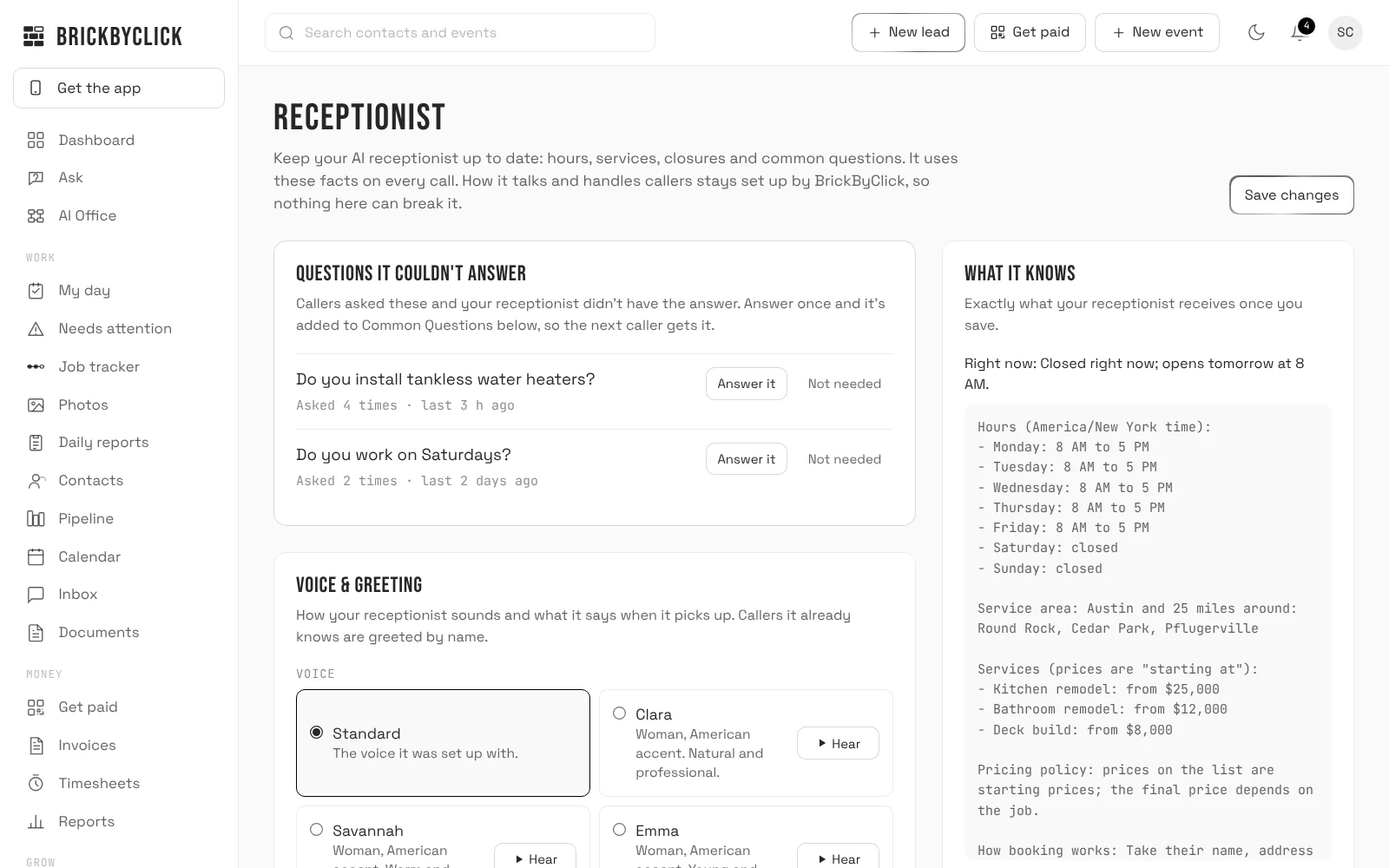
Real screens from the CRM, with sample data. Everything here is in Front Office today.
AI receptionist · 500 minutes a month
Every call answered, day and night
Your receptionist answers in your business's name, using the hours, services, prices and answers you keep on the Receptionist page. Change a price there and it uses the new one on the next call.
- Its own local phone number: forward your business line to it, or put it on your website and ads
- Books new visits into your calendar, within your hours and only for the services you allow
- Knows returning callers by name and their upcoming visits; can move or cancel a visit and add a note, if you switch that on
- Asks new callers how they heard about you
- Every call lands in your Inbox with a summary; new leads go into your pipeline and you get an email
- Robocalls and sales pitches are filtered out
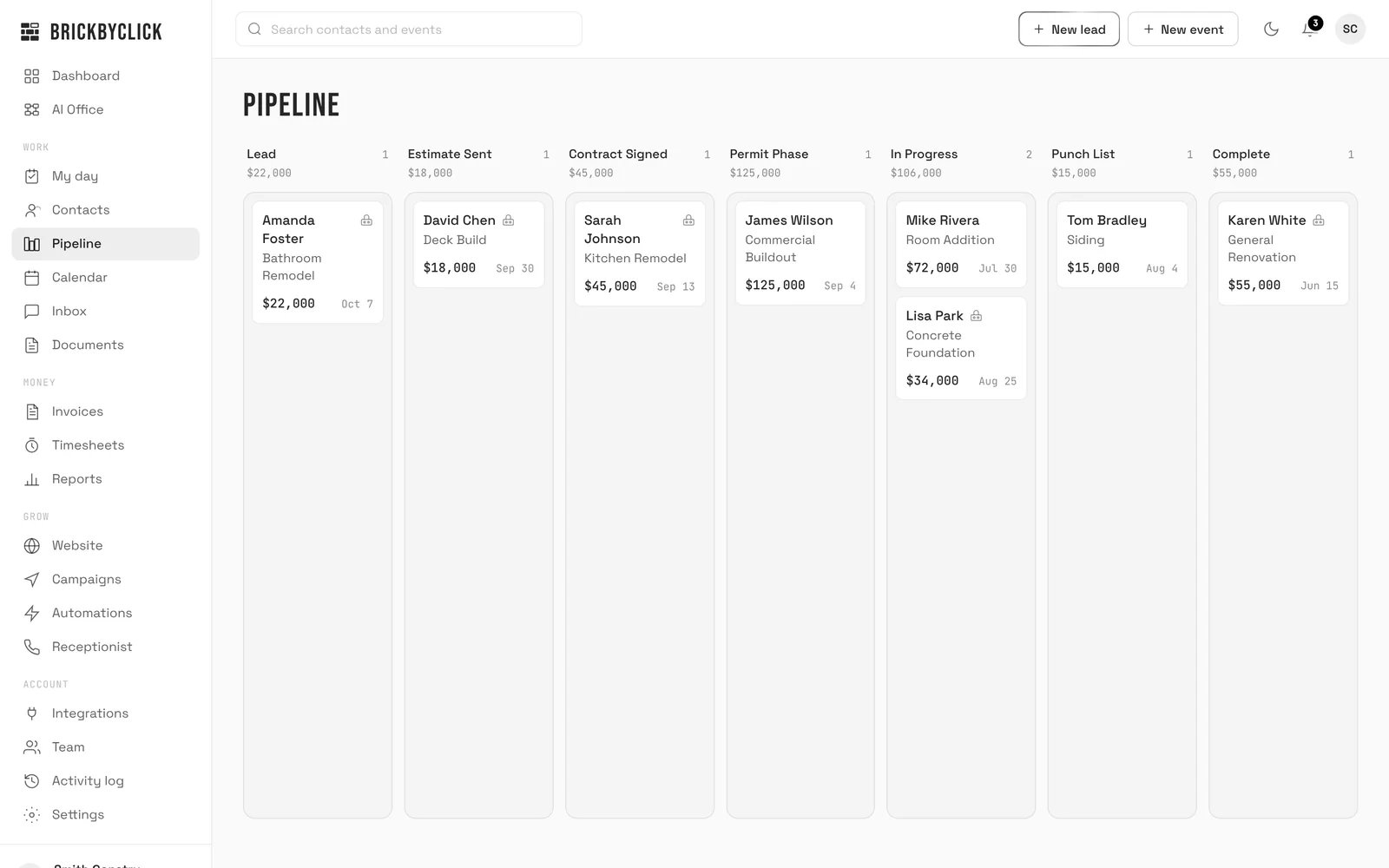
CRM for the office
One place for every lead and job
Contacts, a pipeline with stages set up for your industry, a calendar with repeating jobs, and an Inbox for calls and website inquiries. Works on a phone, in light or dark.
- Online booking page: customers pick a day and time from your real open slots
- Customer portal: each customer gets a private link to their visits, estimates, invoices and job photos
- Documents, with an assistant that answers questions about your files
- AI business advisor on the Reports page: ask about your numbers, answered from your own data
- Reports, an activity log of who changed what, and team logins for owner, office and tech
- Export your contacts any time
Estimates, invoices and payments
Customers accept and pay online
Send an estimate by email. The customer accepts it online, and you can turn it into a deposit invoice in one click. Invoices take card and US bank payments through your own Stripe account, and mark themselves paid when the money comes in.
- Card and bank (ACH) payments, paid out to you by Stripe
- Record cash, check, Zelle, Venmo, Cash App and other payments
- A paid invoice moves the job to won
- BrickByClick fee: 0.5% per card payment, at most $25. Nothing on bank payments
- Send job receipts to QuickBooks Online, photo attached, or download one spreadsheet for any accounting software
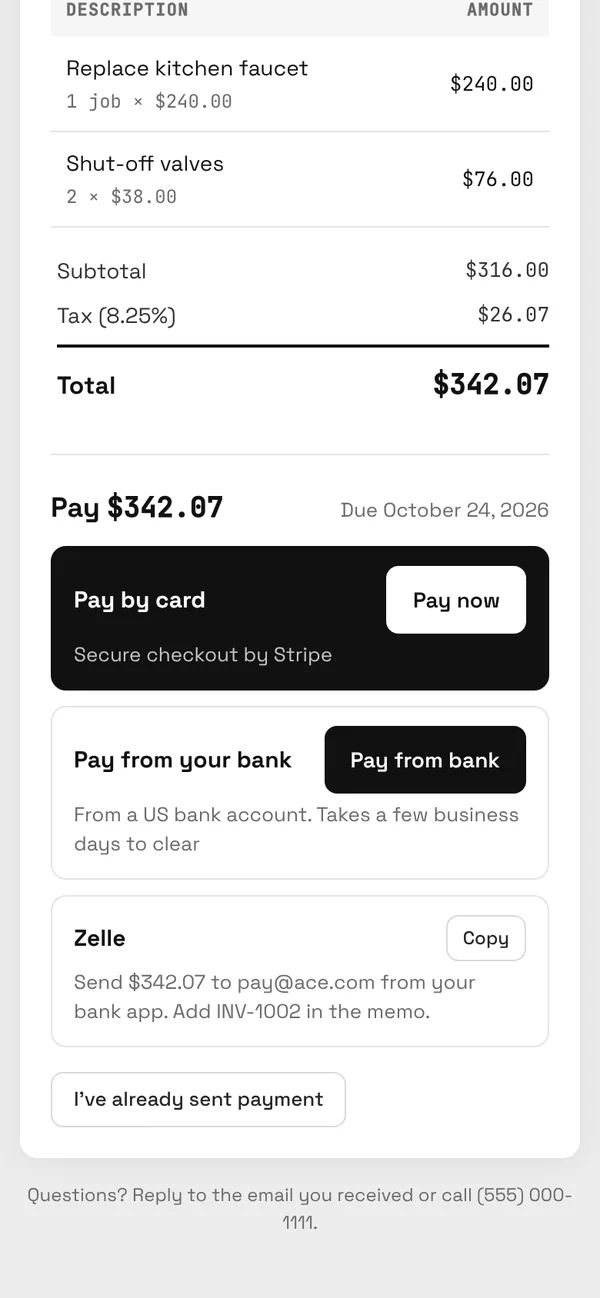
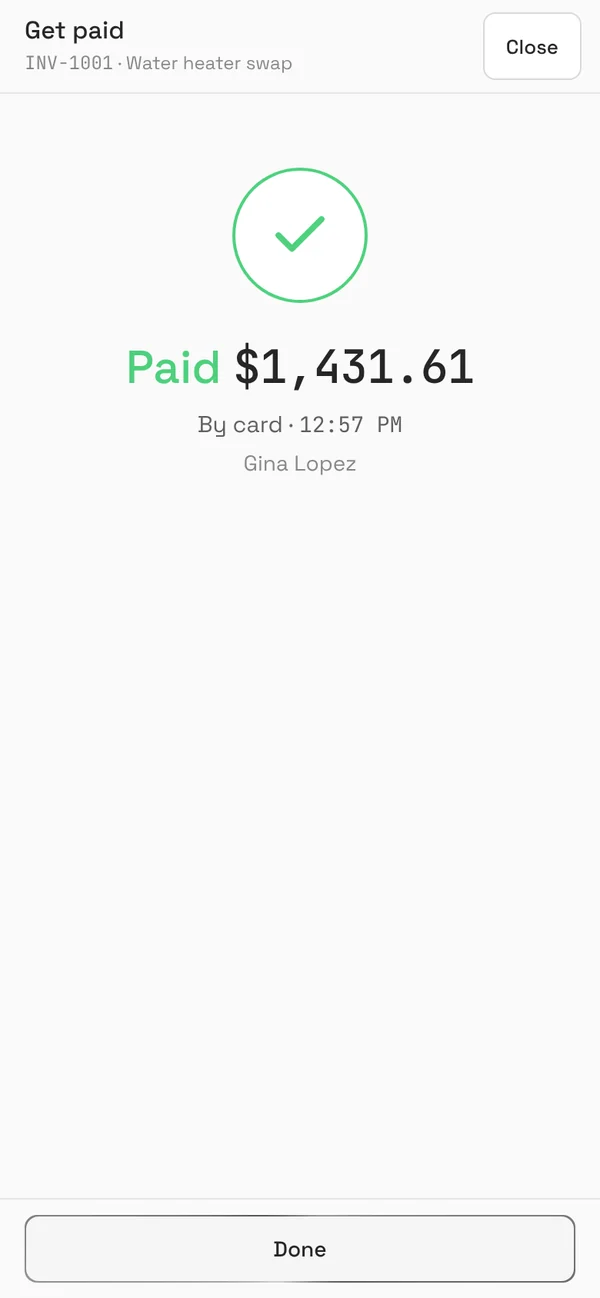
What your customer sees on their phone.
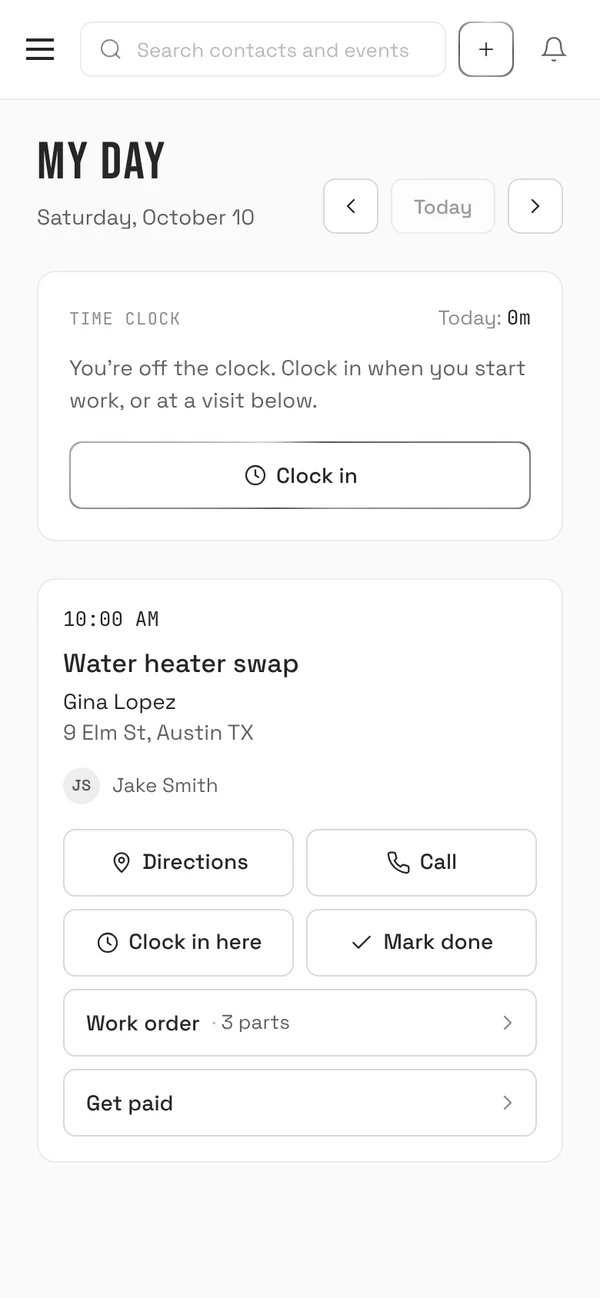
Crew app
Your crew runs the day from their phone
Each tech opens My day: their visits, the address with directions, a button to call the customer, your notes and the equipment on site.
- Time clock and timesheets
- Work orders: checklists or punch lists with photos, parts and materials used, a completion note and the customer's signature
- Job photo updates emailed to the customer
- Get paid on site: the invoice fills in from the parts used, the customer scans a QR code and pays on their own phone
- Photos saved with when and where they were taken, the job's plans with pins, and the work done each day
- Keeps working with no signal: what the crew saves is sent when they're back online
Follow-ups by email
The follow-ups you mean to send, sent
Switch each one on or off. Customer emails come from your business name, and replies go to you.
- Quote follow-ups 2, 5 and 10 days after an estimate. They stop as soon as the job moves or the customer calls
- A Google review request the day after a job is complete
- A reminder about a year later to book the next service
- For you: an alert for every new lead, a 7 AM summary of your day, a Friday 4 PM recap of your week, and the business report on the 1st
Your numbers
What every job made, and where you're heading
Counted from your own records, as the work happens, and summed up for you on the 1st.
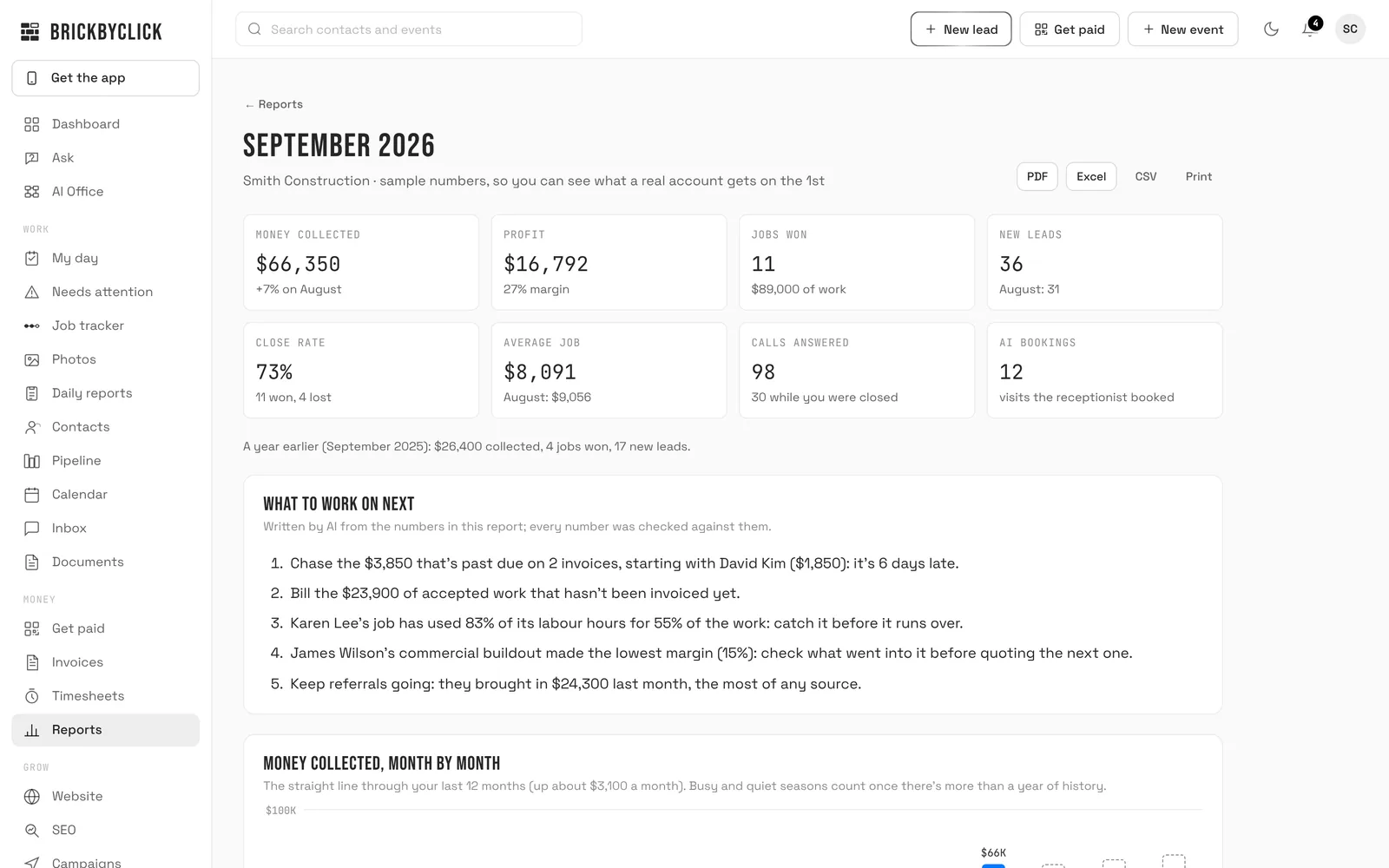
- Job costing: receipts read from a photo, hours at each person's cost per hour and card fees, against the job's budget, with a warning when the hours run ahead of the work
- Daily job reports at 6 PM: crew hours, work done, materials, photos, delays and the weather, for you to approve
- A monthly business report emailed on the 1st with the PDF: money, profit per job, sources, trends and what to work on next
- Ask about your numbers in plain words, and download any answer as Excel, CSV or PDF
Website
10+ pages, hosted, with SSL
We build your website and host it. Need a change? Request it from the Website tab in your CRM, photos included.
Already have a site?
Keep it
The receptionist, the CRM and payments work with any website. Link your booking page from it and you're set.
Not in Front Office
Local SEO and marketing
Local SEO, Google Business Profile management, citations and blog posts are in Growth. Texting is included in Front Office, Growth and Total Growth once your business number is registered with the phone carriers.
How setup works
About two weeks from yes to live. We do the setup; you answer some questions and show up for the walkthrough.
-
15 minutes
A short demo
We show you the receptionist answering for a business like yours and the CRM your crew would use. If it fits, we start.
-
Week 1
We set it up for your business
Your receptionist gets your hours, services, prices and common questions. Your CRM gets pipeline stages for your industry, your services and your team's logins. We start on your website.
-
Week 2
We walk you and your crew through it
You and the office learn the CRM. Your crew learns My day, work orders and Get paid. Call your number and hear your receptionist for yourself.
-
About 2 weeks
You're live
Calls get answered and jobs get booked. From then on, you can change your hours and prices yourself, and request anything else from the CRM.
What we need from you
- Your business hours and any closures
- Your services, with starting prices
- The area you serve
- Answers to the questions customers ask most
- Which services the receptionist may book
- Your team: names, emails and roles
- A Stripe account for card and bank payments
- Your logo, photos and the words for your website (or your current site's address)
Questions
Is there a contract or a setup fee?
What if I use more than 500 minutes?
Does Front Office include SEO?
Can I keep my current website?
What does it cost to take payments?
Does it text my customers?
Other plans
See it on your own business
Fifteen minutes. We'll show you the receptionist answering for a business like yours, and the CRM your crew would use tomorrow.