Limited-time price: Front Office at $249/month, locked for 12 months. Sign up by November 30. See the plan

Your Website ID

Enter the ID from your email to open your preview website, or to hear your AI receptionist answer as your business.

Job costing and production

See what each job makes while there's still time to fix it.

Receipts photographed on site, hours from the time clock, and the work done each day, all against the job's budget. You see the profit as the job goes, and get a warning when the hours run ahead of the work.

  • On every plan, Starter included
  • Receipts read from a photo
  • Techs never see profit

Profit as the job goes

The job's real numbers, not a guess at the end.

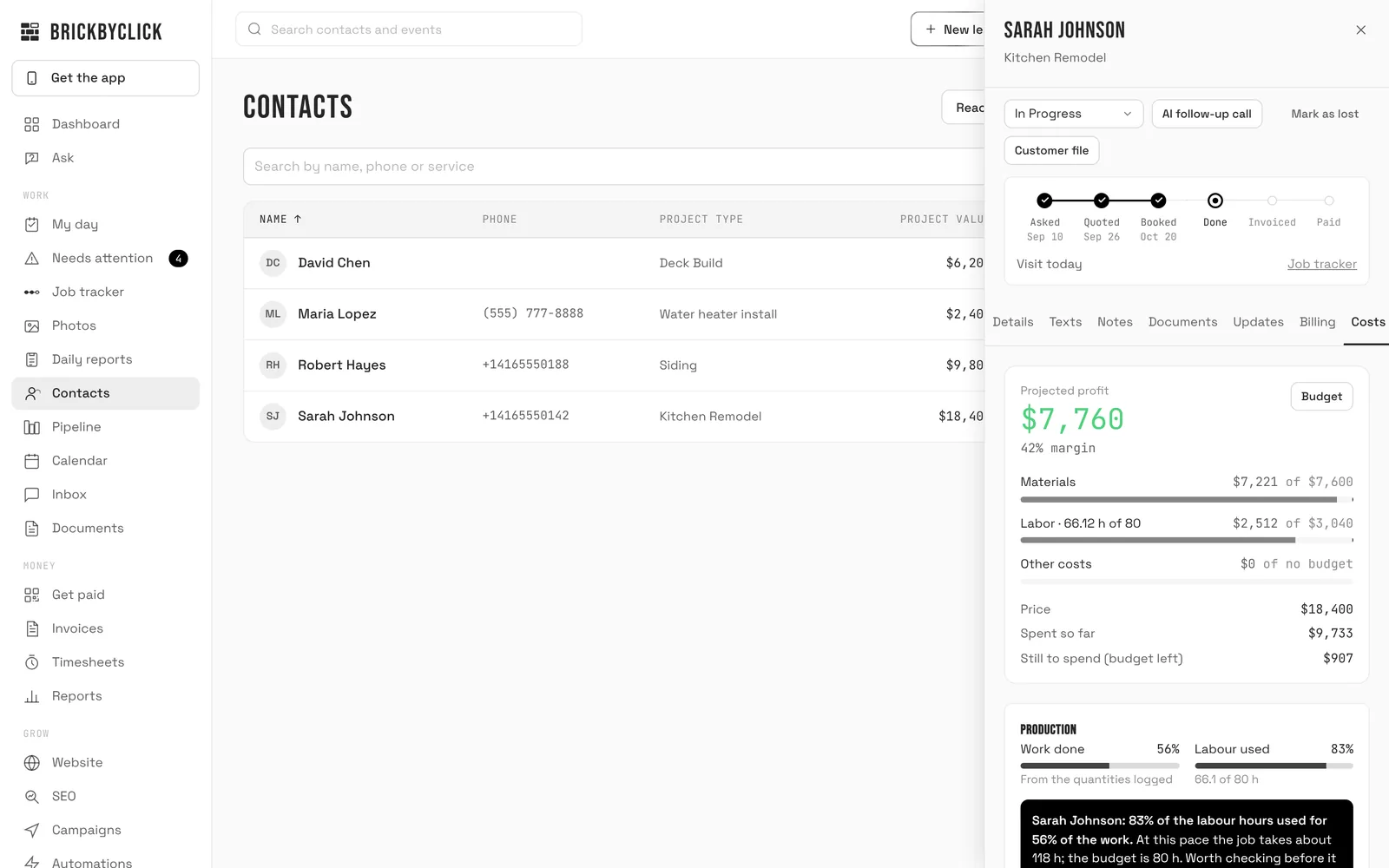
The accepted estimate becomes the job's budget. Every receipt, hour and card fee lands against it, so the Costs tab shows what's been spent, what's left, and the profit and margin the job is heading for.

  • Take a photo of a receipt: the store, date, items, tax and total are read for you, and anything unclear or already added is flagged for a check
  • Labour is each person's hours times their cost per hour, straight from the time clock
  • Card fees on what the customer paid online come off too
  • Needs attention flags jobs going over budget or below your target margin
  • Send checked receipts to QuickBooks Online with the photo attached
crm.brickbyclick.ai/contacts
The Costs tab of a sample kitchen remodel: projected profit $7,760 at a 42% margin, materials $7,221 of $7,600, labour 66 of 80 hours, price $18,400 and spent so far $9,733

Production

Work done, against the hours used.

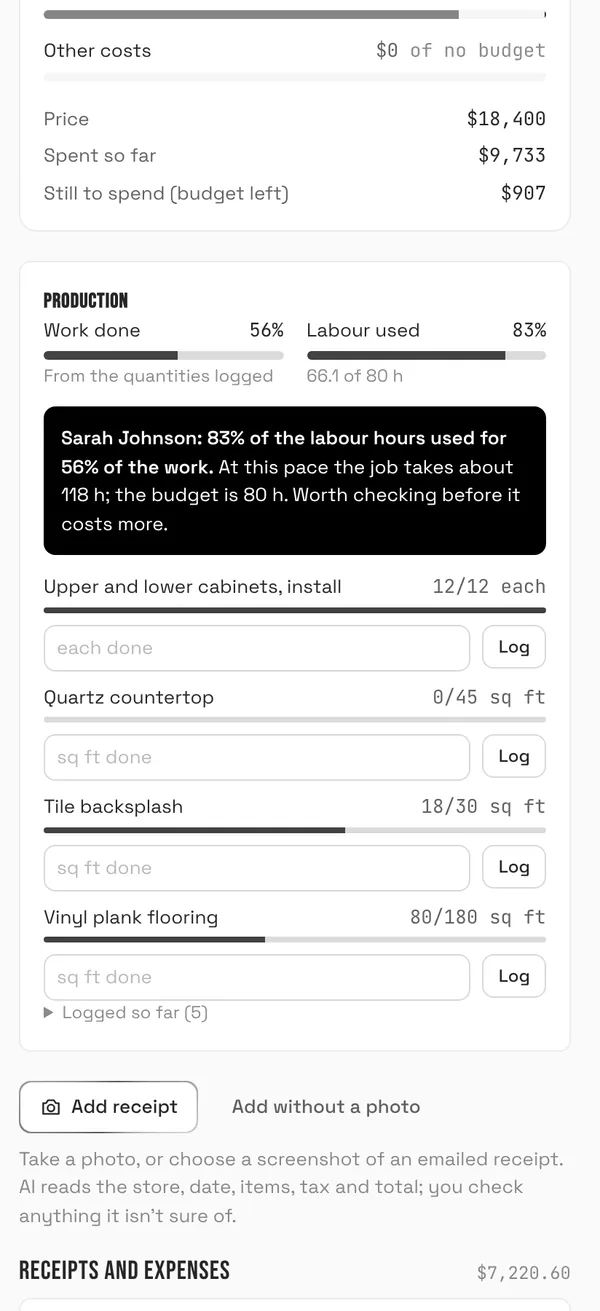
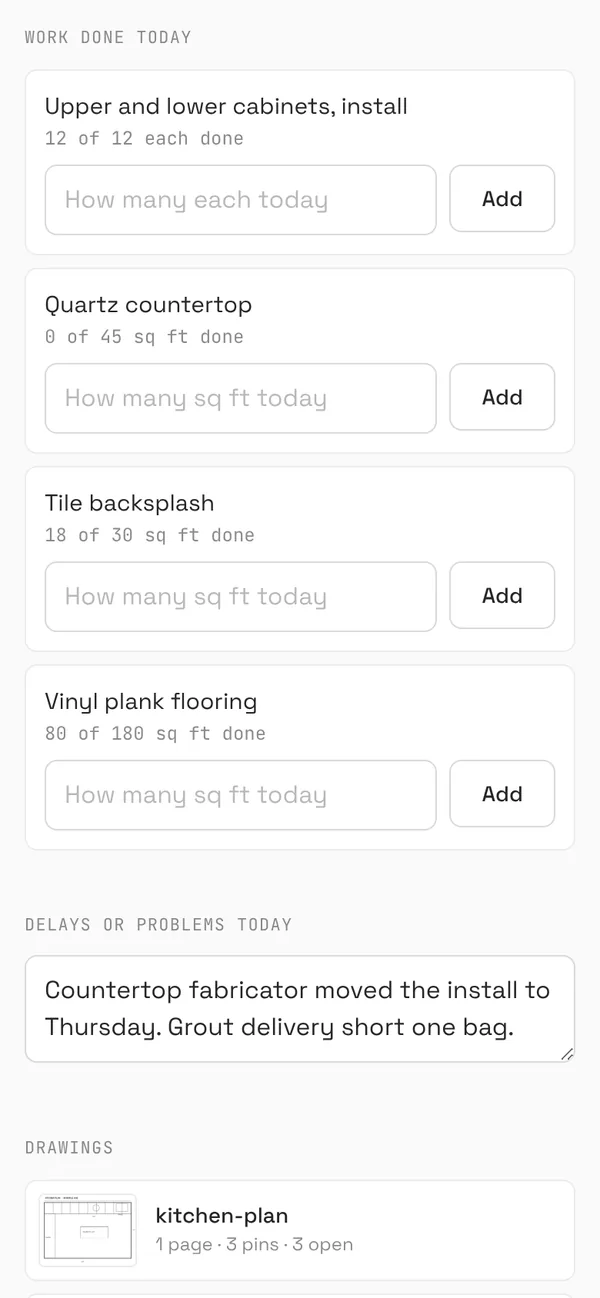
Your crew logs how much got done each day against the estimate's lines, from their phone or the job's link. The job's Production card compares the share of the work done with the share of the labour budget used, and warns you when the hours pull ahead.

  • Quantities from the accepted estimate, like cabinets, square feet or linear feet, weighted by what each line is worth
  • No quantities on a job? It uses the checklist instead
  • The warning says how many hours the job would take at this pace, against the budget
  • Shows in Needs attention as "Job pace", and in the day's daily report
The Production card on a sample kitchen remodel: 56% of the work done and 83% of the labour used, with a warning that at this pace the job takes about 118 hours against 80 budgeted, and quantities logged for each estimate line
The office's view: work done against hours used, and the warning.
The crew's job link on a phone: work done today for each estimate line, like 18 of 30 sq ft of tile backsplash, with a box to add today's amount, and the delays field
The crew logs today's work from the job's link.

The customer file

Every job for a customer, and what each one made.

And every month, in the business report

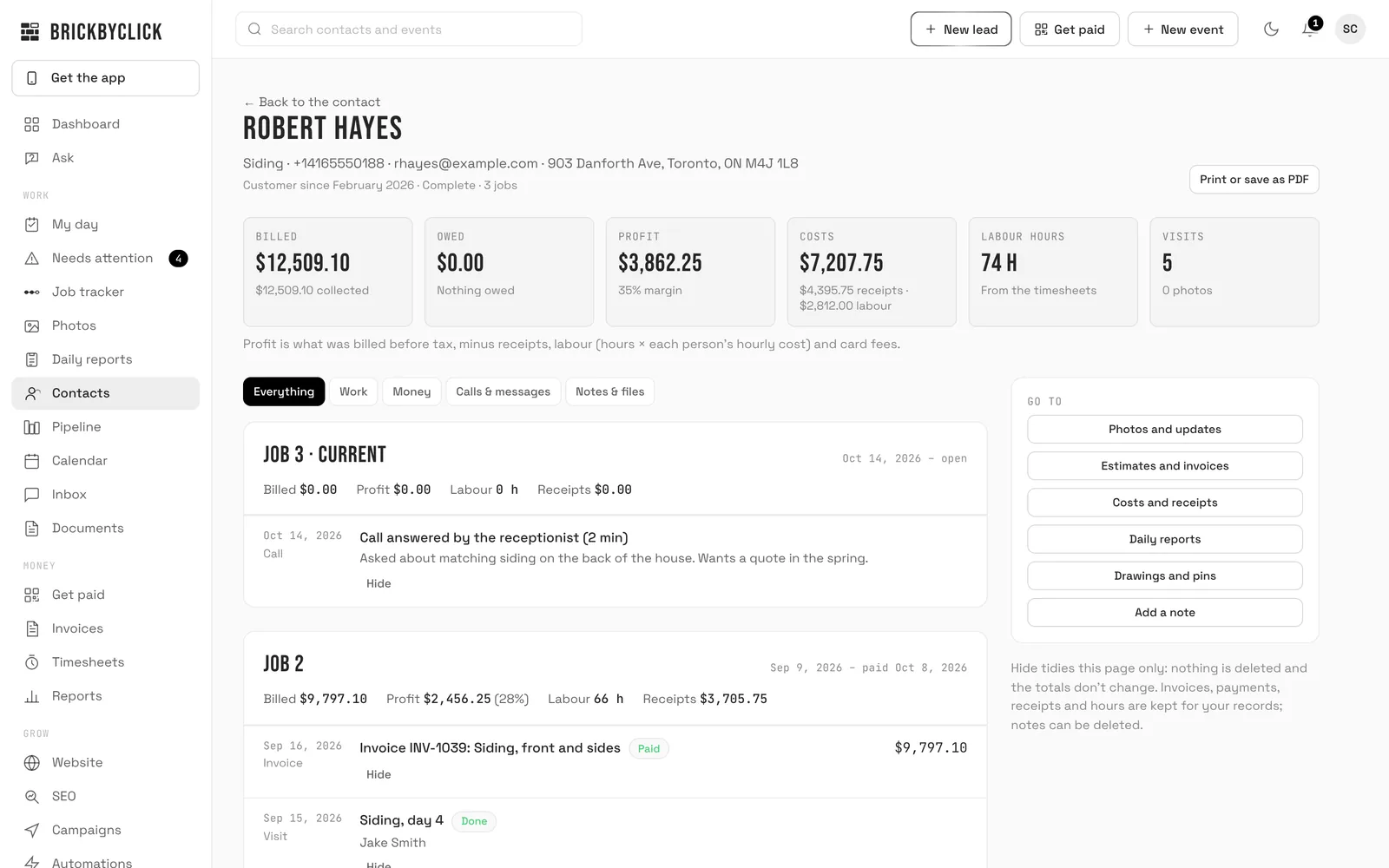
Open any contact's customer file to see everything you've done for them, split into jobs. A repeat customer's jobs are kept apart: a job ends when its final invoice is paid in full.

  • Billed, owed, profit, costs and labour hours for each job and in total
  • A timeline of visits, estimates, invoices, payments, receipts, hours, photos, calls, texts, notes and daily reports
  • Print it or save it as a PDF
  • Hide entries to tidy the page; nothing is deleted and the totals don't change
crm.brickbyclick.ai/contacts
The customer file for a sample repeat customer: $12,509.10 billed, $3,862.25 profit at a 35% margin, 74 labour hours over three jobs, with the siding job's invoice and visits on the timeline

Questions

Do my techs see what a job makes?
No. Profit, budgets and every receipt are for the owner and office. A tech can add receipts to the jobs they work on, and sees only the receipts they added.
Where does the labour cost come from?
From the time clock: each person's hours on the job, at the cost per hour you set for them on the Team page. Hours clocked at a visit count toward that job. The owner's own hours count unless you switch that off. Anyone without a cost per hour yet is named, so you know profit leaves their time out.
How does it know how much of the work is done?
From the quantities logged against the accepted estimate's lines, like 12 of 12 cabinets or 80 of 180 sq ft of flooring, weighted by what each line is worth. Fees, permits and deposits don't count as work. A job without quantities uses its checklist instead.
When does it warn me?
When a job still going has used at least a quarter of its labour hours and the hours are 20 points or more ahead of the work done. It shows in Needs attention as "Job pace", on the job's Costs tab, and in that day's daily report, with the hours the job would take at that pace.
Does it work with QuickBooks?
Connect QuickBooks Online and send job receipts to it as expenses, with the photo attached. Invoices and payments aren't sent to QuickBooks. For your accountant, "Download for your accountant" gives one spreadsheet of every payment, receipt and labour line, for any accounting software.
Which plans include it?
Every plan, Starter included. See the plans.

See it on a job like yours

Fifteen minutes. We'll walk through a job's budget, receipts, hours and production with a business like yours.