Limited-time price: Front Office at $249/month, locked for 12 months. Sign up by November 30. See the plan

Your Website ID

Enter the ID from your email to open your preview website, or to hear your AI receptionist answer as your business.

AI agents for small business

AI agents for your front office.

Not a demo and not a promise about the future. These are the AI agents that come with BrickByClick today, each with one job: answer the phone, follow up, and tell you how the business is doing. They work inside your CRM, from your own information, in every plan from Front Office up.

  • From Front Office up
  • Set up for you
  • Live in about 2 weeks

Five agents, five jobs

Each one does one thing well, and everything it does lands in the same CRM you and your crew use. Real screens below, with sample data.

01 · AI receptionist

Answers the phone, day and night

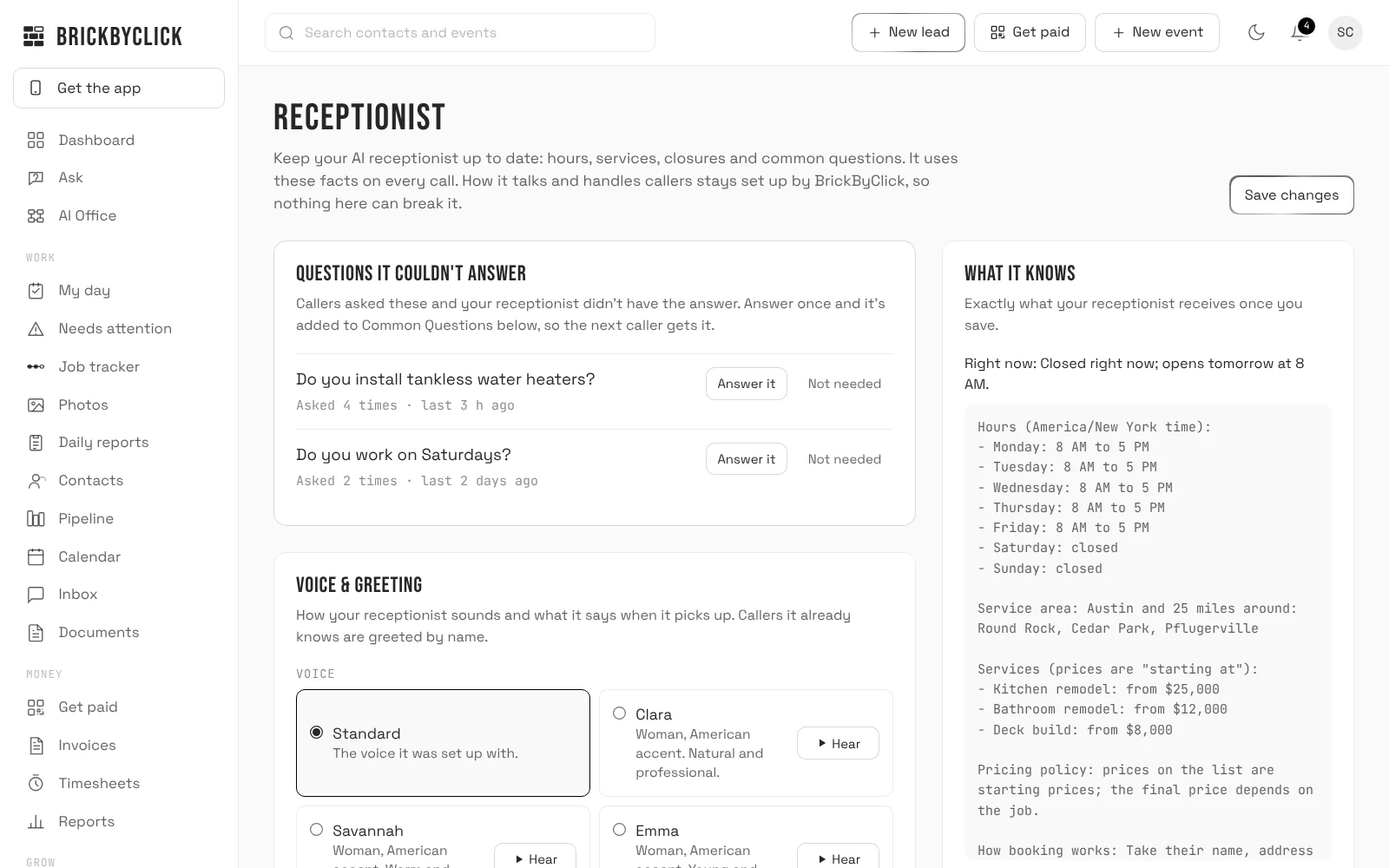
It picks up in your business's name and answers from the hours, services, prices and common questions you keep on the Receptionist page. Change a price there and the next call uses it.

  • Books new visits into your calendar, within your hours and only for the services you allow
  • Greets returning callers by name and knows their upcoming visits; moves or cancels a visit within your notice limit, or takes the request for you
  • Asks new callers how they heard about you and saves it on the contact
  • Logs every call in your Inbox with a summary, the recording and the transcript; new callers land in your pipeline and you get an email
  • Filters out robocalls and sales pitches
How the AI receptionist works
crm.brickbyclick.ai/receptionist
The Receptionist page in the CRM: questions callers asked that it couldn't answer, the voice and greeting, and exactly what the AI receptionist knows, including hours, service area and starting prices

500 minutes a month on Front Office and Growth, 1,000 on Total Growth. Call (888) 533-5784 to hear ours.

02 · Follow-ups by email

Follows up, on time, every time

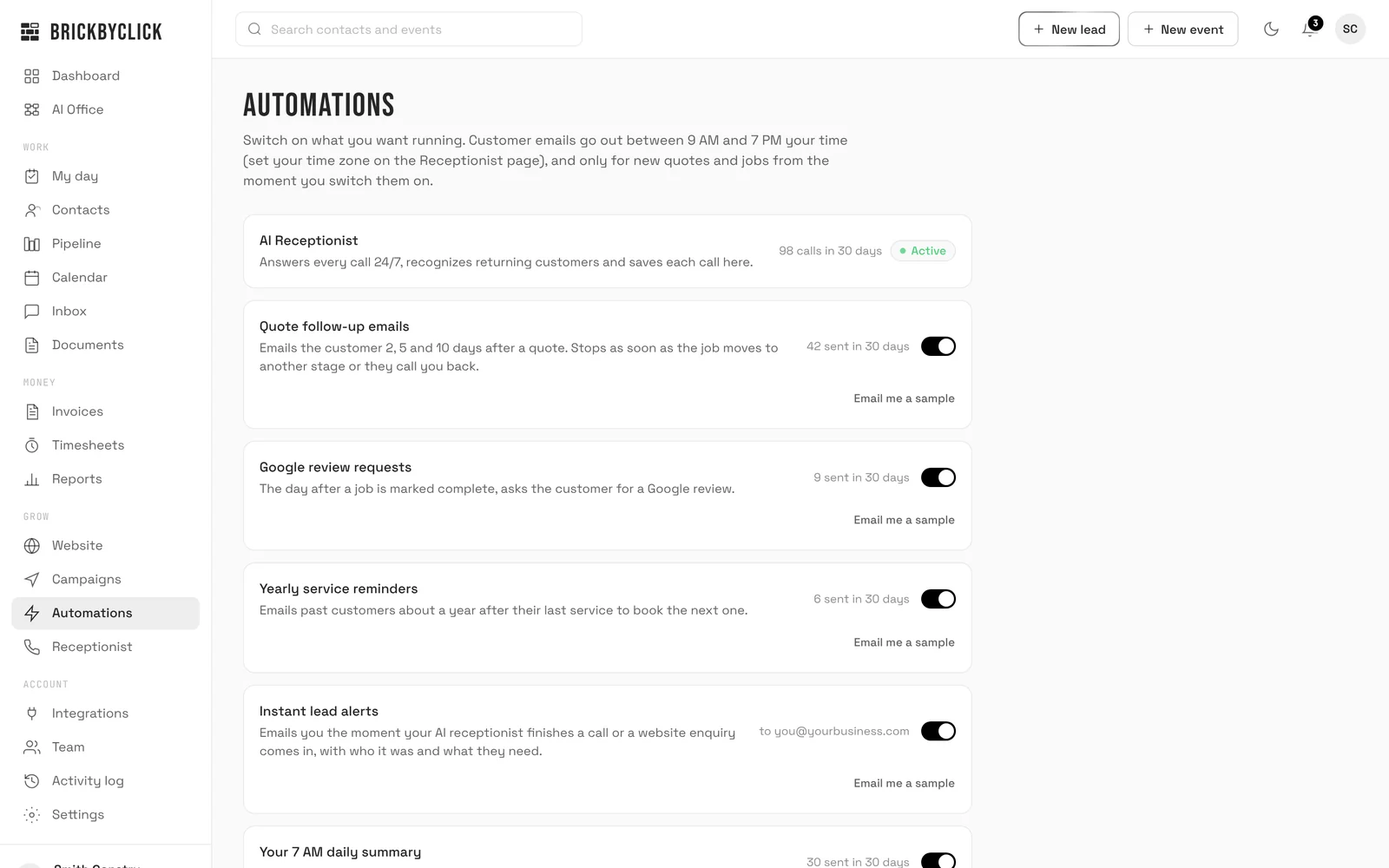
The follow-ups you mean to send, sent. Switch each one on or off in Automations. Customer emails come from your business name, replies go to you, and they go out between 9 AM and 7 PM your time.

  • Quote follow-ups 2, 5 and 10 days after a quote. They stop as soon as the job moves to another stage or the customer calls you back
  • A Google review request the day after a job is marked complete, with the review link you add
  • A reminder about a year after a customer's last service, to book the next one
  • Switching one on never emails old quotes or past jobs: it starts with new ones
crm.brickbyclick.ai/automations
The Automations page in the CRM: the AI receptionist marked active, and switches for quote follow-up emails, Google review requests, yearly service reminders and instant lead alerts, each with how many were sent in the last 30 days

Follow-ups go out by email. Texting (a text back when a call is missed, visit reminders and two-way texts) turns on once your number is registered with the phone carriers.

03 · AI Business Advisor

Answers questions about your numbers

Ask in plain words, like “Which lead source brings my best jobs?”, and it answers from your own CRM: your calls, leads, quotes and jobs won in the last 30 days, next to the 30 days before. Every number in an answer is checked against your CRM before you see it. If it can't check an answer, it tells you what the CRM does show instead.

  • A report on the 1st of every month, in Reports and by email: what's slipping, where there's more to get, and what's working
  • Each finding comes with one thing to do, and the customers behind it
  • It doesn't guess: no made-up totals or “estimated lost revenue”
BrickByClick · 1st of the month
Ace Plumbing: your September report
  • LeakWhere work or money is slipping away
  • OpportunityWhere there's more to get
  • Working wellWhat to keep doing
Each with a “Do this” and the customer list, one click away in your CRM.
Every number in this report comes from your CRM.

04 · Documents assistant

Reads your files so you don't have to

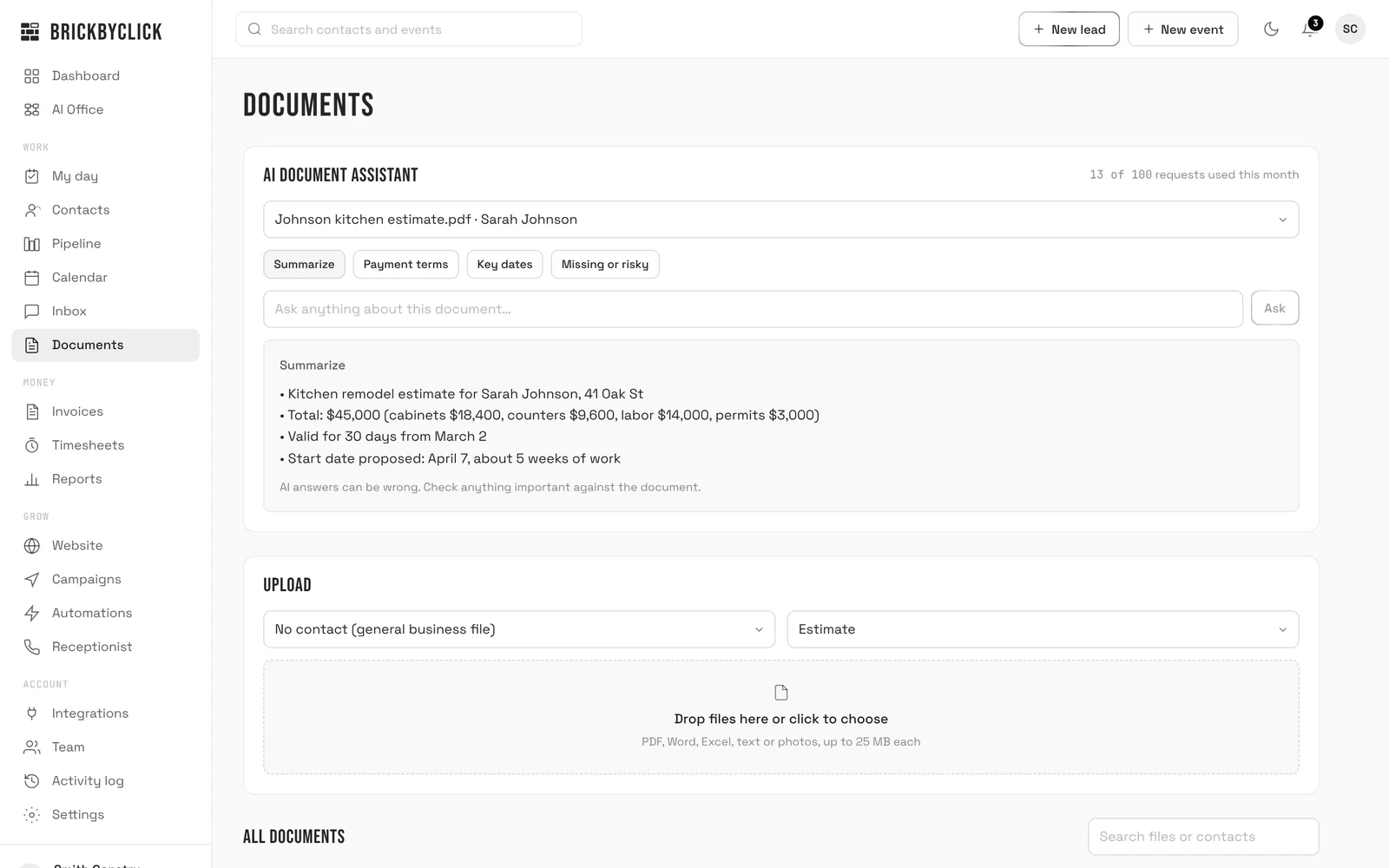
Keep estimates, contracts, permits and other files on the Documents page, on a customer or for the whole business. Pick one and ask a question, or tap Summarize, Payment terms, Key dates or Missing or risky.

  • Upload PDF, Word, Excel, text or photos, up to 25 MB each
  • It reads files that have text in them. A scanned image or a photo has no text for it to read
  • AI answers can be wrong, and it says so: check anything important against the document
crm.brickbyclick.ai/documents
The Documents page: the AI document assistant has summarized a kitchen remodel estimate for Sarah Johnson, with the total, what it covers, how long it's valid and the proposed start date

The advisor and the documents assistant share a monthly allowance of AI questions; the CRM shows how many you've used.

05 · Your daily and weekly emails

Keeps you posted, without a login

Three emails for you, not your customers. Read them on your phone between jobs.

  • An alert the moment your receptionist finishes a call with a new lead, or a website enquiry comes in
  • 7 AM: new leads, calls answered and missed, quotes waiting 7+ days, and today's schedule. Quiet quotes get one-tap Won, Lost or Still waiting buttons
  • Friday 4 PM: what went right this week. Money collected, visits your receptionist booked, calls answered, new leads and jobs won. Skipped on a quiet week
BrickByClick · 7:00 AM
Ace Plumbing: 2 new leads, 1 quote waiting
  • 2 new leads in the last 24 hours
  • 5 calls answered by your AI receptionist
  • 1 quote waiting 7+ days with no activity
  • Today: 10:00 AM · Water heater swap
BrickByClick · Fri 4:00 PM
Your week: $8,940 collected
  • $8,940 collected on 7 paid invoices
  • 11 appointments booked by your AI receptionist
  • 38 calls answered, 9 while you were closed

You stay in charge

The agents work from your information and your rules. Nothing happens out of sight.

Your information

The receptionist answers from your Receptionist page. The advisor answers from your CRM. The assistant reads your files. Nothing comes from a generic script.

Your rules

Your hours, which services it may book, how much notice it needs to move a visit, and whether it quotes prices at all.

On or off

Each follow-up email has its own switch. Live booking and moving visits on the call are yours to turn on or leave off.

On record

Calls in the Inbox with the recording and transcript. Visits it books, moves or cancels noted on the contact and emailed to you.

Handed to you

New leads email you right away. A request it can't handle inside your rules comes to you instead of being guessed at.

Set up by us

We set up your receptionist, your pipeline and your follow-ups with you. How the agents talk and behave stays set up by us, so nothing you type can break them.

Texting

Texting is included: two-way texts with customers, a text back when a call is missed, visit reminders and “On my way” texts. It turns on once your business number is registered with the phone carriers, which we handle during setup.


Need something custom?

Most businesses don't. If you have a job the agents above don't cover, there are two add-ons, sold separately from the plans.

Add-on

Custom AI agent

An AI agent built for one job your business needs, from your own brief. You describe the job the way you'd brief a new hire: how it should sound, what it should ask, what it must never say, and when to flag something to you. We build it, test it with you before it goes live, and look after it.

Setup$499 One time. Its instructions written from your brief, connected to your CRM and calendar, tested on full conversations before it goes live, then a walkthrough and written notes.
Managed$199 /mo We tune it as your business changes, update its instructions whenever you ask, watch how it's doing and flag anything unusual, and send you a report each month.

Ask on your demo whether the job you have in mind is a good fit before you pay anything.

Ask about a custom agent

Add-on

Custom automation

For a workflow your plan doesn't cover, like copying lead emails from another site into your pipeline, or a weekly sheet for your bookkeeper. Tell us the process; we scope it, build it, test it with you and, if you want, run it.

One workflow$500+ One-time build, delivered in 1–2 weeks, with 30 days of adjustments.
Full system$1,500+ One-time build of 3–5 connected workflows with your CRM and pipeline set up, delivered in 2–3 weeks.
Managed automation$299 /mo All your workflows monitored 24/7, unlimited adjustments, new builds at 50% off, a monthly report.
See custom automation

Questions

What do you mean by an AI agent?
Software that does one front-office job on its own: answering calls, sending follow-ups, or answering questions about your numbers or your documents. Each one works from your information and your rules, inside your CRM, and what it does is on record.
Are the AI agents included in my plan?
Yes. The AI receptionist, the follow-up emails, the AI Business Advisor, the documents assistant and your daily and weekly emails are in every plan from Front Office up, starting with Front Office at $399 a month. Custom AI agents and custom automation are add-ons, priced separately.
Will they replace my office staff?
They take the repetitive part: the call at 9 PM, the day-5 follow-up nobody remembers, pulling last month's numbers. Your people handle the work, the judgment calls and the customers who want a person. Every call and email is in the CRM, so anyone can pick up where an agent left off.
Will customers know they're talking to AI?
The receptionist's greeting can introduce it as your AI assistant, and we recommend it. Every call lands in your Inbox with a summary, so you can call back anyone who wants a person.
What happens when an agent can't handle something?
The receptionist won't book outside your hours and rules. If a caller wants to move a visit inside your notice limit, it takes the request and emails you. New leads email you right away. And if the advisor can't check an answer against your CRM, it tells you what the CRM does show instead.
Can they text my customers?
Yes. Text customers from your Inbox and from each contact, with their replies saved on the contact. Callers whose call was missed get a text back, customers get a reminder the day before a visit, and your crew can send “On my way” in one tap. Texting turns on once your business number is registered with the phone carriers, which we handle during setup. Anyone who replies STOP isn't texted again.
Do I need a custom AI agent?
Most businesses don't. The receptionist's rules already cover your hours, prices, booking and emergencies. If you have a job the standard agents don't cover, ask on your demo and we'll tell you honestly whether a custom agent or a custom automation is worth it.
Meet your front office

Fifteen minutes. We'll show you the receptionist answering for a business like yours, the follow-ups it sends, and the CRM it all lands in.