Housecall Pro Alternative
BrickByClick is a Housecall Pro alternative that includes a website built and managed by our team on every full-service plan, and monthly local SEO from the $599 Growth plan, alongside an AI receptionist and a CRM with job tracking, estimates, invoices and card payments. Housecall Pro is field service software with published prices from $79 a month, an optional done-for-you website and a paid AI call-answering feature. Pick Housecall Pro for a lower software bill and more field tools; pick BrickByClick if you want the website, SEO and phones handled for you.
At a glance
- Managed website: BrickByClick builds and hosts a 10+ page site on your domain from Front Office ($399). Housecall Pro offers one built by its team, 1, 5 or 15 pages; its pages show no price.
- Local SEO: BrickByClick from Growth ($599): Google profile management, 25 citations, a blog post a month. Housecall Pro’s pages we read do not list a local SEO service.
- AI phone answering: BrickByClick includes it from Front Office, in French, English and Spanish. Housecall Pro’s CSR AI call answering is a paid feature, sold separately.
- Housecall Pro prices: Basic $79, Essentials $189, Max $329 a month on monthly billing, as listed on its pricing page.
- Who it is for: owner-run service businesses in 30+ industries, contractors included.
- The honest part: Housecall Pro has a free trial, GPS, routing, QuickBooks Online sync and a lower entry price. We have none of those.
Which Housecall Pro alternatives include a managed contractor website and local SEO?
BrickByClick does: a website built, hosted and changed by our team on every full-service plan, and monthly local SEO by our team from the Growth plan ($599 a month). It also includes an AI receptionist and the CRM in the same plan.
Housecall Pro itself offers a done-for-you website: “We handle everything from design to launch”, in 1, 5 or 15 pages (Housecall Pro websites). Its pages we read mention keyword and speed tuning, but no local SEO service such as Google profile management or citations.
What “managed website and local SEO” means here
- Managed website: someone else builds it, hosts it, and makes your changes when you ask.
- Local SEO: ongoing monthly work on your Google Business Profile, directory listings, on-site SEO and new content, so you show up in your towns.
Your three options
- Housecall Pro plus a marketing agency. Keep its field tools; pay an agency for SEO.
- Housecall Pro with its own website. A built-for-you site; local SEO is not listed on its pages.
- An all-in-one plan like BrickByClick. CRM, receptionist, website and SEO from one team, one bill.
This is not only for contractors. BrickByClick serves cleaners, landscapers, pest control and other local service businesses in 30+ industries.
Why look for a Housecall Pro alternative?
Most owners who look are not unhappy with the scheduling. They are short on calls, or tired of managing a separate website and marketing vendor.
You want calls answered without a separate add-on
Housecall Pro says its AI team is “included in Housecall Pro for all plans”, but “CSR AI 24/7 call answering is a paid feature” and is “sold separately” (AI Team). No price is shown on that page.
In BrickByClick, the AI receptionist is part of every plan from Front Office up, with 500 minutes of AI talk time a month (1,000 on Total Growth).
You want the marketing handled, not another login
Software helps you run jobs. It does not get your phone ringing. If nobody is working on your Google profile, listings and website each month, that is usually where the gap is.
You want one team responsible
When the website, the receptionist and the CRM come from different vendors, nobody owns the whole path from search to paid invoice. With BrickByClick, a call from your website lands in the same Inbox and pipeline as everything else.
Housecall Pro vs BrickByClick: how they compare
Feature by feature, from what each company publishes. “Not stated” means the Housecall Pro pages we read do not say. Checked October 27, 2026.
| Feature | Housecall Pro (from its public pages) | BrickByClick |
|---|---|---|
| Monthly price | Basic $79 (1 user), Essentials $189 (5 users), Max $329 (8 users) on monthly billing; less on annual | Starter $99; Front Office $399, Growth $599, Total Growth $999 |
| Free trial | 14 days, no card | No free trial; month to month, no setup fees |
| Managed website | Yes: built by its team, 1, 5 or 15 pages; price not stated | 10+ pages on your domain, built and hosted, from Front Office |
| Local SEO service | Not stated (its website page mentions keyword and speed tuning) | From Growth: Google profile management, 25 citations, a blog post a month, strategy call |
| AI call answering | CSR AI 24/7 call answering, a paid feature sold separately; price not stated | From Front Office, minutes included; not on Starter |
| Call languages | Overview article lists Spanish as a future feature | French, English and Spanish |
| AI texting | Listed as coming soon | Missed-call text-back and two-way texts from Front Office, once your number is registered with the carriers |
| Estimates, invoices, payments | Every plan | Every plan, Starter included |
| Online booking | Every plan | Every plan, Starter included |
| Job costing | Every plan | Every plan, with a pace warning while the job runs |
| Review requests | Review management on every plan | By email after each finished job, every plan |
| GPS and routing | Employee GPS and routes on Essentials; route optimization on Max | Not offered |
| QuickBooks | QuickBooks Online sync on Essentials | Job receipts sent to QuickBooks Online as expenses; no invoice or payment sync |
| Mobile app | Free iOS and Android app | Crew app from the home screen, works with no signal; no app-store app |
Sources: pricing, AI Team, CSR AI overview, websites. Ours: plan comparison.
The website: Housecall Pro websites vs BrickByClick
What Housecall Pro publishes
- Built by its team: you enter your details in the app, review a first draft “within a few weeks”, and request changes (websites).
- Three plans: 1, 5 or 15 pages. Hosting and encryption included. You can use your own domain or get one through Housecall Pro.
- Online booking, chat, customer portal and reviews built into the site.
- Its help center says you “make edit requests” and its staff carry them out; it also described the product as “currently in paid Alpha” (help article).
What BrickByClick does
- 10+ pages on your domain from Front Office, with a page per service and per main town; unlimited pages on Total Growth.
- Changes by our team: send a request from the Website page in the CRM.
- Quick edits yourself: the Edit site tab changes your name, phone, address, service towns, announcement bar and other details, and nothing goes live until you press Publish.
- Counted visits: visitors, taps to call and form messages show in the CRM.
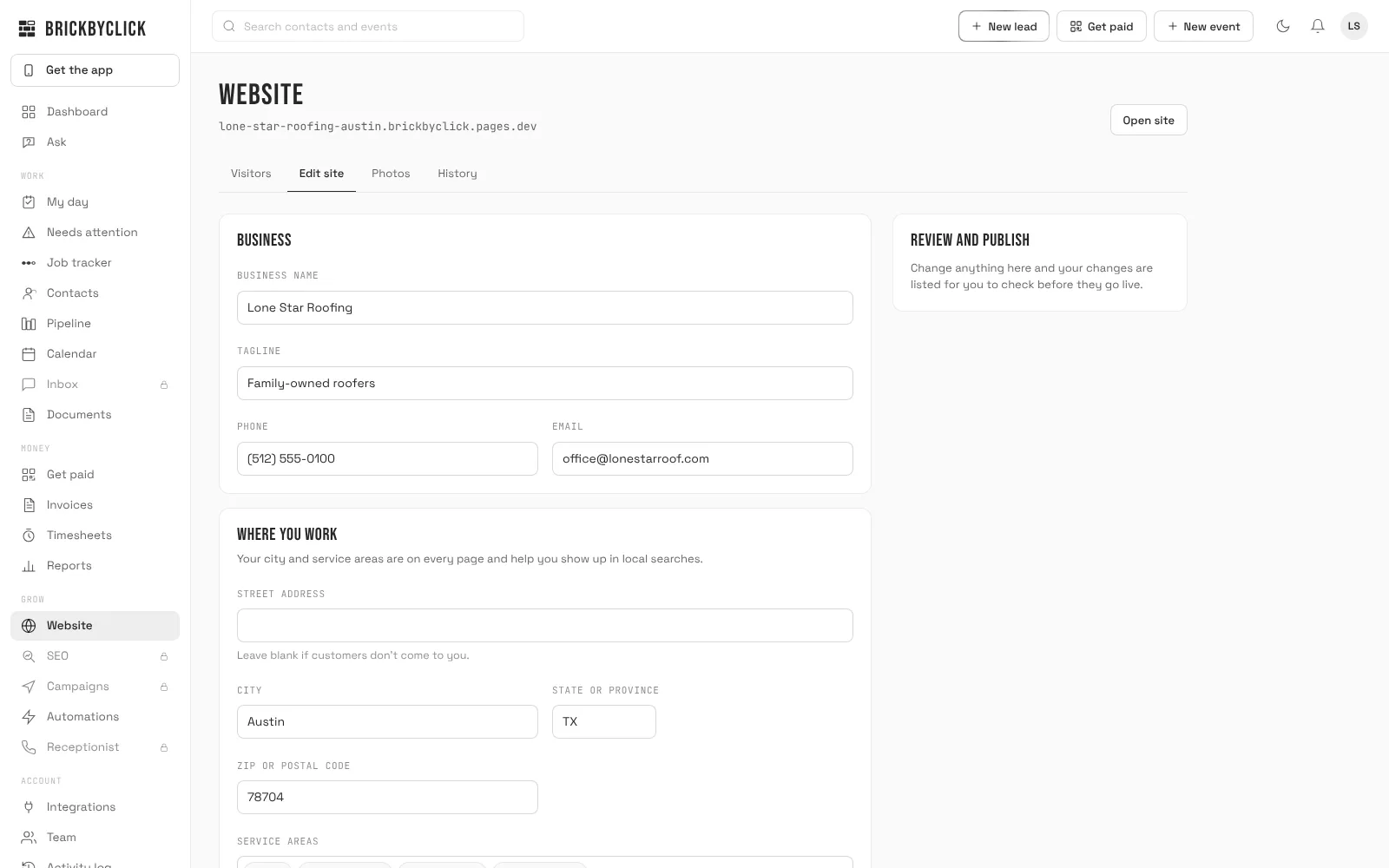
On the self-serve Starter plan the website is on a brickbyclick address and you edit it yourself; there is no own domain or changes by our team.
Local SEO: what you get, and from which plan
This is the part most field software leaves to you. On BrickByClick it is work our team does each month, from Growth.
- Google Business Profile set up and managed by our team.
- 25 citations: your business listed on directories with the same name, address and phone.
- A blog post a month about your services and towns, for you to approve first. Two a month on Total Growth.
- On-site SEO on your pages, and a monthly strategy call.
- Map rankings that show where you appear on Google Maps across a grid around your business, for 3 keywords a month on Growth and 5 scanned weekly on Total Growth.
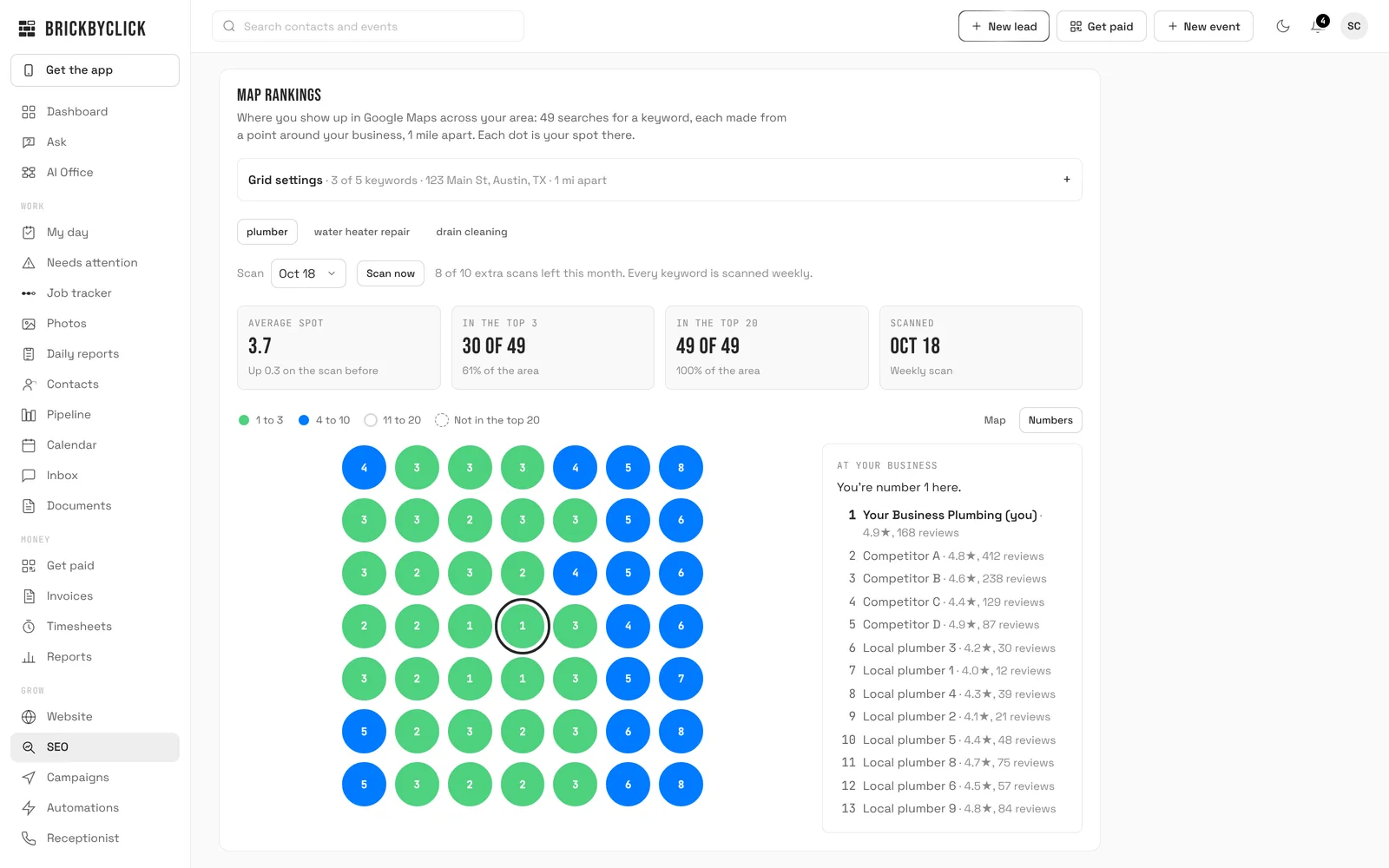
Total Growth adds link building. Nobody can honestly promise a ranking, and we do not.
Housecall Pro CSR AI vs the BrickByClick AI receptionist
What Housecall Pro publishes about CSR AI
- It “answers your business calls”, answers common questions and handles emergencies, which are “always on” (CSR AI overview).
- Its settings control whether it books jobs or creates unscheduled jobs or estimates instead; it needs your pricebook items with duration and price (getting started).
- Calls can be forwarded to a person you choose, during your company hours.
- You forward your calls to a CSR AI number; it “should not be used in any marketing or advertising”.
- The overview article lists texting and Spanish as future features.
What the BrickByClick AI receptionist does
- Its own local number. Forward your line to it for every call or only missed ones, or give the number out directly.
- French, English and Spanish.
- Answers in your business name from your hours, services, service area and price rules.
- Books into your calendar at real open times with Live Booking on, or takes the details for a callback.
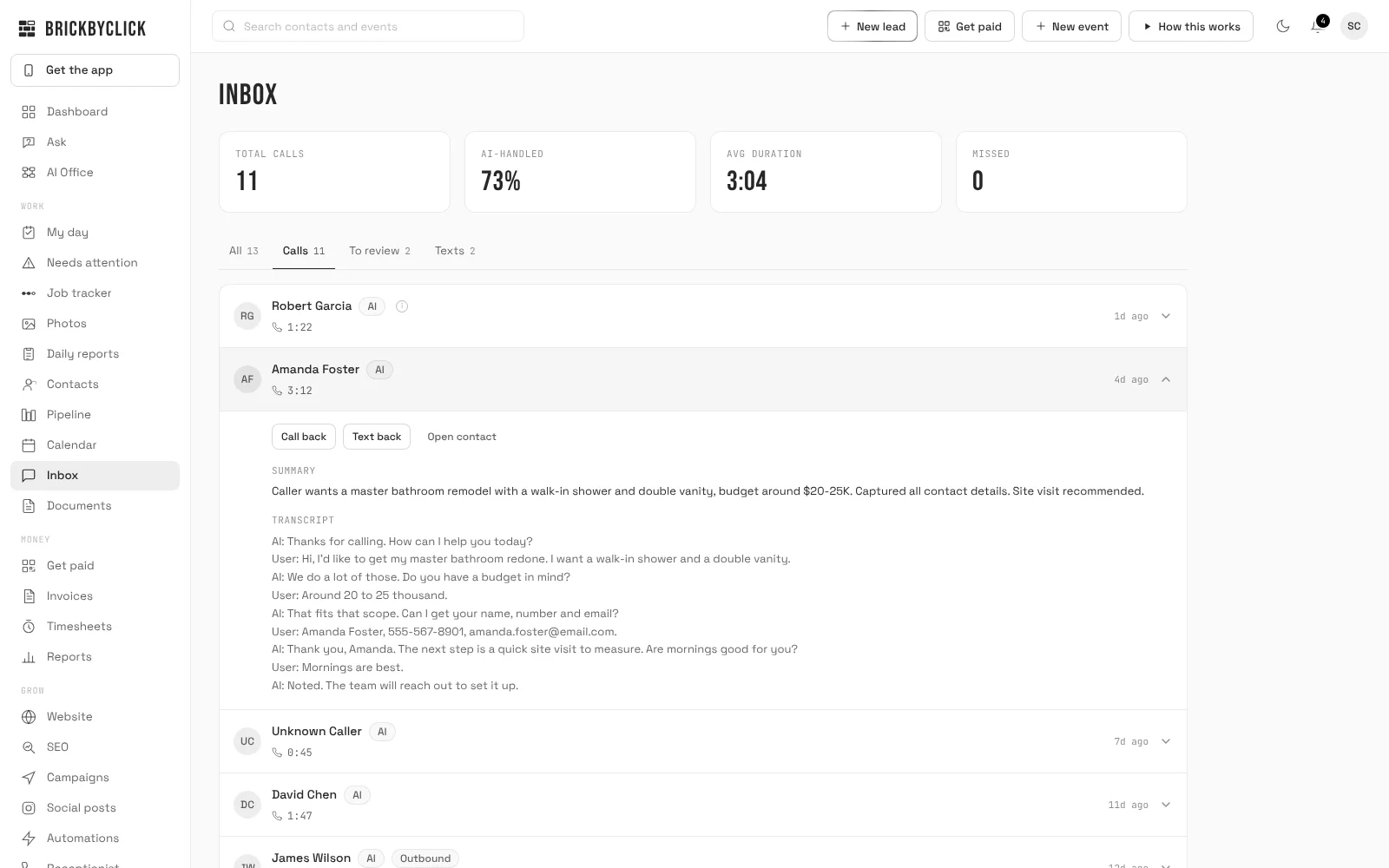
- Files every call in your Inbox with a summary, transcript and recording.
Running the job: where both are similar
Both do estimates, invoices, card payments, online booking, job costing and review requests on the entry plan. The differences are in the details.
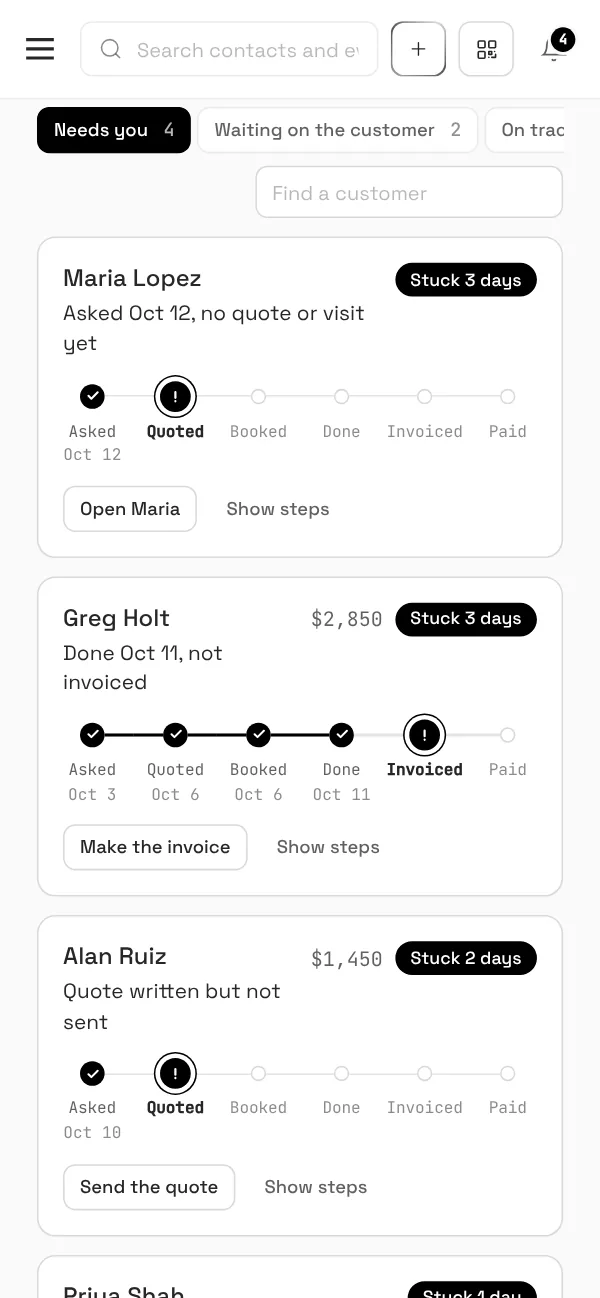
- Stuck jobs: BrickByClick’s Job tracker puts every job on one line from Asked to Paid and flags finished work not invoiced after 2 days.
- Get paid on site: the customer scans a QR code and pays by card, or by bank in the US, on their own phone.
- Pace warning: job costing warns you while a job runs when hours get ahead of the work.
- Follow-ups: quote follow-up emails at 2, 5 and 10 days, stopping when the customer answers.
When Housecall Pro is the better choice
The left column is when BrickByClick fits. The right column is when Housecall Pro is likely the better choice.
A good fit if
- You want a website built and managed for you, and local SEO done each month.
- You miss calls on the job and want an AI receptionist inside the plan.
- You want one team responsible for the website, the phones and the CRM.
- You want your callers answered in French or Spanish as well as English.
Not the right fit if
- You want the lowest software bill. Housecall Pro Basic is listed at $79 a month; our full-service plans start at $399.
- You want to try before you pay. Housecall Pro has a 14-day free trial; we do not.
- You need GPS tracking, route optimization or an app-store app.
- You need invoices and payments to sync to QuickBooks Online.
- You already have a website and SEO you are happy with. Then Starter or staying put may make more sense.
What does it cost?
| Plan | Price | Website and SEO |
|---|---|---|
| Starter | $99 a month | Free website on a brickbyclick address you edit yourself. No receptionist, texting or SEO. |
| Front Office | $399 a month | 10+ page website on your domain, built by us. AI receptionist, 500 minutes. |
| Growth | $599 a month | Adds local SEO, Google profile management, 25 citations, a blog post a month, email campaigns. |
| Total Growth | $999 a month | Adds link building, 2 posts a month, unlimited pages, 1,000 minutes, an account manager. |
Month to month, no setup fees. Card payments carry Stripe’s processing plus 0.5% per card payment (max $25); no BrickByClick fee on bank payments.
Housecall Pro lists Basic at $79, Essentials at $189 and Max at $329 a month on monthly billing, with lower annual prices (pricing). Its website and CSR AI call answering are not priced on the pages we read.
What BrickByClick does not do
- No free trial. We show it on a 15-minute demo instead.
- No GPS, routing or route optimization.
- No QuickBooks invoice or payment sync. Job receipts go to QuickBooks Online as expenses, photo attached; “Download for your accountant” gives one spreadsheet.
- No card reader or tap to pay. Bank payments are US only.
- No texting on day one. It turns on once your business number is registered with the phone carriers; we handle that in setup.
- No SMS campaigns or SMS review requests. Those are email.
- No SEO on Front Office, and no receptionist on Starter.
- No ranking promises.
Moving over: export your customers from Housecall Pro to a spreadsheet and import them with their real dates. See switching.
Questions people ask
Which Housecall Pro alternatives include a managed contractor website and local SEO?
What is the best Housecall Pro alternative?
Housecall Pro vs BrickByClick: what is the difference?
Does Housecall Pro build websites?
Does Housecall Pro do local SEO?
Does Housecall Pro have an AI receptionist?
How much does Housecall Pro cost?
Is BrickByClick more expensive than Housecall Pro?
Does BrickByClick sync with QuickBooks like Housecall Pro?
Can I move from Housecall Pro to BrickByClick?
Does the BrickByClick AI receptionist speak Spanish?
Can BrickByClick text my customers?
Is BrickByClick only for contractors?
See if it fits your business
Fifteen minutes. Tell us what you pay for Housecall Pro, your website and marketing today, and we will tell you straight whether switching is worth it.