Google Business Profile Management Service
A Google Business Profile management service sets up your listing on Google Search and Maps, or takes over the one you have, and keeps it complete and current. BrickByClick's team does this every month on the Growth ($599 a month) and Total Growth ($999) plans: categories, services, hours, service area, photos and posts, matched to your website and listings. You stay the owner of the profile, and nobody can honestly promise you a ranking.
At a glance
- What you get: your profile set up or taken over, then kept current every month by our team, with the work logged in your CRM.
- Who it is for: local service businesses in 30+ industries that get customers from Google Maps and local searches.
- Cost: included in Growth ($599 a month) and Total Growth ($999 a month), prices in US dollars. Not in Front Office or Starter.
- Comes with: website SEO work, 25 citations (directory listings), a monthly blog post and a monthly strategy call on Growth; more on Total Growth.
- What it needs: you add us as a manager on your profile (you stay the owner) and send photos and news as they happen.
What is a GBP management service?
The short answer
Your Google Business Profile (GBP) is the listing that shows your business on Google Maps and in the box on the right of Google Search. It holds your hours, phone, photos, reviews and services.
GBP management means someone keeps that listing complete, accurate and active, so the profile Google shows matches the business you run today.
What BrickByClick sets up at the start
- A new profile if you do not have one, or we take over managing yours.
- Your main category and the extra ones that fit what you do.
- Your services, with short descriptions.
- Your hours and the area you serve.
- A business description in plain words.
- Your logo, a cover photo and photos of your work.
- Your website and online booking page linked.
What we keep current every month
- Posts about your work, seasonal services and recent jobs.
- New photos as you send them.
- Holiday hours and closures.
- Services and hours updated when they change.
- Your name, address and phone kept the same as your website and your citations.
- What we did, logged in your CRM and gone through on the monthly strategy call.
Why does Google Business Profile management matter?
It is often the first thing a new customer sees
Someone searching "plumber near me" or "house cleaning in my area" usually sees the map and a few profiles before any website. Your photos, hours and reviews are the first impression.
Google uses it to decide who shows up
Google says local results are based mainly on relevance, distance and prominence. You cannot move closer to a searcher, but you can make the profile complete and accurate, which is the part you control.
Profiles go stale
- Holiday hours that were never set send customers to a locked door.
- A service you added last year is missing from the list.
- The phone on the profile does not match your website or your directory listings.
- The last post or photo is months old.
None of these is hard to fix. They are easy to forget when you are busy doing the work, which is why a monthly routine helps.
How do our GBP management services work?
Step 1: access, while you stay the owner
You add us as a manager on your profile; we send you the steps. You stay the owner and can remove us any time. No profile yet? We set one up, and walk you through Google's verification step, which sometimes needs a short video or a code.
Step 2: the setup
We complete the profile: categories, services, hours, area, description, photos and links. We match your business name, address and phone to your website and directory listings.
Step 3: the monthly routine
Each month we post, add the photos you sent, update hours and services, and check that the details still match everywhere.
Step 4: you see what was done
The SEO page in your CRM has a monthly checklist, "Your Growth SEO this month", showing what the plan includes and what is done, plus a "What we did" list of the work our team logged, month by month.
The Google & listings tab keeps an 11-item profile checklist: category, other categories, services, area, hours, description, 10+ photos, weekly post, Q&A, links and replies to reviews.
Step 5: the strategy call
Once a month we go through what we did and what comes next. Our team sets the time with you.
How do I know if my Google Maps ranking is improving?
Growth and Total Growth include Map rankings in the CRM. It searches Google Maps for your keywords from a 7 by 7 grid of 49 points around your business and shows your spot at each one.
What each plan scans
- Growth: 3 keywords, scanned once a month, plus 3 extra "Scan now" scans a month.
- Total Growth: 5 keywords, scanned weekly, plus 10 extra scans a month, a table of the businesses you are up against with their own maps, and AI suggestions after each scan.
Four tiles sum it up: Average spot, In the top 3, In the top 20 and the scan date. Tap a dot to see who shows up at that point.
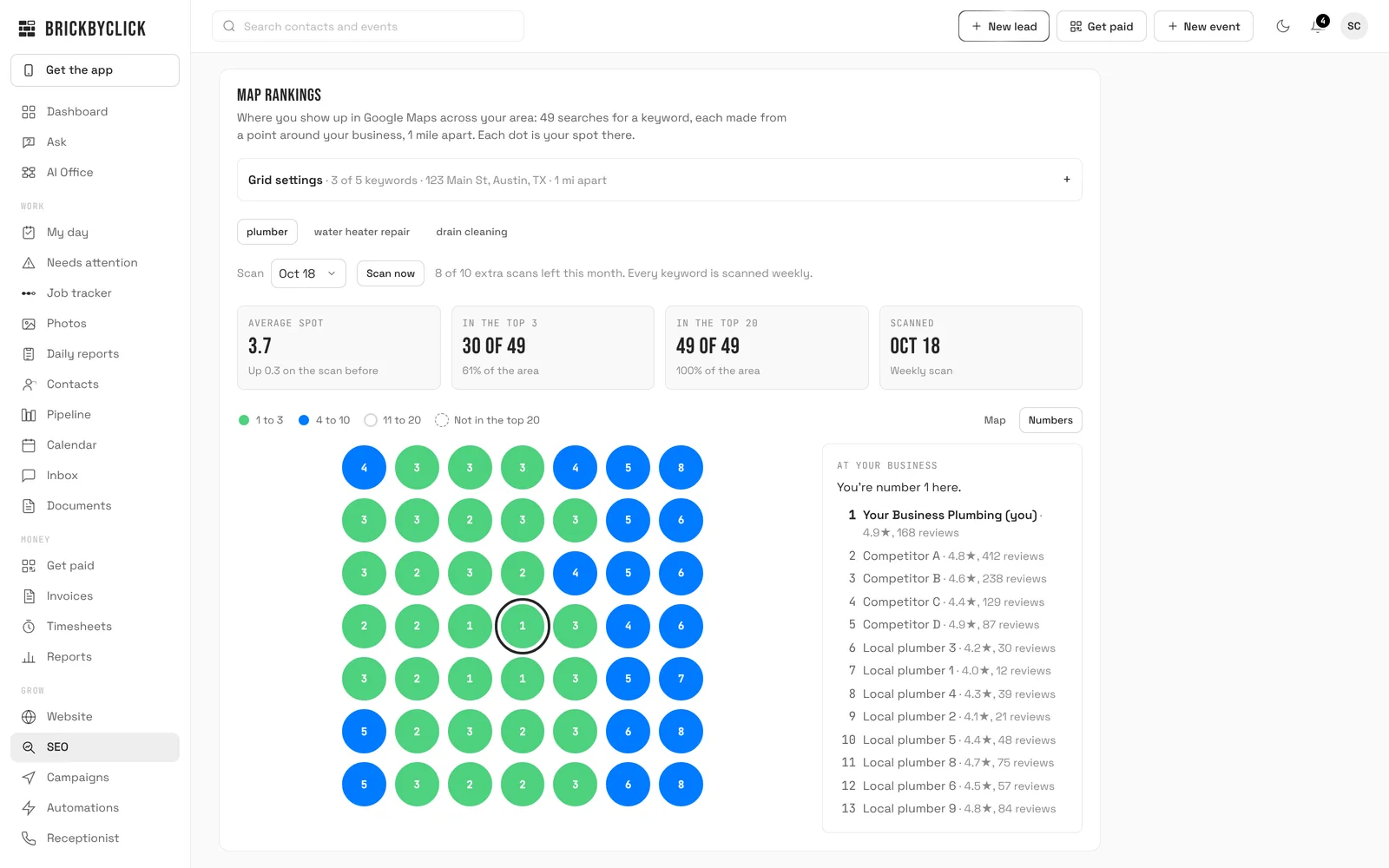
Map rankings measure Google Maps only, for the keywords you put on the map. A point where you are outside the top 20 counts as spot 21 in the average.
Does GBP management include reviews?
Review requests, in every plan
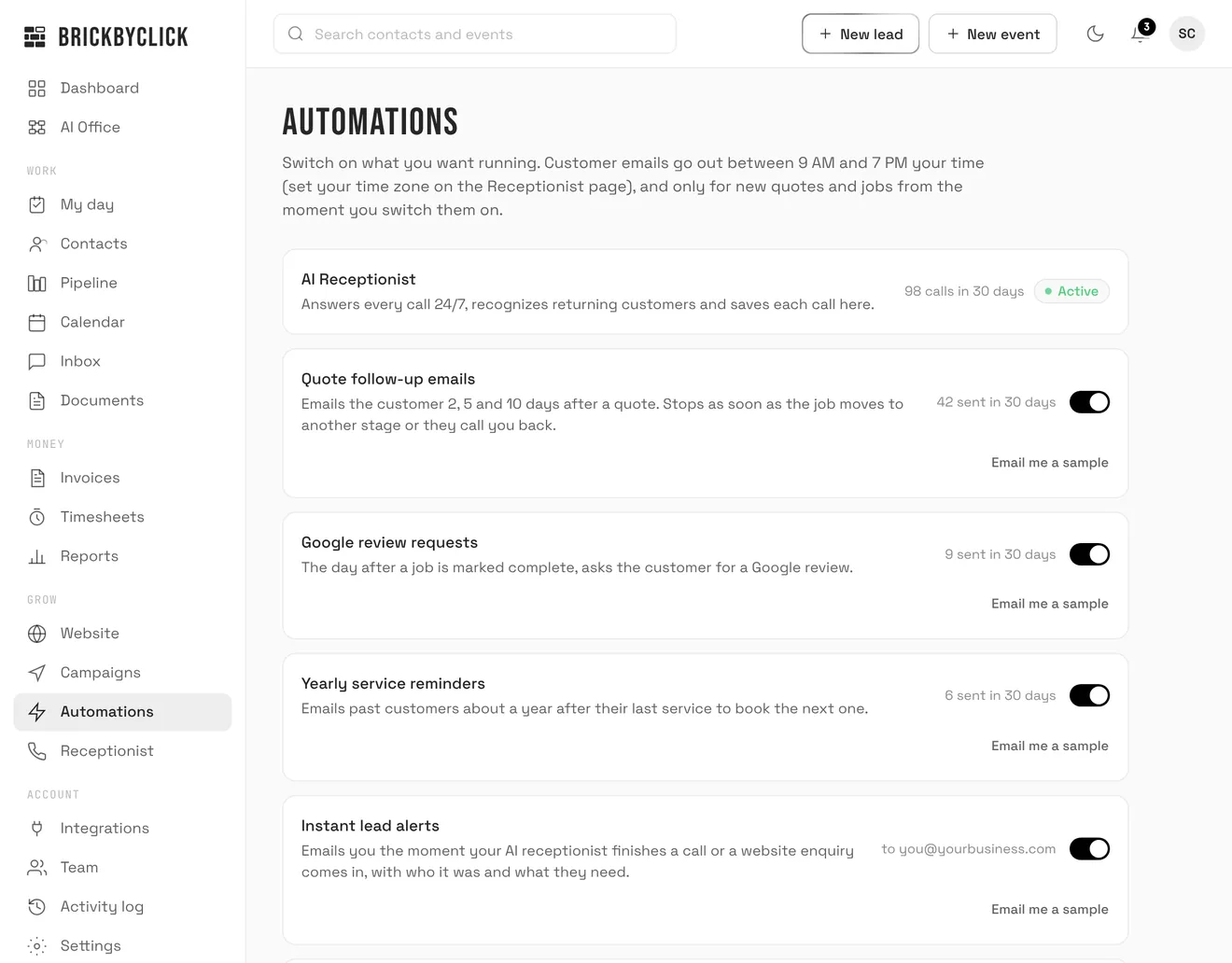
Every plan can send customers a Google review request by email after a job is done, with one button that opens your profile's review form. Turn it on or off under Automations.
- Sent one day after the job is done (three days if the "How did we do?" check is on), between 9 AM and 7 PM your time.
- A customer is asked at most once every 180 days, and not again after they opened the link.
- It needs your Google review link, your business address and a reply-to email. When we manage your profile, we get the link for you.
Review replies
In the CRM's Reviews tab, pick the stars, paste the review and press Write a reply to get a draft. You copy it and post it on Google yourself. Read more on review software.
Review requests are email, not text. Whether a customer leaves a review is up to them, so we never promise a number of reviews.
Does my Google profile affect AI search answers?
AI assistants that search the web read business listings and review sites when they recommend a local business. A complete profile and matching listings give them consistent facts to read.
Growth includes an AI search check in the CRM: it asks an AI with web search 10 questions your customers might ask (20 on Total Growth) and records whether you were named, and which websites it read.
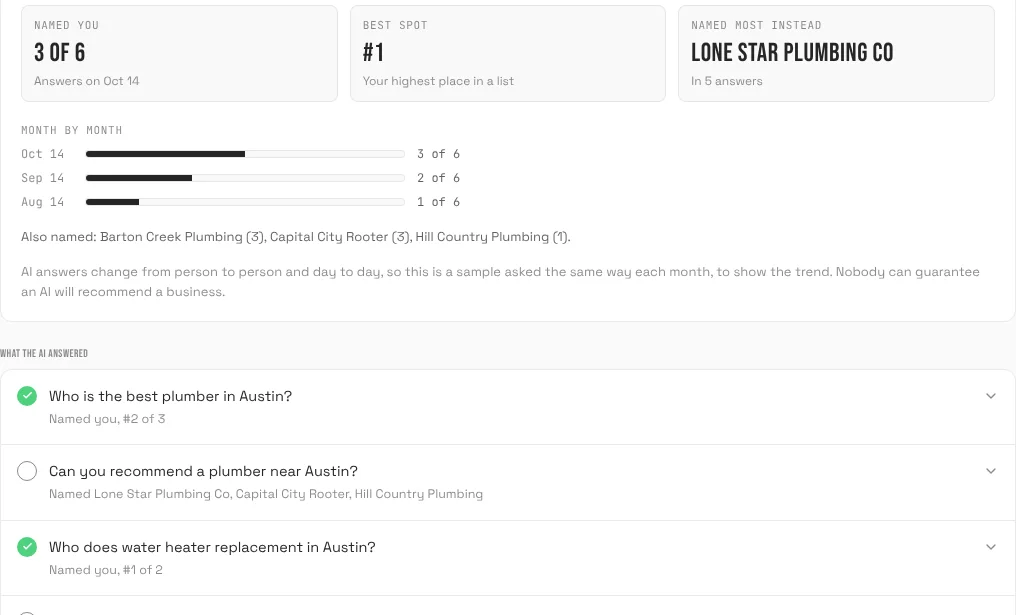
AI answers change from person to person and day to day, so the check is a sample asked the same way each month to show the trend.
GBP management service vs doing it yourself vs a freelancer
Each option can work. The difference is who remembers to do it every month and what else comes with it.
| Do it yourself | Freelancer or separate agency | BrickByClick Growth | |
|---|---|---|---|
| Setup | You learn Google's settings. | Usually included. | Included: setup or takeover. |
| Monthly posts and photos | When you find time. | Depends on the package. | Every month, from what you send. |
| Details match your website and listings | You check by hand. | Depends whether they also manage those. | We manage the website SEO and listings too. |
| Tracking | Google's own profile stats. | Their report, if any. | Map rankings and a monthly work log in your CRM. |
| Tied to your calls and jobs | No | Usually not. | Yes. Leads and jobs live in the same CRM. |
| Cost shape | Your time. | Monthly fee, varies. | Included in $599 a month, with the rest of the plan. |
The first two columns describe how each option usually works, not any one provider.
GBP management for different kinds of business
Plumbers, HVAC and electricians
Most customers search when something breaks. Emergency hours, a clear service area and photos of real jobs matter most.
Roofers, landscapers and seasonal work
Seasonal services and holiday hours change through the year. Posts about the season's work keep the profile current.
Cleaners, salons and appointment businesses
Customers want to book. Linking your online booking page from the profile gives them a direct way in.
Service-area businesses
If you work at customers' homes and do not want your address shown, the profile can show the area you serve instead. We set it up that way.
It is the same service for 30+ industries.
Do I need a Google Business Profile management service?
A good fit if
- New customers find you on Google Maps or local search.
- Your profile is incomplete, outdated or was set up years ago.
- You want the profile, website and listings handled by one team, with the work logged.
- You also want the rest of Growth: website SEO, listings, a blog post a month and a strategy call.
Not the right fit if
- You only want profile management on its own. It comes as part of Growth, not separately.
- You enjoy managing the profile yourself and already keep it current.
- You want a guaranteed top-3 spot. Nobody can honestly promise that.
- Most of your work comes from referrals and you do not rely on search.
How much does Google Business Profile management cost?
| Plan | Price | Profile management |
|---|---|---|
| Starter | $99 a month | Not included |
| Front Office | $399 a month | Not included |
| Growth | $599 a month | Included |
| Total Growth | $999 a month | Included |
Growth includes your Google Business Profile, local SEO and on-page work on your website, 25 citations (directory listings), a blog post a month, email campaigns and a monthly strategy call.
Total Growth adds a second blog post a month, local link building, weekly map scans and competitor tracking. Compare every plan. Prices are in US dollars.
What our GBP management does not do
- No ranking promises. Google decides who shows up on the map.
- No review numbers. Customers decide whether to leave a review.
- No posting by the CRM. Posts are done by our team; the CRM's post and reply tools write drafts you copy yourself.
- No automatic reading of your profile. The 11-item checklist is ticked by hand, by you or our team.
- No text review requests. They are email.
- Not sold on its own, and not in Front Office or Starter.
Questions people ask
What is a GBP management service?
How much does a Google Business Profile management service cost?
What does Google Business Profile management include?
Will I still own my Google Business Profile?
What if I do not have a Google Business Profile yet?
Can I still post and make changes myself?
Do you guarantee I will show up in the top 3 on Google Maps?
Do you reply to my Google reviews?
Is GBP management worth it for a small plumbing or cleaning business?
How long does it take to see results from GBP management?
GBP management vs local SEO: what is the difference?
Can you manage a profile for a service-area business with no storefront?
Let's look at your profile
Fifteen minutes. We will look at how your business shows up on Google today and what we would set up and keep current for you.