Website Design and Hosting for Service Businesses
BrickByClick builds and hosts a website for your service business, and connects it to the CRM you run the business from. On Front Office, Growth and Total Growth our team builds it with your logo, photos and services, hosts it with SSL, and you connect it to your own domain. On Starter you get a free website on a brickbyclick address that you fill in and edit yourself.
At a glance
- What you get: a website with your services, your town and the towns you serve, a contact form, hosting and SSL, and visit counts inside your CRM.
- Who it is for: local service businesses in 30+ industries: trades, cleaners, landscapers, and other businesses that get customers by phone and by form.
- What it costs: free on Starter ($99 a month for the whole CRM); 10+ pages on Front Office ($399 a month); unlimited pages on Total Growth ($999 a month).
- How fast: a Starter site builds in about 2 minutes for nine trades; full-service plans go live in about two weeks from the demo.
- What it needs: your business details and a logo; for the full-service plans, photos of your work and your domain name if you have one.
- What it is not: an SEO guarantee. A good site helps you get found, but rankings take ongoing work.
What is website design and hosting for a service business?
It is a website that is built for you, kept online for you, and wired into the tools you already use to run jobs. “Hosting” means we keep the site on a fast, secure server and keep its SSL certificate on, so it opens over https with the padlock.
The website is not a separate project. Visits, taps on your phone number and contact form messages show up in the Website page of your CRM.
What a BrickByClick website includes
- Pages for your services and the towns you serve, with your name, phone number and city on every page.
- A contact form. Each message lands in Contacts in your CRM and you are alerted. A returning customer’s message goes on their existing file.
- A link to your online booking page, where customers pick from open times inside your hours.
- Hosting and SSL on the plans that include a website built by our team, and a free brickbyclick address on Starter.
- Pages that read well on a phone, with your number a tap away.
- A visitor report: visits, taps to call, forms sent and bookings opened, counted without cookies.
Two ways to get a site
Built by our team. Front Office, Growth and Total Growth. We build it from your logo, photos and services, or from your current site, and we host it.
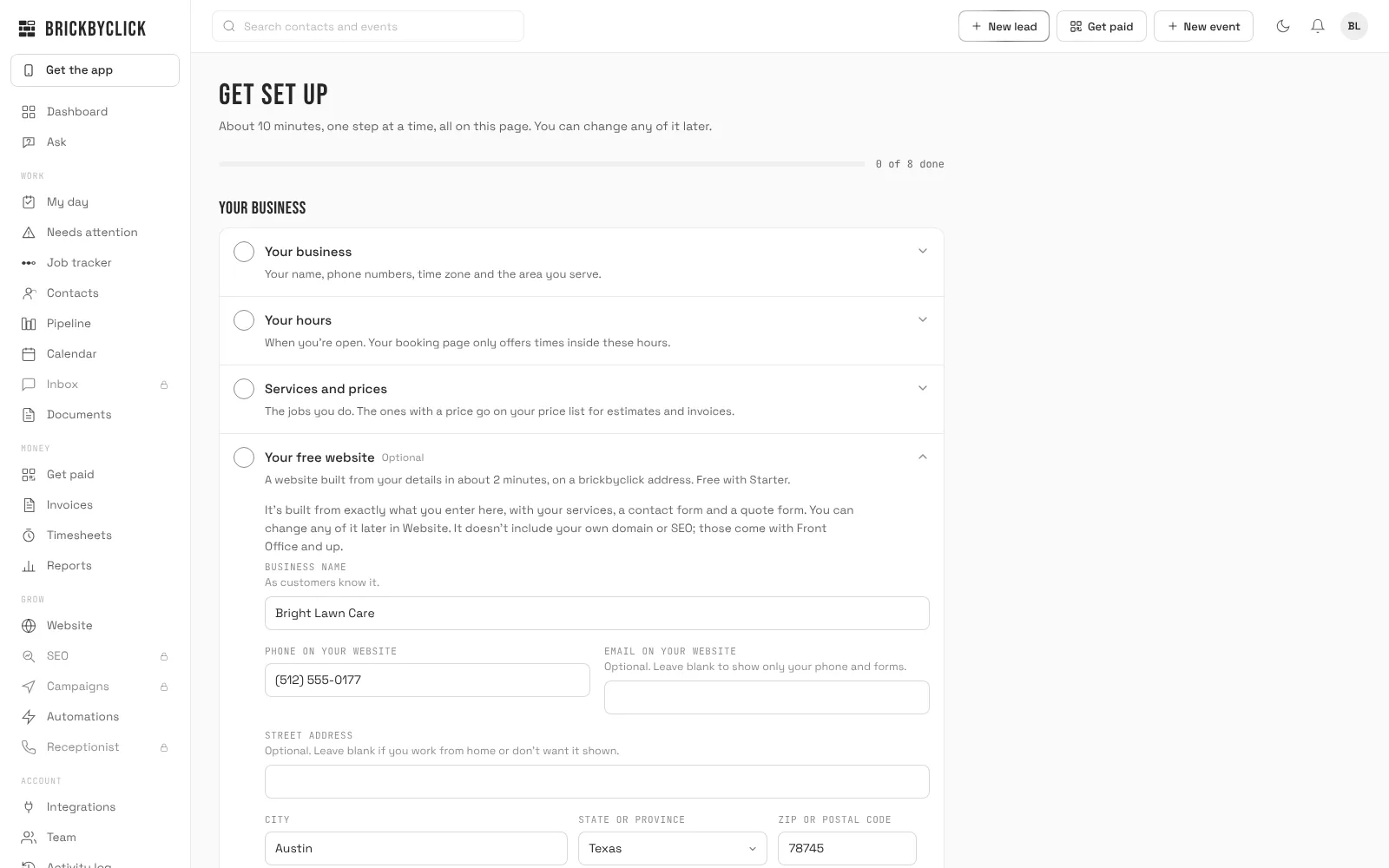
Built by you, from a form. Starter. You enter your details once in Get set up and the site is built from exactly what you entered. You change it later in the Website page.
Why does a service business need its own website?
Customers check a business before they call. A site with your real services, towns and phone number answers that check in a few seconds.
Your website is where your other marketing lands
- People who find your Google Business Profile tap through to your website.
- Listings and citations point to it.
- Review links, estimates and invoices all carry your name, and customers often look you up.
It turns visitors into jobs, not just page views
A site that only looks good does not help if the form goes to an inbox nobody checks. Here, form messages become contacts in the same place as your jobs, estimates and follow-ups.
The AI receptionist and online booking page work alongside the website. The receptionist answers the phone, the booking page takes the customers who would rather click.
It is the page search engines read
Google reads your pages to decide what you do and where. Your services and service area need to be on the page as plain text. The on-site SEO and local SEO work builds on that foundation.
You should own and control it
Changing a phone number or posting a holiday notice should not take a week. In the Website page you can do both yourself and publish when you are ready.
How does website design and hosting work with BrickByClick?
On Front Office and up: our team builds it
- You book a 15-minute demo and decide.
- You send your logo, photos, services, the area you serve and, if you have one, your domain name or current website address.
- Our team builds and hosts the site during setup. The full setup, receptionist included, takes about two weeks from the demo to live.
- You connect the site to your CRM with the 6-digit Website ID from your preview email.
- From then on you edit details and photos yourself, and ask us for bigger changes.
On Starter: it builds from your details
In Get set up, open “Your free website”, enter your name, phone, city and the towns you serve, then submit. For roofing, plumbing, HVAC, electrical, general contracting, landscaping, painting, cleaning and concrete it builds in about 2 minutes and we email you the link.
Other trades are built by our team by hand and we email you when it is live. The address is a brickbyclick address, like yourname-yourtown.brickbyclick.pages.dev.
When you publish, what happens
You press “Publish”. The site is rebuilt with your changes, every page is checked, it goes live, and the live site is loaded to check it. This normally takes about a minute.
If the check fails, the previous site goes back up by itself. You can leave the page while it runs.
What can I change myself on my website?
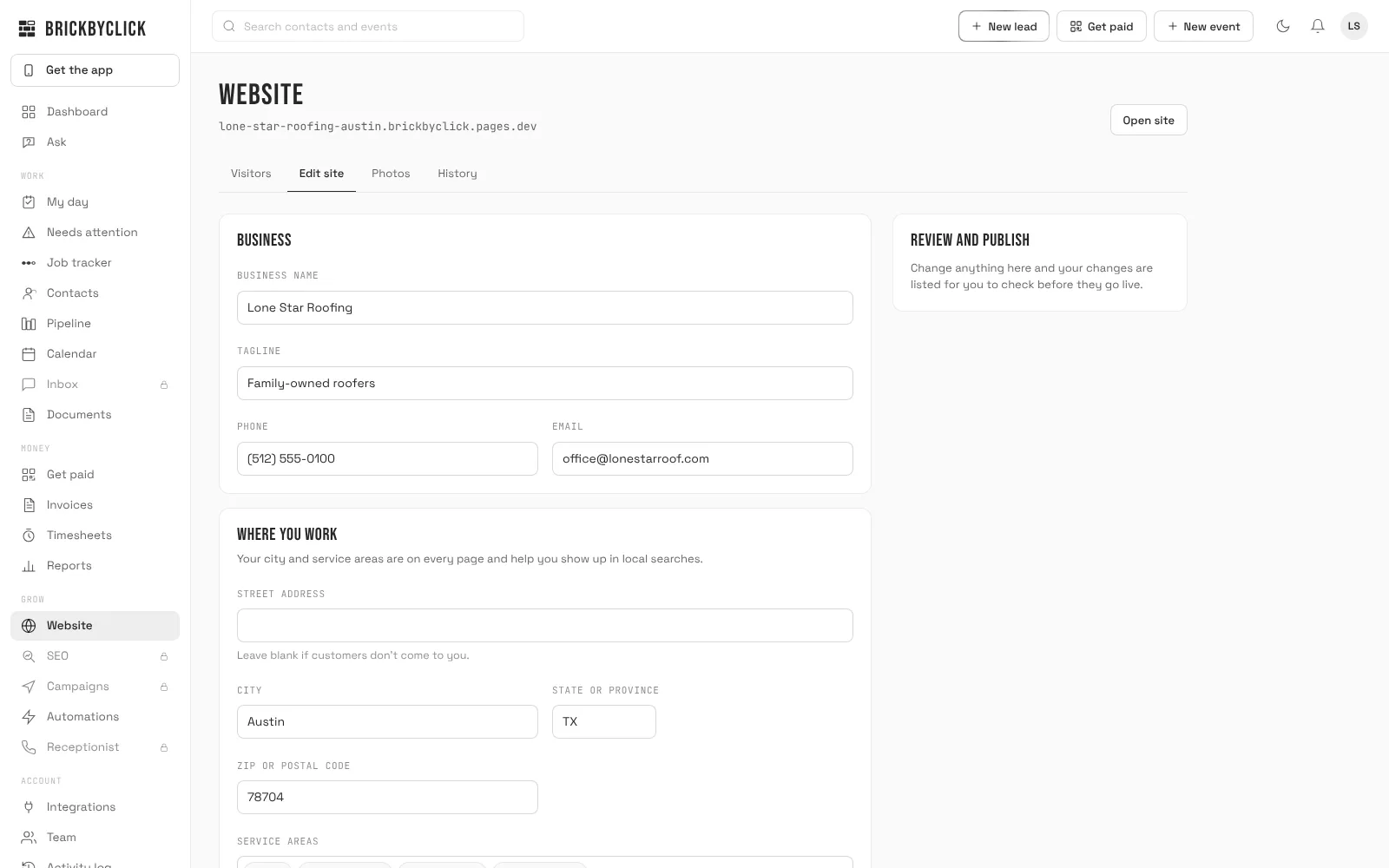
The Edit site tab lets you change a fixed set of 20 details. The site is rebuilt from them, so the design stays consistent.
The 20 fields
- Business name and tagline.
- Phone, email, street address, city, state or province, and ZIP or postal code.
- Service areas: up to 7 towns besides your city.
- Years in business, warranty in years, and a license or insurance line.
- Google rating and number of Google reviews, if you want them shown.
- Links to your Google Business Profile, Facebook, Instagram and Yelp.
- An announcement bar and the date it ends.
A blank optional field is left off your website. The site never makes up numbers or ratings.
Review and publish
Every pending change is listed with the old value crossed out. “Undo” puts one field back, “Discard changes” drops them all, and “Publish” puts the rest live. Nothing goes live until you press it.
Photos
- Add a logo and a main photo for the top of the home page.
- Add up to 12 photos to an “Our work” gallery, with a caption up to 120 characters for each.
- Add one photo per service page.
- Photos stay drafts until you press “Publish photos”. They are shrunk, turned upright and stripped of location data.
Undo a mistake
The History tab keeps your last 10 versions. Press “Put back” on an older one to make it live. The version that is live now is saved first, so you can switch back.
How do I get bigger changes made?
Wording, prices, new pages, layouts and colors are not in the 20 fields. On Front Office and up you ask our team in the Requests tab.
Sending a request
- Describe the change in your own words, up to 5,000 characters.
- Drop up to 20 photos, 10 MB each (JPG, PNG, WebP, HEIC or GIF).
- Choose a photo type: project photos, before and after, team, equipment, office or shop, logo and branding, or other.
- Press “Send request” and follow its status: Received, In progress, Done.
Our team moves the status by hand, so it is a record of where your request is, not an automatic timer.
On Starter
Starter has no Requests tab and no website changes by our team. You make every change yourself in Edit site and Photos. Moving up to a full-service plan adds our team’s changes. Everything you added stays.
Can I use my own domain for my business website?
Yes, on Front Office and up. Starter stays on its free brickbyclick address.
How to connect your domain
- Open Website, then Move your site, once your new site is published.
- Type your domain, like yourbusiness.com, and press “Connect my domain”.
- We look it up and copy your email settings first, so your email keeps working.
- You are shown two nameservers with a Copy button and steps for your registrar. Change them where you bought the domain.
- Press “I’ve changed them: check now”. The page also keeps checking by itself.
The Website page says this usually shows within an hour and sometimes takes up to a day. When it is live, you get an email and the site’s pages switch to your domain.
What to keep and what to cancel
- Keep the domain registration where you bought it. We do not transfer it, and you do not pay twice.
- Keep your email.
- Cancel the old website plan only after the new site is live on your domain.
Only the owner can connect a domain. A few registrars, such as Cloudflare or Shopify, cannot be pointed this way. For those, call (888) 533-5784 and we do it with you.
How do I move from my old website?
The Move your site tab scans your old site and lets you keep what you want from it. It does not copy your design or your wording.
What the scan reads
- Up to 15 pages, which takes up to a minute.
- Contact details, address, towns you serve, social links, tagline, years in business, warranty and license line.
- Your logo and photos. You pick where each goes: logo, main photo, gallery, or not used.
You tick what to keep and press “Use what’s ticked and publish”. Nothing changes until you do. If the new site is not published yet, press “Save for my new website” instead and the picks go on automatically once it is live.
Your services and hours are not imported. They are set up in the receptionist and Get set up.
Can I keep my current website and still use BrickByClick?
Yes, on every plan. The CRM, the AI receptionist and payments do not depend on who built your site.
What you connect to a site built elsewhere
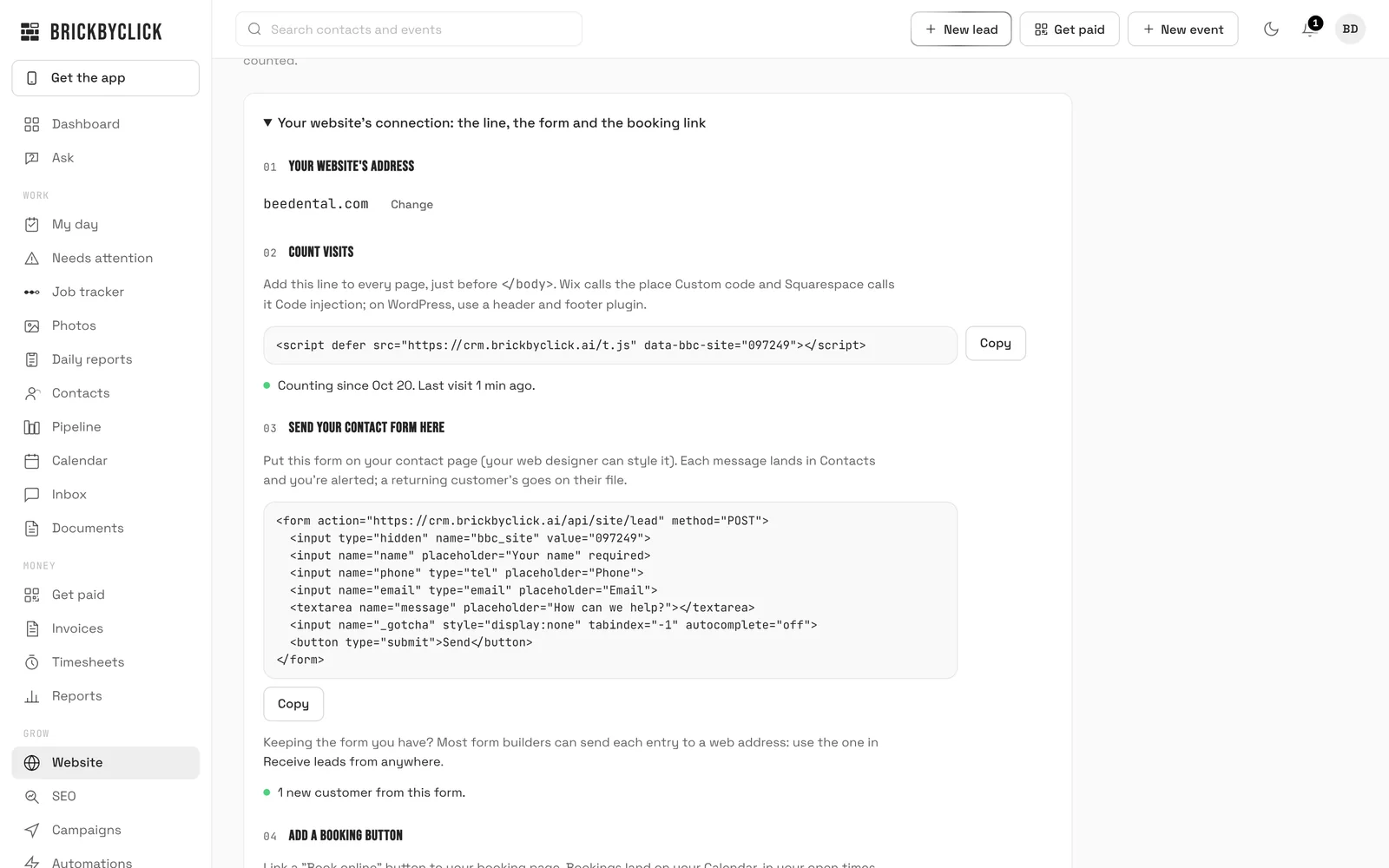
- Type your site’s address in Website, Visitors.
- Copy one counting line and paste it on every page, just before the closing body tag. WordPress, Wix and Squarespace each have a place for it.
- Optionally paste our contact form code so messages land in Contacts, and add a booking button linking to your booking page.
The page has a “Copy the steps for your web person” button that copies all three as one note.
You still edit that site where it was built. The Edit site, Photos and History tabs only work on websites we build.
How does this compare with other ways to get a website?
Owners usually weigh four options. The right one depends on who should do the work and where leads should go.
| Option | Who makes changes | Where leads go | Hosting and SSL | Usually fits when |
|---|---|---|---|---|
| Do-it-yourself site builder | You, on your own time | Whatever the builder provides, often an email inbox | Usually part of the builder’s plan | You enjoy design and have the hours |
| Freelance web designer | The designer, by request or invoice | Wherever they set it up | Often separate; ask who pays and who owns it | You want a one-off custom design |
| Marketing agency site | The agency, often under contract | An agency form or inbox | Often the agency’s, which can be hard to move | You want a managed marketing service |
| BrickByClick, Starter | You, in the Website page | Contacts in your CRM | Included, free brickbyclick address | You want a simple site today, with no sales call |
| BrickByClick, Front Office and up | You for details; our team for the rest | Contacts in your CRM | Included, on your own domain | You want it built for you and tied to the CRM |
The real difference
Most separate options stop at the website. Here the website feeds the CRM, the booking page and the reports you read to see what is working.
The trade-off is real: your design options are narrower than with a custom build, because the site is built from a fixed structure.
What does a service business website look like for my trade?
The site is built around what you sell and where you sell it. Here is what that looks like for a few trades.
Plumbers, HVAC and electricians
Service pages for the jobs people search for, a phone number that is one tap on a phone, and the towns you cover. An announcement bar helps when you change after-hours availability.
Roofers and general contractors
A photo gallery of finished work, a license and warranty line, and your Google rating if you have one. The “Our work” gallery holds up to 12 photos with captions.
Landscapers and lawn care
A page per service and a list of the towns you travel to, so customers can see quickly if you cover them. Seasonal banners let you post spring cleanup or snow dates.
Cleaners and other home services
A clear list of services, your booking page linked from the site, and a contact form for quotes. For service types outside the nine template trades on Starter, our team builds the site by hand.
Businesses outside the trades
BrickByClick serves local service businesses in 30+ industries. Any business that wins customers by phone, form or booking can use the same structure.
How do I see whether my website is working?
The Visitors tab shows what people did, over 7, 30 or 90 days, each compared with the period before.
Four numbers
- Visits: one person on one day counts once. Someone who returns on three days counts three times.
- Tapped to call: taps on your number. It counts taps, not calls answered.
- Filled out a form: messages sent from your contact form.
- Opened booking: people who opened your booking page.
Where they came from
You also see where visitors found you, your most viewed pages, and whether they used a phone, a computer or a tablet.
How the counting works
Counting uses no cookies and keeps no IP addresses. Known robots are not counted. Numbers start only once the counter is on the site, and counts older than about 13 months are deleted.
For the money side, the dashboard shows customers who first reached you by website form, online booking or the receptionist, and what they paid.
How much does website design and hosting cost?
The website comes with the plan. There is no separate setup fee or hosting bill. Prices are in US dollars and month to month.
| Plan | Price | Website |
|---|---|---|
| Starter | $99 a month | Free site on a brickbyclick address, built from your details, edited by you. No own domain. |
| Front Office | $399 a month | 10+ pages, hosted, with SSL, built by our team. Own domain. Change requests. |
| Growth | $599 a month | Everything in Front Office, plus SEO work including on-page work and a blog post a month. |
| Total Growth | $999 a month | Everything in Growth, with unlimited website pages. |
Those plans also include the CRM, the AI receptionist (from Front Office up), the crew app and payments. See plans compared for every feature.
Card payment fees
If customers pay you by card through the CRM, the fee is Stripe’s processing plus 0.5% per card payment, capped at $25. There is no BrickByClick fee on bank payments.
Will my website rank on Google?
A well-built site gives you the right base, but no one can honestly guarantee a ranking.
- Front Office has the site built and hosted by our team; Starter has the free site only. SEO starts at Growth.
- Growth and Total Growth add our team’s monthly work: on-site SEO, Google Business Profile management, citations and blog posts.
- Total Growth adds backlinks.
Local rankings build over months. See local SEO for what the work involves.
What does this website service not do?
- No design changes from the CRM. Edit site is a fixed list of 20 fields. Wording, prices, pages, layouts and colors need a request to our team (Front Office and up).
- No own domain, 10+ page website or changes by our team on Starter. Those are Front Office and up.
- Nothing publishes by itself. Edits and photo uploads stay drafts until you press Publish.
- No editing of a site built somewhere else. We count its visits and receive its form messages; you edit it where it was built.
- No domain transfer. The domain stays registered where you bought it.
- No email moving. We copy your email settings so email keeps working, but your email provider does not change.
- No invented numbers. If you leave out a rating or a year count, the site does not show one.
- No ranking promise. No one can honestly promise one.
- Not unlimited pages on every plan. Unlimited is Total Growth; the others have 10+.
Who is this for, and who is it not for?
A good fit if
- You run a local service business and get customers by phone, form or booking.
- You want the site, the leads and the jobs in one place.
- You would rather not manage hosting, SSL and renewals.
- You want to change your phone number, photos or a banner yourself.
Not the right fit if
- You want a fully custom design with animations and unusual layouts.
- You sell products online and need an online store.
- You are happy with a website built elsewhere and only want its design to stay as it is (you can still connect it).
- You want a ranking guarantee.
Do I need a new website?
If your current site is fast, shows your services and towns, and sends you leads you actually see, you may not. Connect it and count its visits instead.
When is a new website not worth it?
When the real problem is phone calls that go unanswered or leads that are not followed up. Fix that first with the AI receptionist and follow-ups.
Questions people ask
How much does website design and hosting cost for a service business?
Is the website really included, or is it an extra?
Can I use my own domain, like yourbusiness.com?
How long does it take to build a website?
Can I edit my website myself?
How do I get bigger changes made, like new pages or new wording?
What if I make a mistake when I publish?
Can I keep my current website and still use the CRM?
What is the difference between the Starter website and the Front Office website?
Does a website built here send leads into my CRM?
Is my website secure and hosted for me?
Will my website rank on Google?
Is a service business website worth it compared with just a Google Business Profile?
How do I know if people actually use my website?
See what your website would look like
Take fifteen minutes with us. We will show you the website, the Website page in the CRM and how a form message becomes a job.