AI Receptionist for Contractors
An AI receptionist for contractors answers your business phone in your company's name while you are on a ladder, on a roof or in a client's kitchen. BrickByClick's answers estimate requests and common questions such as "are you licensed and insured?" from the facts you give it, books site visits into your calendar if you allow it, and saves every call in your CRM with a summary and transcript, in English, French or Spanish. It comes with the Front Office plan ($399 a month) and up, and you can hear ours on (888) 533-5784.
At a glance
- What you get: a virtual receptionist for contractors that picks up every call, knows returning clients by name, books estimate and site visits within your rules and files each call with a summary, transcript and recording.
- Who it is for: general contractors, renovation and remodeling companies, painters, roofers, deck and fence builders and other trades that miss calls on job sites.
- Languages: it answers calls in English, French and Spanish.
- Cost: included from Front Office ($399 a month), with 500 receptionist minutes a month on Front Office and Growth and 1,000 on Total Growth. Not on Starter.
- What it needs: your business line forwarded to its own local number, plus your hours, services, service area and common questions filled in. Set up with you in about two weeks.
What is an AI receptionist for contractors?
A front desk that answers while you build
It is an AI phone answerer that holds a real conversation in a natural-sounding voice. There is no "press 1" menu and no voicemail beep.
For a construction or renovation company, the job is mostly the same on every call: find out what the project is, where it is, how soon, then book the estimate visit or take a clear message.
What makes it a contractor receptionist
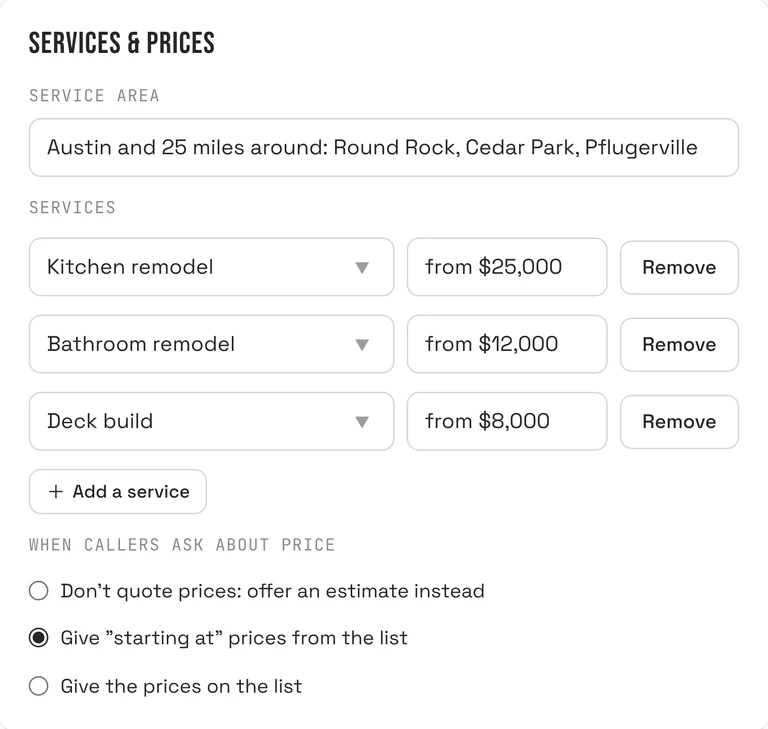
- Your services list: kitchen and bathroom remodels, additions, interior and exterior painting, roof repair and replacement, decks, fences, whatever you actually take on (up to 30 services).
- Your service area in your own words, such as "the city and 25 miles around".
- Your rule for price questions, so it never quotes a remodel over the phone unless you want it to.
- Your common questions, up to 15, like "Are you licensed and insured?", "Do you charge for estimates?" or "Do you pull permits?"
- What gets booked on calls: an estimate visit or site visit, and how long it takes.
BrickByClick serves local service businesses in 30+ industries on the same system; the general version is on the AI virtual receptionist page. This page is about the calls contractors and trades get.
Why do contractors and trades use an AI receptionist?
You cannot answer from a roof or a scaffold
Construction work happens with both hands busy, often with a saw running. The phone rings when you are tearing out drywall or halfway up a ladder with a brush.
Someone planning a renovation usually calls a few contractors. If yours goes to voicemail, the next one who answers may get the estimate visit. We do not publish a percentage for this; you know your own missed calls.
Estimate calls are long and repetitive
- The same questions on every call: do you do this kind of work, do you come to my area, are you insured, what does it cost roughly.
- Then the back-and-forth to find a time for a site visit.
- Then typing it all into your notes at night, if you remember the details.
Calls come after hours too
Homeowners plan projects in the evening and on weekends. The receptionist knows from your hours and closures whether you are open, answers anyway, tells callers when you are back and, with Live Booking on, offers your next open times.
How does an AI receptionist answer construction calls?
Step 1: calls reach it
You get a local phone number for your receptionist. Forward your business line to it, every call or only the ones you miss, or put the number on your truck signs, yard signs and website. Setup shows the forwarding codes for the major US carriers; for other carriers we walk you through it on a call.
Step 2: it looks up the caller
Before it speaks, it checks the number against your contacts. For a client it sees their name, up to five jobs on file, recent call summaries and notes, and upcoming visits.
Step 3: it greets them
A new caller hears your greeting (up to 200 characters, your words) and "Just so you know, calls are recorded for quality." A returning client hears "Hey" and their first name, then "thanks for calling" your business "back!"
Step 4: it answers only from your information
It answers from your saved facts, the caller's file and a search of your own website, if your website is connected to our system. If none of those has the answer, it says someone will get back to them. It does not make things up about your licence, insurance or prices.
Step 5: it books or takes a message
- Live Booking on: it offers two or three real open times for an estimate visit and books the one the caller picks.
- Live Booking off: it takes the name, number and what the project is, and says the team will call back.
Step 6: you see the result
The call lands in your Inbox with a summary and transcript, a note goes on the contact, and you get a phone notification plus an email ("New lead from a call") unless you turn Instant lead alerts off.
Six real contractor calls, and what the AI receptionist does with each
These are the calls general contractors, remodelers and trades get every week. For each: what the caller gets and what you get.
1. "Can you give me a quote on a bathroom remodel?"
The most common call for a renovation contractor. A remodel cannot be priced over the phone, and the receptionist does not try to unless you allow it.
- What the caller gets: a check that you do bathrooms and cover their area, your "starting at" price if you chose to share it, and an offer of an estimate visit.
- What you get: a booked visit and a call summary like "Full bathroom remodel, wants a walk-in shower, house built in the 1970s".
2. "Are you licensed and insured?"
Homeowners ask this before they let anyone in. Put your answer in Common Questions, word for word, including your licence number if you want it given out.
It reads your answer. It never invents a licence number or an insurance amount that you did not write down.
3. A client asks about a change order
A client whose kitchen you are working on calls: they want to add an island and ask what it will cost. The receptionist knows them by their number and sees their job on file.
- It does not approve, price or promise a change. That is your decision.
- It takes the request in detail and tells them you will get back to them.
- The summary lands on their contact, so the change request is written down, not lost in a voicemail.
4. "When is your crew coming back?"
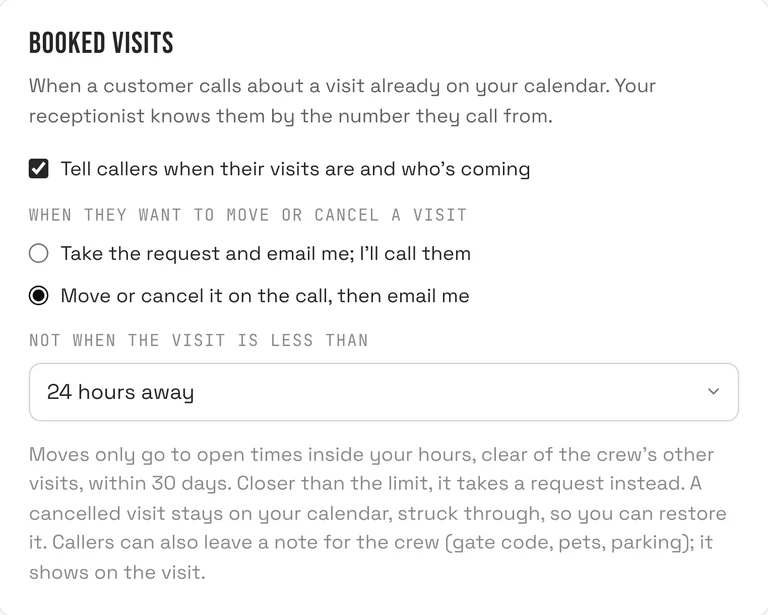
With Tell callers when their visits are and who's coming ticked, it tells the client their next visit and who is coming, but only to the number calling.
A request to move the visit is emailed to you by default. You can let it move or cancel on the call, never closer than the notice limit you set.
5. A call from a job site
A neighbour of the job, a supplier or a client standing in the half-finished room calls your main line. The receptionist answers, takes who they are and what they need, and you read the summary between tasks instead of stopping work to pick up.
If you would rather take those calls yourself, use Ring my phone first (more below).
6. After-hours storm damage call to a roofer
A homeowner calls at night about a leak after a storm. You choose what happens: tick We take emergency calls, describe what counts as one (for example "active leak into the house"), and the caller is given your emergency number.
If you do not take emergency calls, it takes the details and books the first open inspection time, or tells them when you open.
An AI receptionist for each trade
General contractors
- Screens the project type and size against your services, so you do not drive across town for work you do not take.
- Books a site visit with a 90 or 120 minute slot for bigger walkthroughs.
- Keeps a record of every call on the client's file, useful when a job runs for months.
Renovation and remodeling contractors
- A renovation contractor virtual receptionist mostly handles estimate requests and "when can you start?" questions.
- Put your typical lead time in Common Questions so callers hear a real answer, not a guess.
- Returning clients are recognised, so a call about a past kitchen job reaches you with the job history attached.
Roofers
- Separates leaks you treat as emergencies from replacement quotes, by your written rule.
- Books inspection visits around your other jobs, with travel time between them.
Deck and fence builders
- Answers "do you build composite decks?" or "what fence styles do you do?" from your services list.
- Takes the rough size and what they want, and books the measure-up visit.
- A crew note from the caller, such as "gate code 4412" or "dog in the yard", shows on the visit in the crew app.
The same receptionist works for the other trades we serve, such as plumbers, electricians, HVAC and landscapers.
AI receptionist for painters
Painting companies get a steady stream of estimate calls, many of them in spring and summer, while every crew member has a brush or a sprayer in hand.
What painting callers ask, and what it can answer
- "Do you do interior, exterior or both?" From your services list.
- "Do you paint cabinets?" or "Do you do drywall repair?" From your services list or Common Questions.
- "Do you supply the paint?" or "Which brands do you use?" Only if you wrote the answer in Common Questions.
- "How much to paint a three-bedroom house?" Your price setting decides; the default offers an estimate visit instead.
Booking painting estimates
Set "What gets booked on calls" to an estimate visit with a 30 or 45 minute slot, and a daily cap so the receptionist leaves room for production days.
Weather questions about exterior work ("will you still come if it rains?") go to Common Questions too, in your own words.
Can it book site visits and estimates into my calendar?
Yes, once you tick Book appointments on calls. It is off until you turn it on.
Booking rules that fit a construction schedule
- What gets booked (default "Estimate visit") and How long: 15, 30, 45, 60, 90 or 120 minutes.
- Travel time between visits: none, 15, 30, 45 or 60 minutes.
- Earliest booking: 1, 2, 4, 12, 24 or 48 hours from now, so nobody books you for this afternoon.
- How far ahead: 3, 7, 14, 21 or 30 days.
- Most per day: 1 to 20 bookings by the receptionist, so estimate visits do not eat your production days.
The panel "Next openings your receptionist would offer" shows the real times it would give callers, so you can check your rules first.
What it checks before booking
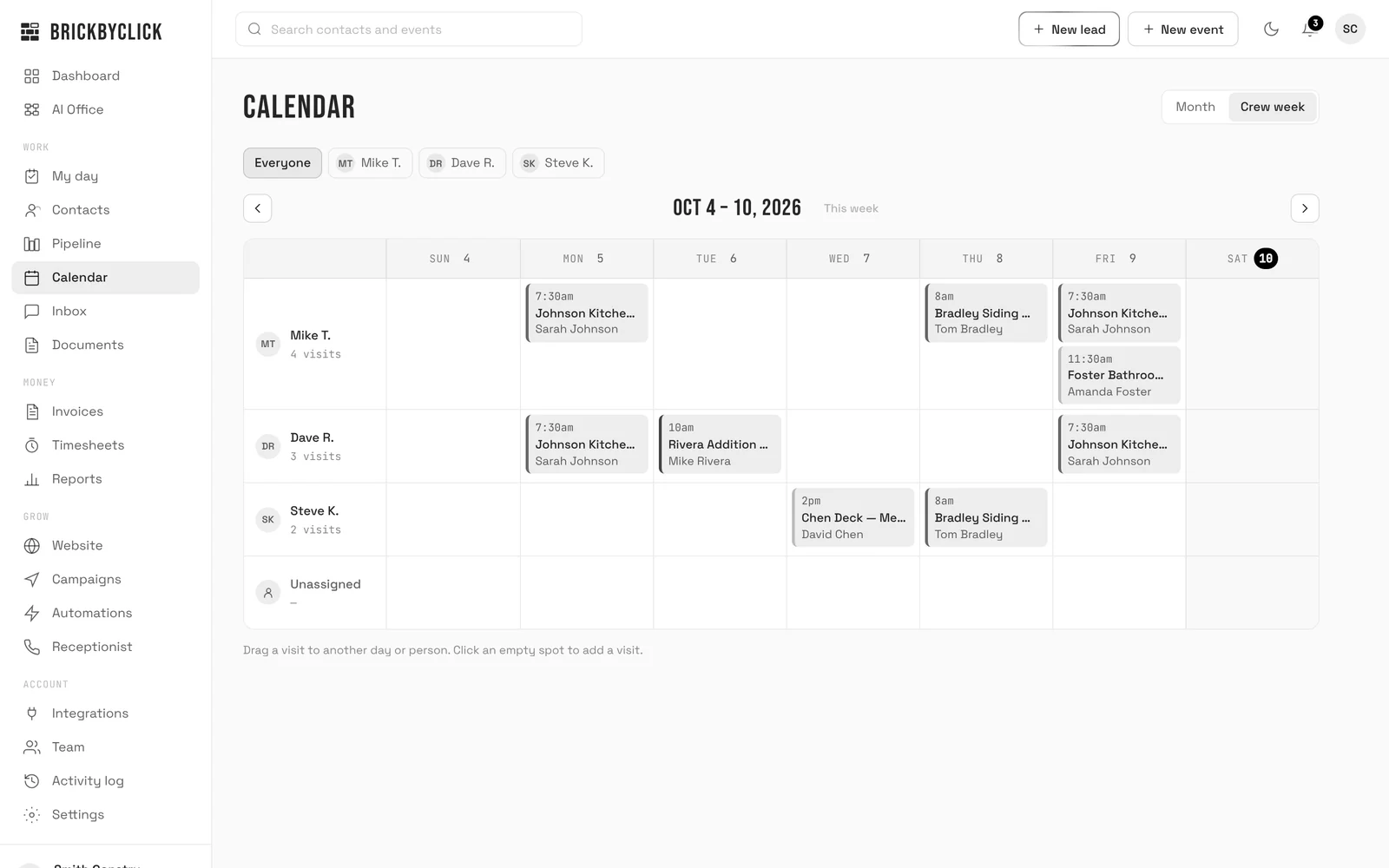
Your hours and closures, visits already on the calendar plus the travel buffer, and busy times from a connected Google calendar if you let it block booking. Just before booking it checks the time is still free; if not, it offers another.
Existing clients and their visits
Does it answer calls in French and Spanish?
Yes. The receptionist answers calls in English, French and Spanish, which matters for contractors who work with French-speaking clients in Quebec or Spanish-speaking clients in much of the US.
- The call summary and transcript land in your Inbox like any other call.
- Ask us in the demo how it handles your clients' language before you rely on it.
Call it on (888) 533-5784 and try it in the language your clients speak.
What lands in my CRM after each contractor call?
In the Inbox
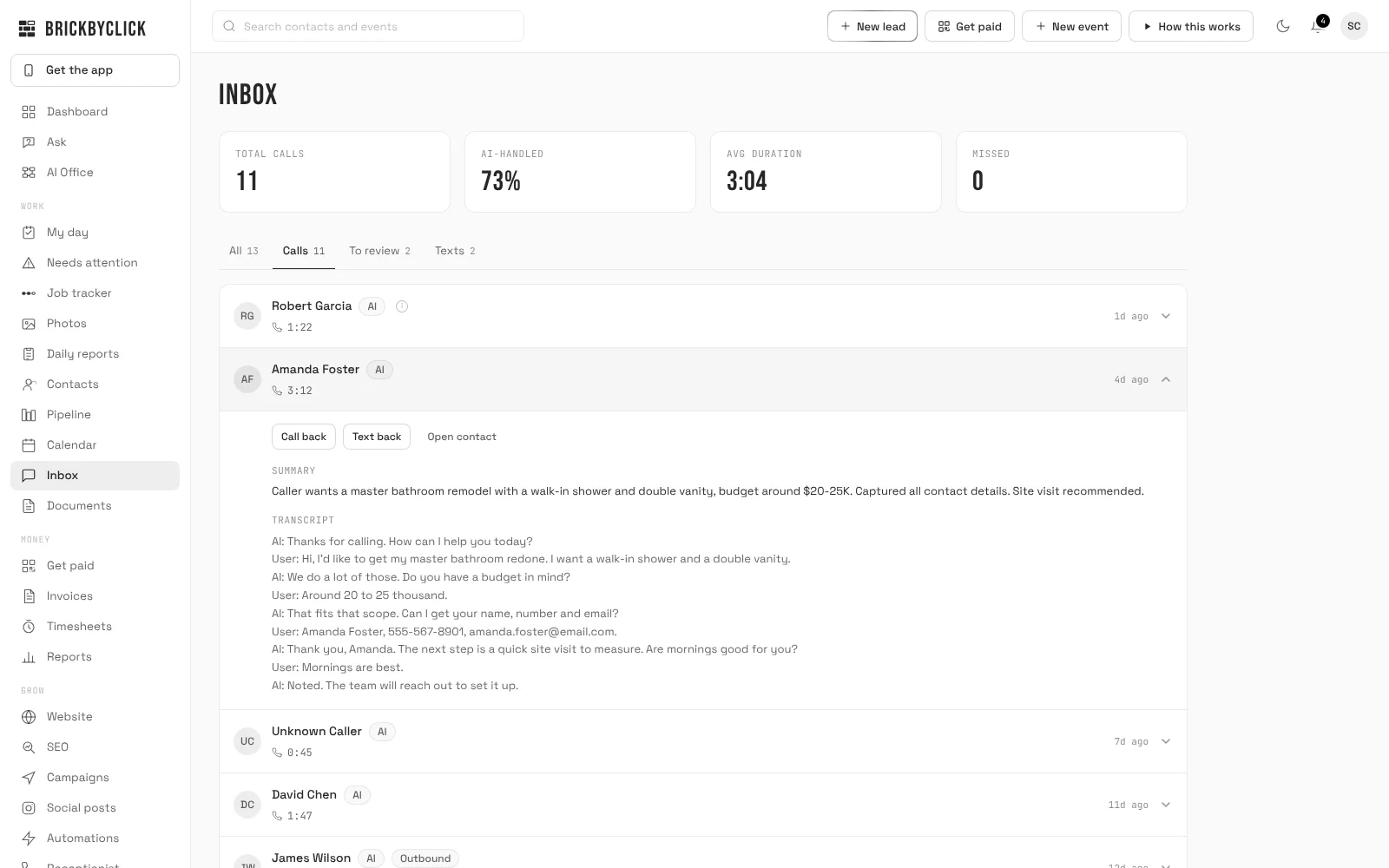
Each call shows the caller, its length, a summary and the full transcript, with Call back, Text back and Open contact buttons. Most calls also have a recording you can play.
On the contact and in your pipeline
- New callers are created as contacts and placed in the first stage of your pipeline.
- A note is added: "AI call", the length and the summary.
- New callers are asked how they heard about you, and the answer is saved, so business reports show which sources bring work.
- If the call moved a job forward, it suggests a pipeline move; you tap to accept. Nothing moves on its own.
Robocalls and sales pitches from unknown numbers are marked as spam, with no contact and no alert. When an estimate turns into a job, it moves into the job tracker and your estimates and invoices.
Does it text clients?
The receptionist does not text during a call. Texting is included from Front Office up and turns on once your business number is registered with the phone carriers. We handle that during setup, so it is not on from day one.
- Missed-call text-back, never between 9 PM and 8 AM your time.
- Visit reminders the day before, and "On my way" texts from the crew app.
- Two-way texts from the Inbox.
There are no text campaigns, text quote follow-ups or text review requests; those go by email.
Call (888) 533-5784 and hear it answer
Call (888) 533-5784: that is BrickByClick's own AI receptionist, on the same system your clients would reach. Ask it something it should not know and listen to how it handles it.
Hear it answer as your company
Got a preview website from us? Enter the Website ID from your email and call your receptionist right here in your browser. It picks up in your company's name and answers from your preview website.
Things to try
- What do you charge for a typical job?
- Can someone come out this week?
- Do you work in my area?
- What are your hours?
Your browser will ask to use your microphone.
Demo calls end after 3 minutes.
- 1Enter the Website ID from your email.
- 2Press Call and allow your microphone.
- 3Ask it what your callers ask: "Do you do kitchen remodels?", "Are you licensed and insured?", "Can someone come look at my deck?"
The demo answers from your preview website and takes a message. Your real receptionist answers from the information you give it and can book the site visit into your calendar.
No Website ID yet? Call (888) 533-5784 to hear ours, answering for BrickByClick.
How do I set up an AI receptionist for my contracting business?
We set it up with you in about two weeks.
- Book a call with us and pick a plan from Front Office up.
- We set up your receptionist's local number and link it to your account.
- Fill in the Receptionist page: hours and time zone, closures, service area, services and prices, common questions (licence, insurance, permits, lead times).
- Pick one of six voices and type your greeting.
- Decide on Live Booking: what gets booked, how long, travel time and the daily cap.
- Forward your business line to the receptionist, all calls or only missed ones.
- Press Save changes, then call your own number to hear it.
Until you save the page for the first time, it is given no hours and booking stays off. Every later save is used on the next call, and the last 20 saves can be restored.
Keep answering calls yourself when you can
With Ring my phone first, calls during your hours ring your own phone for 15 to 30 seconds. Press 1 to take it; if you are up a ladder and cannot, the receptionist answers. We switch this on for your number during setup.
AI receptionist vs answering service, voicemail or hiring for contractors
| Voicemail | Forward to your cell | Human answering service | Hiring an office person | BrickByClick AI receptionist | |
|---|---|---|---|---|---|
| Answers while you are on a job site | No | Only if you can pick up | Yes, in their hours | Yes, in their shifts | Yes, at any hour |
| Knows your services and price rules | No | You do | What you brief them on | Yes, once trained | Yes, from your Receptionist page |
| Books estimate visits | No | You do, later | Depends on the service | Yes, by hand | Yes, with Live Booking, inside your rules |
| Knows returning clients | No | If you remember | Rarely | If they look it up | Yes, by the number calling |
| Answers in English, French, Spanish | n/a | Whatever you speak | Depends on the service | Depends on the hire | Yes |
| Record of the call | Audio message | None | A message, often by email | Their notes | Summary, transcript, recording, note on contact |
| Judgment on odd calls | None | Yours | Script | Yes | Limited: passes unknowns to you |
| Cost shape | Free | Free, but your time | Usually per call or per minute | Wage and payroll | Included in plans from $399 a month |
Many contractors combine two: ring-first to their own phone during the day, and the AI receptionist for what they miss and everything after hours.
Is an AI receptionist worth it for a small contracting business?
A good fit if
- You miss estimate calls because you are on site, driving or after hours.
- You answer the same questions all day: area, insurance, "do you do decks", rough price.
- You want site visits booked without phone tag.
- You want every call written up and tied to a client without typing.
- Some of your clients speak French or Spanish.
Not the right fit if
- You get a handful of calls a month. Voicemail and a call back may do.
- You want it to price change orders or approve extra work. It takes the request; you decide.
- You want it to take deposits on the phone. It does not take payments.
- You are on Starter ($99, self-serve). The receptionist is from Front Office up.
- You want to write its instructions yourself. You supply the facts; we set how it behaves.
How much does an AI receptionist cost for contractors?
It is not sold on its own. It comes in the full-service plans with the CRM, estimates and invoices, the crew app, online payments and your website. Month to month, no setup fees.
| Plan | Price | Receptionist minutes |
|---|---|---|
| Front Office | $399 a month | 500 a month |
| Growth | $599 a month | 500 a month |
| Total Growth | $999 a month | 1,000 a month |
Minutes count the time the AI receptionist spends talking on calls. Starter does not include it. Compare every plan.
What the AI receptionist does not do for contractors
- It does not price jobs or change orders. It takes the details; you price the work.
- It does not take payments or deposits on the call or send invoices.
- It does not quote prices unless your price setting allows it, and never invents one.
- It does not make claims you did not write, such as a licence number, insurance amount or warranty.
- It does not receive photos. Ask for photos when you call back or at the site visit.
- It does not text or email the caller during the call.
- It does not move or cancel visits unless you choose that, and never inside your notice limit.
- It does not call people back by itself. AI follow-up calls start only when you press the button on a contact, between 8 AM and 8 PM your time.
- It is not on Starter.
We do not publish uptime or call-volume guarantees. Ask in the demo what applies to your setup.
Questions people ask
How much does an AI receptionist cost for a contractor?
What is the best AI receptionist for construction companies?
Can an AI receptionist book estimates and site visits?
What does it say when someone asks if we are licensed and insured?
Can an AI receptionist handle change-order calls?
Does the AI receptionist speak French and Spanish?
Is there an AI receptionist for painters?
Is an AI receptionist worth it for a small renovation contractor?
AI receptionist vs answering service for contractors: which is better?
Will it quote prices for remodels, roofs or painting?
Can I keep my business phone number?
Can I still answer calls myself when I am free?
Does it work after hours and on weekends?
Can the AI receptionist text my clients?
Hear it answer before you decide
Call (888) 533-5784 and talk to ours. Then take fifteen minutes with us and we will show you how it would answer for your company.