HomeAdvisor Alternative for Electricians
The main HomeAdvisor alternative for electricians is owning your own demand: a website and Google Business Profile that bring panel, EV charger and repair calls straight to you, reviews in your own name, and a phone that is answered every time. BrickByClick builds that for you: an electrical website, an AI receptionist that answers every call, and the CRM that runs the job, from $399 a month, with local SEO from the $599 Growth plan. It takes longer to start than buying leads, and the customers who call are not shared with other electricians.
At a glance
- What it replaces: paying per lead for homeowners that HomeAdvisor may also send to other pros, with calls that come to your own number instead.
- What you get: a 10+ page website, an AI receptionist on its own local number, the CRM with estimates, invoices and card payments, and email review requests. Local SEO and Google profile management from Growth.
- Who it is for: electricians, one truck or several crews, who want steady residential and light commercial calls without per-lead fees. BrickByClick also serves 30+ other service industries.
- What it costs: Front Office $399, Growth $599, Total Growth $999 a month, month to month. Starter ($99) is the CRM alone.
- How fast: set up with you in about two weeks. Search rankings take months, and nobody can promise a position.
- Honest catch: buying leads gives you volume this week; owning your demand pays off later. You can run both for a while.
What is a HomeAdvisor alternative for electricians?
It is any way of getting electrical work that does not run through a lead marketplace. The useful question is not “which site replaces HomeAdvisor” but “who owns the customer when they decide to call”.
How HomeAdvisor works for an electrician
HomeAdvisor’s help center now calls the pro side “Angi Leads (formerly HomeAdvisor Pro)”. Here is what its own pages say:
- Market Match leads go to “up to four pros” (HomeAdvisor leads FAQ).
- Exact Match and Instant Booking leads go to as many pros as the homeowner chooses, and you “may be charged more” when a homeowner picks you directly.
- You pay per lead: “You’ll be charged for each new lead as soon as it’s sent”, and “Leads are not guaranteed jobs” (How leads work).
- The price varies with factors that include project size, location and type. Your monthly spend target “is not a hard cap”.
- Lead credits can be requested in some cases, for leads at least 24 hours and under 30 days old, with call tracking on and call attempts on more than one day (lead credits).
HomeAdvisor does not publish a price list for electrical leads, so we do not quote one here. Your own account statements are the real number.
What “owning your demand” means instead
- A homeowner searches “electrician near me” or “panel upgrade [your town]” and finds your website or your Google Business Profile.
- They call your number, and the call is answered in your company’s name, day or night.
- They leave a review on your Google profile, which helps the next customer pick you.
- You pay a flat monthly price, not a fee per homeowner.
Why do electricians look for HomeAdvisor alternatives?
Lead services are not all bad. They are tired of paying for a conversation that several other shops may be having at the same time.
Shared leads turn into a speed race
When a Market Match lead can go to up to four pros, the one who calls back first often wins. That is hard when you are in an attic running wire or have your hands in a live panel.
You pay whether or not it turns into a job
A lead is charged when it is sent. Some will be price shoppers, some will be outside the work you want, and some will never pick up. Credits exist, but only inside the rules on HomeAdvisor’s own credit page.
The reviews build someone else’s brand
Reviews you collect on a marketplace help you there. Reviews on your own Google Business Profile help you on Google Maps, which is where a lot of people look when the power is out.
Electrical work suits search
People search for the exact job: “EV charger installation”, “200 amp panel upgrade”, “outlet not working”, “generator hookup”. Each of those can be its own page on your website.
How does an electrician replace HomeAdvisor leads?
This is the order we set it up in with BrickByClick. You can keep your HomeAdvisor account running while it builds, then cut back when your own calls cover it.
Step 1: a website built around your electrical services
On Front Office and up our team builds a 10+ page website with your logo, photos, services and the towns you serve, with hosting and SSL, on your own domain. A page for each service you want more of: panel upgrades, EV chargers, rewiring, lighting, troubleshooting.
You change your phone number, photos and banner yourself in the CRM, and ask our team for bigger changes. See website and hosting.
Step 2: your Google Business Profile and local SEO
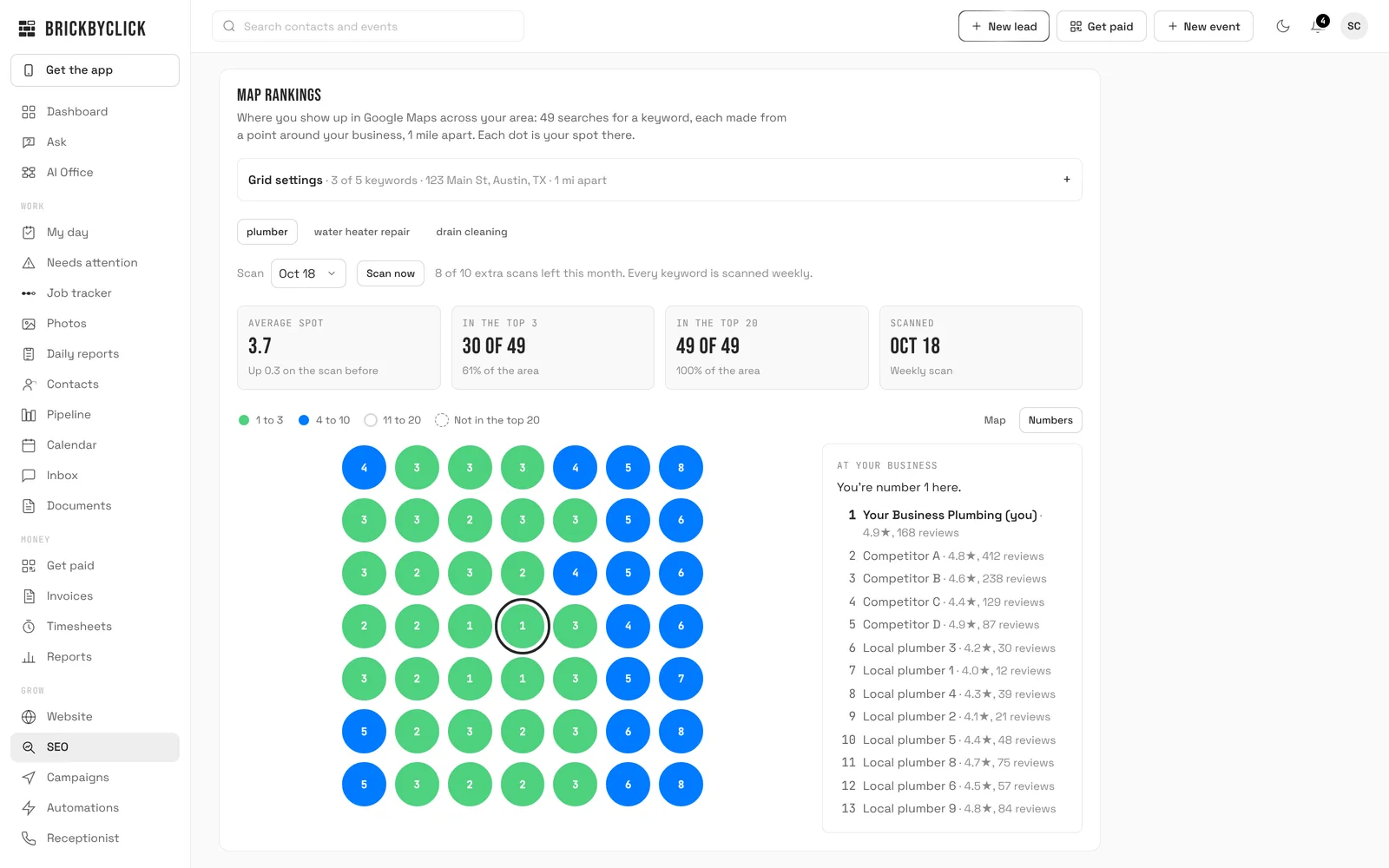
From the Growth plan our team manages your Google profile, builds and fixes your directory listings, writes a blog post a month and holds a monthly strategy call. You see your Google Maps position from 49 points around your shop.
Step 3: every call answered
Your AI receptionist has its own local number. Forward your line to it (every call, or only the ones you miss). It answers in your name from your hours, services and price rules, books visits if you allow it, and gives your emergency number when a call matches what you call an emergency.
Step 4: follow up and ask for the review
Quotes get follow-up emails 2, 5 and 10 days later, stopping when the job moves on. A finished job gets a Google review request by email the next day. Both are switches on the Automations page.
Step 5: watch where the money came from
The Reports page groups leads, jobs won and money collected by where each customer said they found you, so you can see when your own calls are carrying the business.
Electrical calls you want to own, and how each one reaches you
These are the jobs electricians tell us they want more of. For each: how the customer finds you without a marketplace, and what happens when they call.
Panel upgrades
- How they find you: a “panel upgrade” page on your site for each main town, plus photos of finished panels on your Google profile.
- On the call: the receptionist books an estimate visit by default. It only gives a price if you allow it, and only the “starting at” price on your services list.
EV charger installs
- How they find you: a dedicated EV charger page that answers what owners ask: whether their panel can take it, what they need to buy, how long it takes.
- On the call: the common questions you write on the Receptionist page, like “Do you install chargers I already bought?”, are answered in your words.
Troubleshooting and repairs
- How they find you: “electrician near me” searches, which lean heavily on your Google profile and reviews.
- On the call: with Live Booking on, it offers two or three real open times inside your hours and around your travel time.
Emergencies: no power, burning smell, sparking
- How they find you: mostly Google Maps, at all hours.
- On the call: if you tick “We take emergency calls” and describe what counts, it gives those callers your emergency number. It is not your on-call electrician, so make sure that number reaches a person.
Light commercial and property managers
Repeat customers like property managers are the opposite of a one-off lead. The receptionist greets a returning caller by first name and sees their past jobs, visits and notes before it speaks.
HomeAdvisor vs your own website for electricians
A fair comparison, using what HomeAdvisor states publicly and what BrickByClick does today. Neither column promises a number of jobs.
| HomeAdvisor (Angi Leads) | Your own demand with BrickByClick | |
|---|---|---|
| How you pay | Per lead, charged when the lead is sent | Flat monthly plan: $399, $599 or $999 |
| Who else gets the customer | Market Match: up to four pros. Exact Match: as many as the homeowner picks | Nobody: they found and called you |
| How fast it starts | As soon as your profile is live and leads match | Website and receptionist in about two weeks; search rankings take months |
| Who answers the phone | You, racing other pros | Your AI receptionist, every call, in your name |
| Where reviews build up | On the marketplace | On your Google Business Profile |
| What runs the job after | Not part of buying leads | CRM, estimates, invoices, card payments, crew app |
| When you stop paying | New leads stop | Ask us what happens to the website in the demo; your domain and Google profile stay yours |
For the full cost side of this, see HomeAdvisor vs your own website. For every trade, see HomeAdvisor alternatives for contractors.
Is BrickByClick the right HomeAdvisor alternative for your electrical business?
A good fit if
- You already get some work from Google and referrals and want more of it.
- You miss calls while you are on a job and want every one answered.
- You can wait a few months for search to build, or keep some leads running meanwhile.
- You want one system for calls, estimates, invoices, payments and the crew.
- You want reviews in your own name.
Not the right fit if
- You need jobs this week and have no other source. Buying leads is faster at the start.
- You only do new-construction work for a few builders and never get homeowner calls.
- You do not want more calls, or have no crew time to do the work.
- You want a lead count promised. We do not promise rankings or calls.
- You only want the CRM: that is Starter at $99, without the receptionist, SEO or your own domain.
Do I need to quit HomeAdvisor first?
No. Many electricians keep their HomeAdvisor spend target while the website and Google profile build, then lower it as their own calls grow. BrickByClick does not connect to HomeAdvisor; add those customers to the CRM yourself so all your jobs sit in one pipeline.
When is it not worth it?
When you are fully booked from referrals. More visibility means more calls, and that only helps if you can take the work.
What does a HomeAdvisor alternative cost an electrician?
BrickByClick plans are month to month, in US dollars, with no setup fees.
| Plan | Price | What it adds for an electrician |
|---|---|---|
| Starter | $99 a month | CRM, estimates, invoices, card payments, booking page, crew app, email review requests, a free website on a brickbyclick address you edit yourself. No receptionist, texting, own domain or SEO. |
| Front Office | $399 a month | AI receptionist with 500 minutes a month, 10+ page website on your domain built by our team, texting once your number is registered with the phone carriers. |
| Growth | $599 a month | Everything in Front Office, plus local SEO, Google Business Profile management, directory listings, 1 blog post a month, email campaigns and a monthly strategy call. |
| Total Growth | $999 a month | Everything in Growth, plus 1,000 receptionist minutes, 2 blog posts a month, link building, unlimited website pages and a dedicated account manager. |
Receptionist minutes are AI talk time. Card payments carry Stripe’s processing fee plus 0.5% per payment (maximum $25); bank payments have no BrickByClick fee. See all plans compared.
What this does not do
- It does not sell you leads. There is no marketplace and no list of homeowners.
- It does not promise rankings, calls or a date. Google decides. Search takes months.
- It does not connect to HomeAdvisor or Angi. Leads you buy there stay in their app unless you add them.
- It does not text on day one. Texting turns on once your business number is registered with the phone carriers; we handle that during setup.
- It does not send review requests by text. They are emails after a finished job, at most once every 180 days per customer, to customers with an email on file.
- It does not quote electrical prices unless you allow it. The default is to offer an estimate visit.
- It does not replace your on-call person. For emergencies it gives the number you set.
- It does not include SEO on Front Office or Starter. SEO starts at Growth.
Electricians are not the only ones who use it
BrickByClick runs the same system for local service businesses in 30+ industries: plumbing, HVAC, roofing, cleaning, landscaping, pest control and more. The electrical pages, services and questions are yours; the tools are shared.
Questions people ask
What is the best HomeAdvisor alternative for electricians?
Does HomeAdvisor send the same electrician lead to other pros?
How much do HomeAdvisor leads cost for electricians?
Can I get a refund on a bad HomeAdvisor lead?
How do electricians get leads without HomeAdvisor?
How long does it take to replace HomeAdvisor leads with my own?
Is an AI receptionist useful for electricians?
Will the AI receptionist quote prices for panel upgrades?
Can I keep HomeAdvisor and use BrickByClick at the same time?
Does BrickByClick text customers?
Is BrickByClick only for electricians?
HomeAdvisor vs your own website for an electrician: which is better?
Own your electrical calls
Take fifteen minutes with us. We will look at where your electrical work comes from today and show you how your website, Google profile and receptionist would run.