Best Free Invoicing Software for Contractors
The best free invoicing software for contractors depends on what you need next to the invoice: Wave if you want free bookkeeping, Zoho Invoice if you want quotes and up to 500 invoices a year, with payment fees set by the gateway you connect, Square or PayPal if your customers already pay that way, and BrickByClick Free if you want invoices paid by card or bank on the spot with a QR code. All of them are $0 to start. What you really pay is the fee on each card or bank payment, so compare those before the feature lists.
At a glance
- What this is: a 2027 buyer's guide to free contractor invoicing software, with each free tier's limits and payment fees taken from the maker's own pages.
- Our interest: we make BrickByClick, so one entry is ours. We say where the others do a job better.
- The real cost: card fees run from about 2.9% to 3.4% plus a fixed fee per payment, depending on the tool, and more for PayPal wallet or Pay Later checkout. Bank payments are cheaper.
- Who it is for: one-person crews and small contracting outfits that bill a few jobs a week and want to get paid faster without a monthly bill.
- What to check: the yearly or client limit, whether estimates are free, whether a homeowner can pay by bank, and who owns the payment account.
What does a contractor need from free invoicing software?
A contractor's invoice is not a shop receipt. One job can mean a deposit, a progress bill and a final bill, paid over weeks, sometimes on the homeowner's porch.
The must-haves
- Deposits and progress billing: a way to bill part of the job now and credit it on the final bill.
- Card and bank payments: a pay link in the email, so the homeowner can pay by card for a small job or by bank for a big one.
- Getting paid on site: a way to take payment from your phone before you leave.
- Who owes what: a list that shows sent, overdue and paid at a glance.
- Tax: a default tax rate so you do not work it out on every invoice.
- A clean PDF or link with your name, logo and licence number on it.
What "free" usually means
- A free plan with limits: free forever, but capped by invoices a year, clients or users. Zoho Invoice and Invoice Ninja work this way.
- Free software, paid payments: no monthly fee, and the maker earns a cut of each card or bank payment. Wave, Square, PayPal and BrickByClick Free work this way.
- A free trial: free for a while, then a monthly price. Invoice Simple, for example, lets you start free but lists only paid plans, from $6.99 a month.
None of these is a trick. They are different business models, and the right one depends on how many jobs you bill and how your customers pay.
Why the payment fee matters more than the price tag
On a free tool the fee on each payment is your real bill. A 1% difference on a $9,000 kitchen job is $90, on one invoice.
Card versus bank
Card fees are a percentage with no cap, so they grow with the job. Bank payments usually cost less and some tools cap them. For large jobs, ask the homeowner to pay by bank.
Whose account the money lands in
Some tools pay out through their own payment service. Others, like BrickByClick, send the money to your own Stripe account. Check payout timing and who you call when a payment is disputed.
The limits that bite later
- A yearly invoice cap is fine at three jobs a week and tight at fifteen.
- A client cap of 5 ends quickly for a handyman with many small customers.
- Branding on free invoices ("Powered by") is a small thing, but some owners mind it.
How we compared the free options
We read each maker's own pricing and product pages in October 2026 and wrote down only what they state. Where a page did not say, we say "check their pricing page" instead of guessing.
- Is there a free plan, not just a trial?
- What are the limits on invoices, clients or users?
- Are estimates or quotes included free?
- What does a card payment cost, and a bank payment?
- Can you get paid on site from a phone?
- What else comes with it, such as bookkeeping or time tracking?
Fees and plans change. Before you sign up anywhere, open the maker's pricing page and check today's numbers.
The best free invoicing software for contractors in 2027
Wave: best if you also want free bookkeeping
Wave's free Starter plan lets you create unlimited estimates, invoices, bills and bookkeeping records, with mobile invoicing and no card to sign up. That bookkeeping side is its real strength: none of the other free tools here keep your books.
- Card payments on Starter: 2.9% + $0.60 per transaction (3.4% + $0.60 for Amex).
- Bank payments: 1% per transaction, $1 minimum.
- A paid Pro plan is $19 a month and lowers card fees on some transactions; check their pricing page for the current terms.
Zoho Invoice: best fully free plan
Zoho Invoice is free with no subscription. Its free plan states up to 500 invoices a year, two users and three projects, with quotes, recurring invoices, time tracking and a customer portal.
- Online card, ACH and e-wallet payments go through a payment gateway you connect; the gateway's own fees apply.
- Good fit for a crew that sends many quotes and wants time logged against a project.
Square Invoices: best if you already take Square in person
Square's free plan is $0 a month per location and includes invoices, recurring invoices, estimates and contracts. If you already use a Square reader, it all sits in one account.
- Online card payment on an invoice, free plan: 3.3% + 30¢.
- Bank (ACH) payment, free plan: 1%, $1 minimum, no cap listed.
- Square Invoices Plus is $49 a month per location, with lower card fees (2.9% + 30¢), a $10 ACH cap and payment schedules.
PayPal Invoicing: best if your customers want to pay with PayPal or Venmo
PayPal charges when an invoice is paid. Its US fee sheet lists no fee for sending, and an optional invoicing subscription at $14.99 a month.
- Card, Apple Pay and other wallets: 2.99% + $0.49.
- PayPal, Venmo or guest checkout: 3.49% + $0.49. Pay Later: 4.99% + $0.49.
- Pay by Bank (ACH): 1%, capped at $10 a payment.
- For estimates and other features, check PayPal's own invoicing pages.
Invoice Ninja: best for a very small client list
Invoice Ninja's free plan is free forever with unlimited invoicing for up to 5 clients. It includes recurring invoices, a client portal and online payments through a gateway you connect.
- Free invoices carry Invoice Ninja branding; Pro removes it and the client cap at $14 a month.
- It can also be self-hosted; see their self-hosting site.
- Five clients suits a sub working for a few general contractors, not a residential crew.
BrickByClick Free: best for getting paid on site
BrickByClick Free is the invoicing and payments part of our CRM, for $0 a month and no card to sign up. It is made for local service businesses in 30+ industries, contractors included.
- A customer list, and invoices sent by email with a private pay link the homeowner opens on their phone.
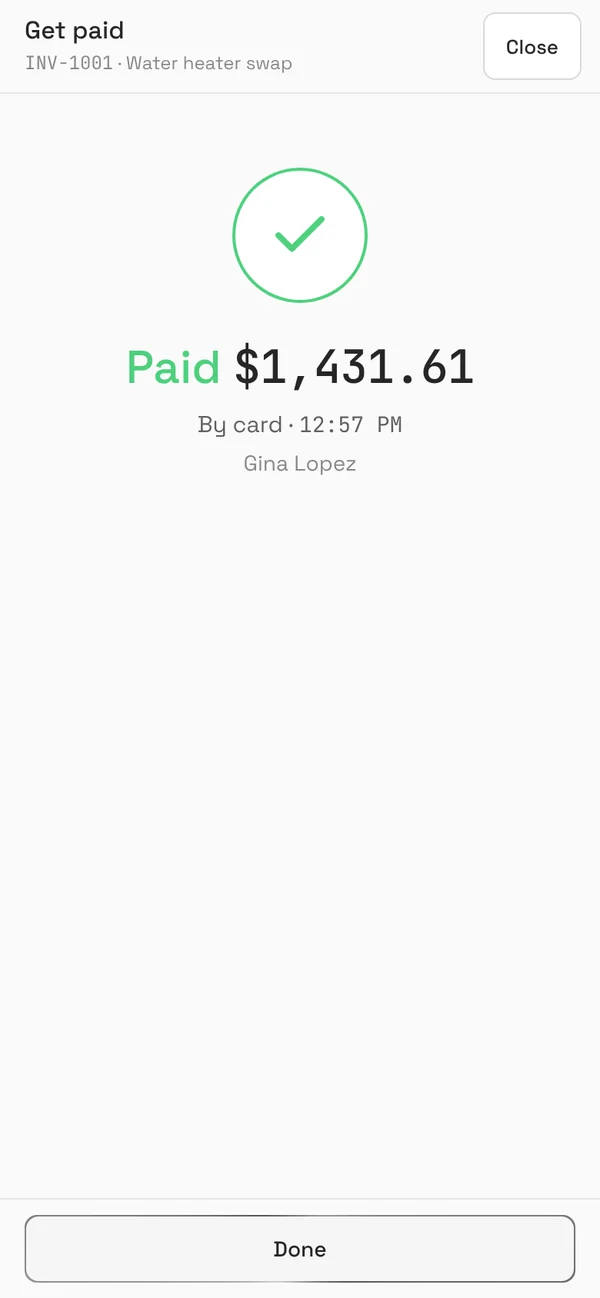
- Card, Apple Pay, Google Pay or US bank payment through your own Stripe account. The invoice marks itself paid.
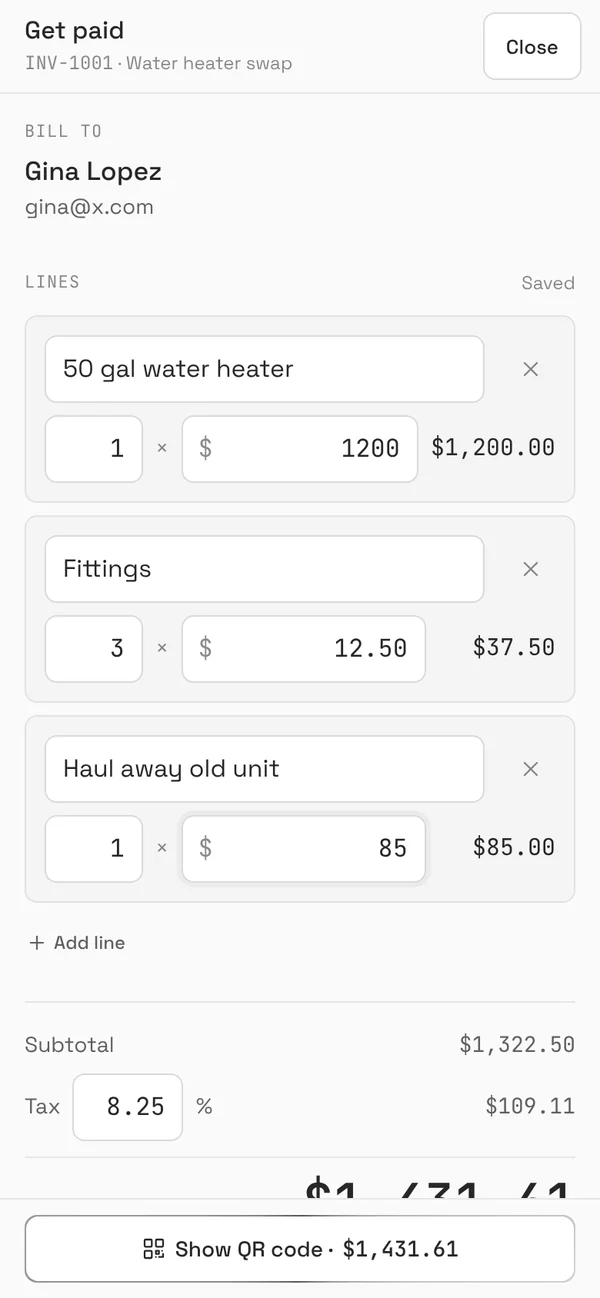
- Get paid shows a QR code on your phone for payment on the spot. Cash and checks are recorded by hand.
- Fees: Stripe's processing + 0.5% per card payment (max $25). No BrickByClick fee on bank payments.
- Limits: one login, a "Powered by BrickByClick" line on invoices, and daily limits on invoice emails for new accounts.
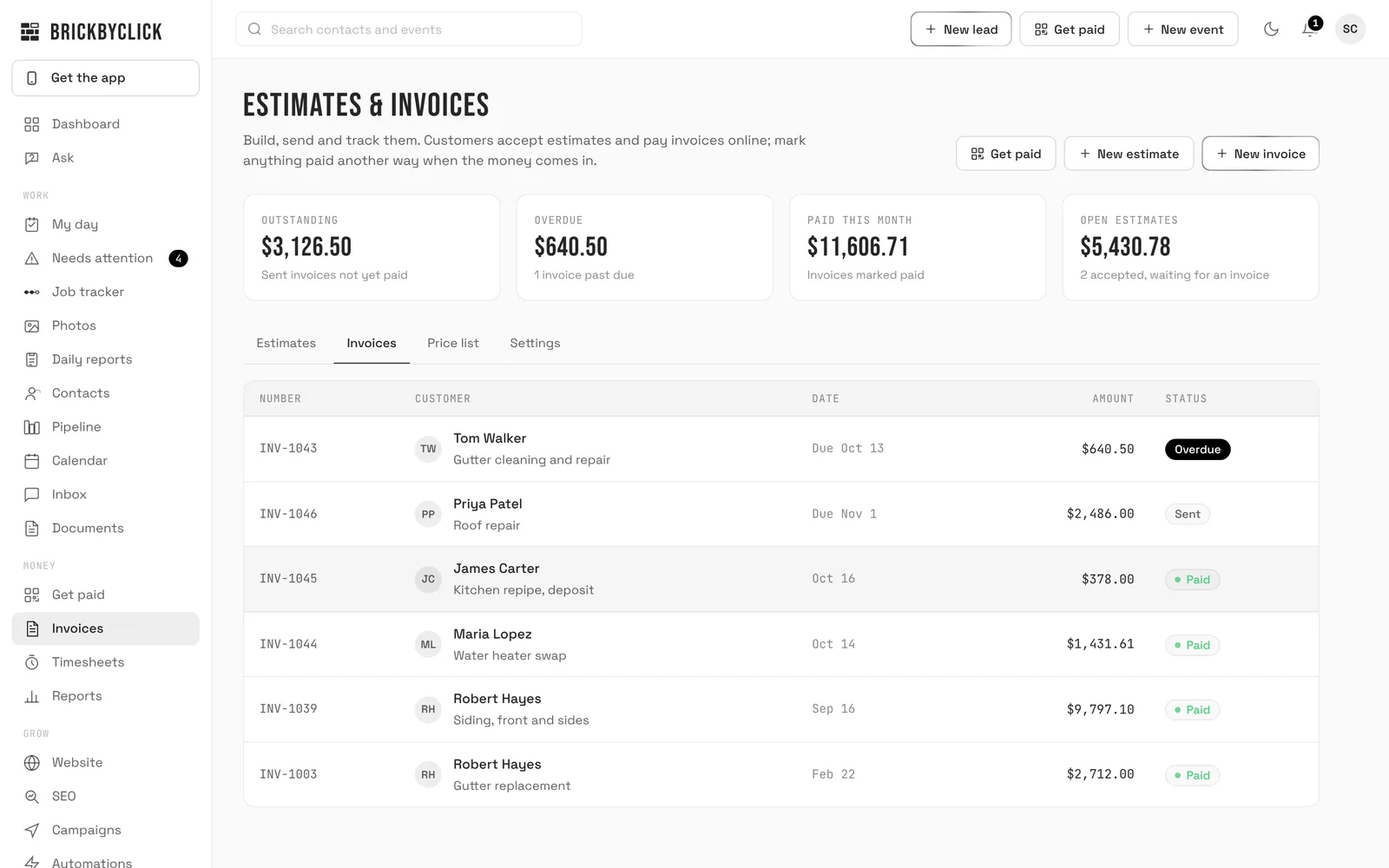
Where it is weaker: Free has no estimates, so no deposit-from-estimate flow, no payment reminders and no bookkeeping. Estimates with deposits, the job tracker and reminder emails start on Starter at $99 a month. For full details see BrickByClick Free.
Free contractor invoicing software compared
| Tool | Free plan | Stated limits | Card fee | Bank fee | Estimates free |
|---|---|---|---|---|---|
| Wave | Yes (Starter) | Unlimited invoices and estimates | 2.9% + $0.60 | 1%, $1 min | Yes |
| Zoho Invoice | Yes | 500 invoices a year, 2 users | Your gateway's fee | Your gateway's fee | Yes (quotes) |
| Square Invoices | Yes | Per location | 3.3% + 30¢ | 1%, $1 min | Yes |
| PayPal Invoicing | No fee to send | Check their pages | 2.99% + $0.49 | 1%, max $10 | Check their pages |
| Invoice Ninja | Yes | 5 clients | Your gateway's fee | Your gateway's fee | Check their pricing page |
| BrickByClick Free | Yes | One login, daily email limits | Stripe's + 0.5% (max $25) | Stripe's, no BrickByClick fee | No (Starter) |
Invoice Simple is not in the table because it lists no free plan; its paid plans start at $6.99 a month.
How to choose free invoicing software by situation
One-person crew, a few jobs a week
Any of these works. Pick the one whose fee you can live with. If you mostly bill homeowners by text or email and want them to pay from their phone, BrickByClick Free or Square keep it short.
You send a lot of estimates
Wave, Zoho Invoice and Square include estimates free. BrickByClick Free does not; estimates with online accept and a deposit come with Starter.
You need accounting, not just invoices
Wave is the clear pick on a $0 budget, because the bookkeeping comes with it. Otherwise give your accountant a clean record of invoices and payments from whichever tool you use.
You take payment on site
If you already have a Square reader, stay with Square. If you do not want hardware, a QR code the homeowner scans with their own phone does the job. In BrickByClick, open Get paid, enter the amount and tap Show QR code.
You bill big jobs
Push the homeowner toward bank payment. PayPal caps bank payments at $10 and BrickByClick adds no fee of its own on bank payments; card fees with no cap get expensive on a $20,000 job.
You work with only a few clients
A sub billing three general contractors fits inside Invoice Ninja's 5-client free plan.
How BrickByClick Free works for a contractor
You sign up at crm.brickbyclick.ai/start with an email and a password, confirm the email, then link Stripe. Your logo, address and tax rate go in Settings once.
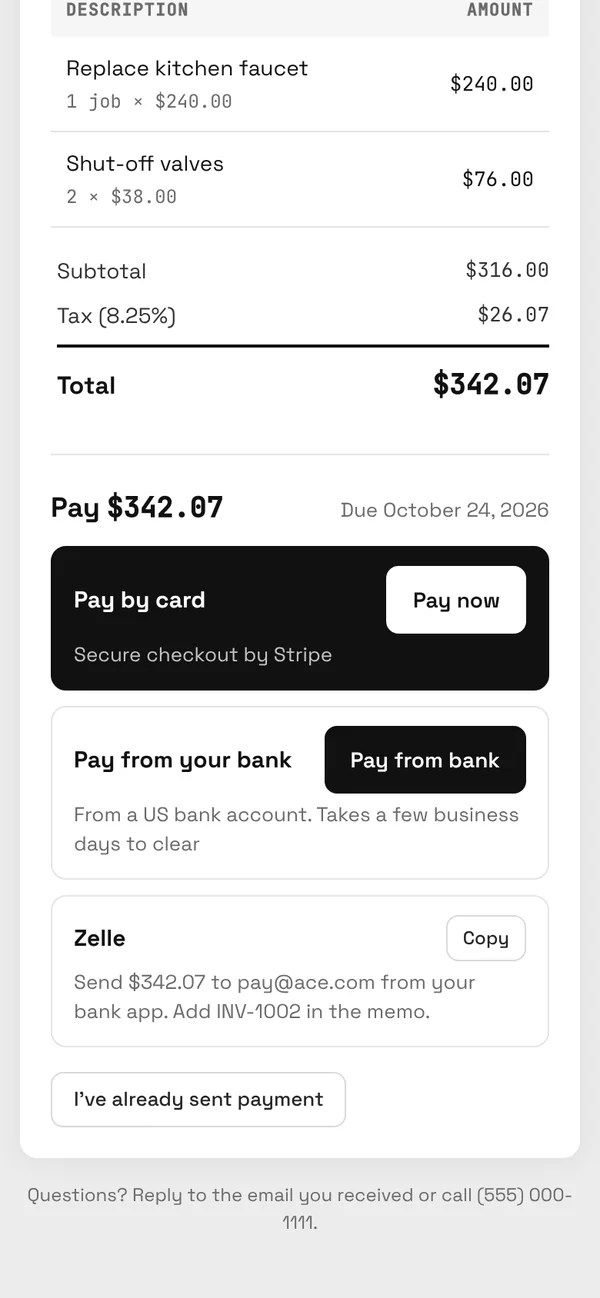
The homeowner gets an email from your business name. They tap the button, see the invoice on their phone and pay by card or bank. No account, no app.
What free invoicing software will not do for you
- Chase the money for you on most free plans. Check whether reminders are included; on BrickByClick they start on Starter.
- Replace a bookkeeper, except partly in Wave.
- Remove card fees. Every tool here charges, or passes on, a fee on each card payment.
- Track job costs or crews. For that you need job software, such as the job tracker and job costing on BrickByClick paid plans.
- Sync invoices to QuickBooks from BrickByClick. It does not, on any plan.
Is BrickByClick Free right for your business?
A good fit if
- You bill homeowners and want them to pay from a link or a QR code.
- You want card payments to land in your own Stripe account.
- You may later want estimates, scheduling and a crew app in the same place, on Starter.
Not the right fit if
- You need free estimates or quotes today: Wave, Zoho Invoice or Square include them.
- You need free bookkeeping: Wave.
- You need several people logged in for free: Zoho Invoice allows two users.
Questions people ask
What is the best free invoicing software for contractors?
Is there a truly free invoice app for contractors?
Which free invoicing software has the lowest card fees?
Can I take a deposit with free invoicing software?
What is the best free invoicing software for a one-person contracting business?
Can a homeowner pay a contractor invoice by bank transfer?
Does free invoicing software include estimates?
Is Wave or Zoho Invoice better for contractors?
Can I send invoices from free software to QuickBooks?
When should a contractor move to paid invoicing software?
Try BrickByClick Free on your next job
Sign up with an email, link Stripe and send the next invoice from your phone. No card needed.