HVAC Contractor Website Design
An HVAC contractor website wins calls when it shows the exact jobs you do (AC repair, furnace and heat pump work, maintenance), the towns you cover and a phone number one tap away, and when every call and form lands somewhere you will see it. BrickByClick builds and hosts HVAC websites: on Front Office and up our team builds a 10+ page site on your own domain with SSL, and on Starter you get a free HVAC site on a brickbyclick address that you fill in yourself.
At a glance
- What an HVAC website needs: a page per service, a page per area you serve, a clear emergency and after-hours line, maintenance plan and financing pages, real job photos and your Google reviews.
- What you get here: a site built for you on Front Office and up (10+ pages, own domain, hosting and SSL, change requests in the CRM), unlimited pages on Total Growth.
- What it costs: free on Starter ($99 a month for the CRM); Front Office $399 a month; Growth $599; Total Growth $999.
- How fast: a Starter HVAC site builds from a form in about 2 minutes; full-service plans go live in about two weeks from the demo.
- What else answers calls: the AI receptionist picks up on its own local number, from Front Office up.
- What it is not: a ranking guarantee. The site is the base; SEO work starts at Growth.
What are HVAC contractor web design services?
HVAC contractor web design services plan, build and host a website for a heating and cooling company. A good one is built around how people actually search: by the job ("AC not cooling", "furnace repair") and by the town.
The design matters less than three things: the page answers the search, the phone number is easy to tap, and the lead reaches you.
The pages every HVAC contractor website should have
- Home page: what you do, where, and your phone number at the top.
- One page per service: AC repair, AC installation, furnace repair, furnace replacement, heat pumps, ductless mini-splits, water heaters, indoor air quality, duct work. Each page names the job in plain words.
- Service area pages: your city and the towns around it, so a homeowner sees fast that you cover them.
- Emergency and after-hours page: whether you take no-heat and no-cool calls at night and on weekends, and how to reach you.
- Maintenance plan page: what a tune-up includes, how often, and what members get.
- Financing page: if you offer financing on new systems, say so plainly and say who it is through.
- Reviews and photos: real installs, real crew, real Google reviews.
- Contact page: a short form, your hours and the towns you serve.
Web design for HVAC contractors versus a general website
A general template talks about "solutions". An HVAC site talks about the system that broke today. It should read like your dispatcher talks.
It also has to work at 2 AM in January, on a phone, for someone with no heat. That is why the phone number, the emergency line and fast loading come before anything decorative.
Why does an HVAC contractor website matter for getting calls?
HVAC work is urgent and seasonal. When the first heat wave or cold snap hits, people search, check two or three sites, and call the one that looks like it can help today.
People check you before they call
- Someone who finds you on your Google Business Profile taps through to your site to check services and area.
- Someone referred by a neighbour still looks you up before dialling.
- A homeowner comparing quotes for a new system reads your install and financing pages.
Service and area pages are what Google reads
Google matches "heat pump installation in [town]" to a page that says heat pump installation and names the town in plain text. A single "Services" page with a list of ten jobs gives it little to match.
That page-per-service, page-per-area structure is the foundation the local SEO work builds on.
A website that loses the lead is worse than none
If the form goes to an inbox nobody checks in July, the visitor calls the next company. The site only pays off when calls get answered and forms land where you work every day.
How to build an HVAC website that wins calls
Whoever builds it, the steps are the same. Here they are in order, with how each one works at BrickByClick.
1. List your services and towns first
Write down every job you want more of and every town you will drive to. These become your pages. Leave out work you do not want, like small jobs far away.
2. Put the phone number everywhere
The number goes in the header of every page, tappable on a phone. On our sites your name, phone number and city are on every page, and the Visitors tab counts every tap on the number.
3. Decide who answers
More traffic means more calls you cannot take from a roof or an attic. The AI receptionist comes with its own local phone number; you forward your line to it or give it out directly (Front Office and up).
4. Add real photos and reviews
Use your own installs, units and vans, not stock photos. Show your Google rating and review count only if you have them; our sites leave a blank rating off rather than inventing one.
5. Make it fast on a phone
Most emergency searches happen on phones. Keep pages light, photos compressed and the form short. Photos uploaded in the CRM are shrunk before they go on the site.
6. Connect it to your Google Business Profile and your CRM
Link the profile to the site, keep your name, address and phone the same on both, and make sure form messages land in your CRM. On a site we build, every form message becomes a contact and you are alerted.
How should an HVAC website handle emergency and after-hours calls?
No heat and no cooling calls are the most valuable calls you get, and they rarely come at 10 AM on a Tuesday. Your site has to say clearly what you do after hours.
Say it on the page
- State whether you take emergency calls, which days and hours, and whether there is an after-hours rate.
- Say what counts as an emergency for you: no heat in winter, no cooling for a vulnerable person, a gas smell (tell them to call the gas company first).
- Use the announcement bar for short-term notices, like holiday hours or a heat-wave backlog. On our sites you set it in Edit site with an end date, and it comes down by itself.
Make sure someone picks up
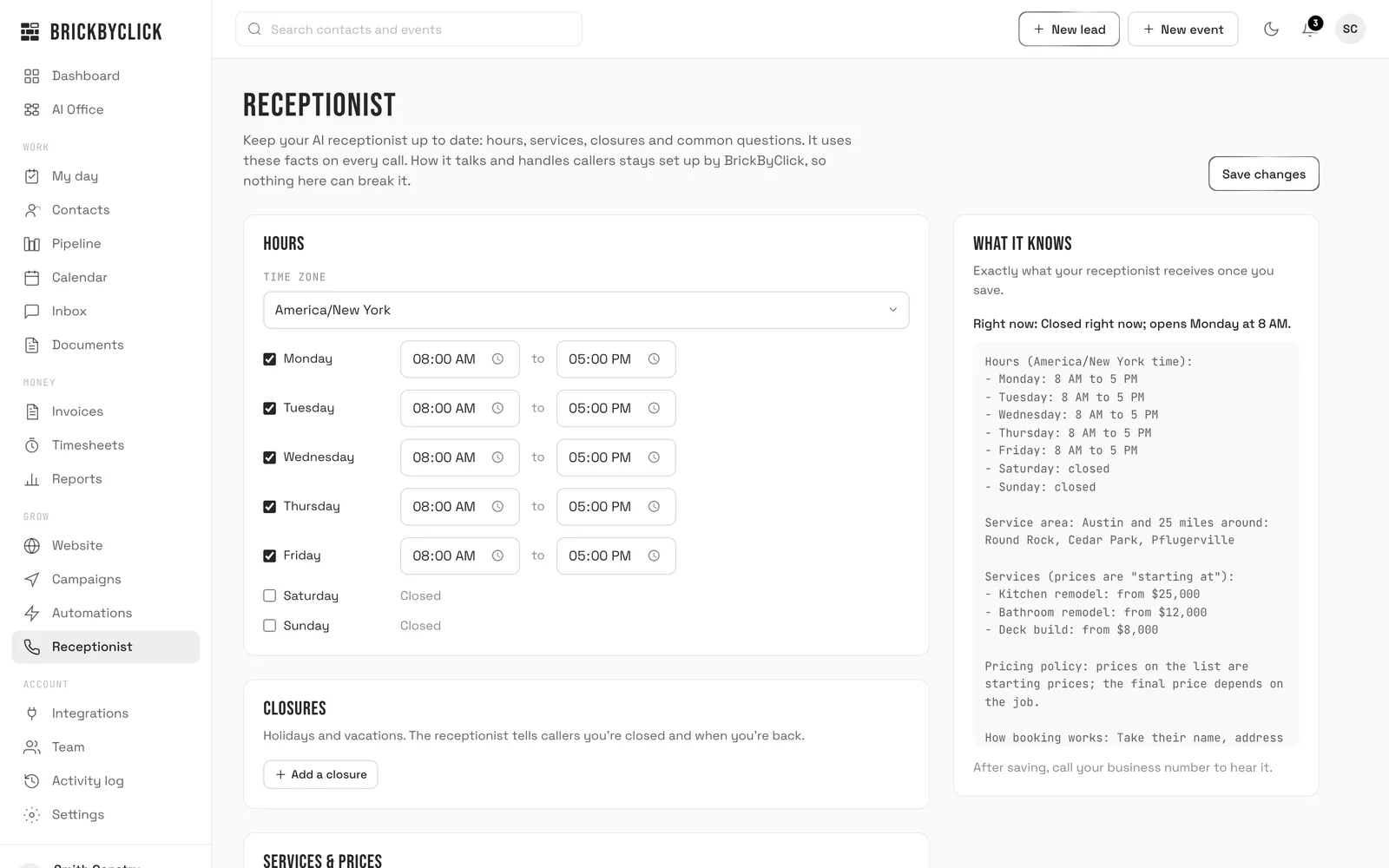
On the Receptionist page you tick "We take emergency calls", add the emergency number and describe what counts as an emergency (up to 300 characters). The receptionist uses that on every call.
You can also switch on "Ring my phone first" so calls during your open hours ring you, and the receptionist takes the ones you miss.
Missed calls
A missed call shows in the Inbox and you are alerted. Missed-call text-back is included from Front Office up; it turns on once your business number is registered with the phone carriers, which we handle during setup.
Should an HVAC website have maintenance plan and financing pages?
Yes, if you offer them. They answer the two questions that stall most system sales: "what does it cost to keep it running" and "can I pay over time".
Maintenance plan page
- What a tune-up checks, for heating and for cooling.
- How often visits happen, usually spring and fall.
- What members get, such as priority booking, if you offer it.
- How to sign up: a form or a phone number.
Behind the page, the CRM keeps the plan running: repeating visits on the calendar (every week up to every month), equipment on each customer's file with brand, model, serial and a service interval, and yearly reminder emails you switch on in Automations.
Financing page
Say who provides financing, how to apply and which jobs it covers. Do not post rates you cannot keep up to date. On Front Office and up, our team adds the page through a change request.
How does BrickByClick build an HVAC contractor website?
On Front Office and up: our team builds it
- You book a 15-minute demo and decide.
- You send your logo, photos, services, the towns you cover, and your domain or current website address.
- Our team builds a 10+ page site and hosts it with SSL. The full setup, receptionist included, takes about two weeks from demo to live.
- You connect your own domain in Website, Move your site, by changing two nameservers where you bought it. We copy your email settings first so email keeps working.
- After launch, you change details yourself and send bigger changes (new pages, wording, a financing page) in the Requests tab.
Total Growth includes unlimited website pages, useful when you want a page for every service in every town.
On Starter: a free HVAC site you fill in
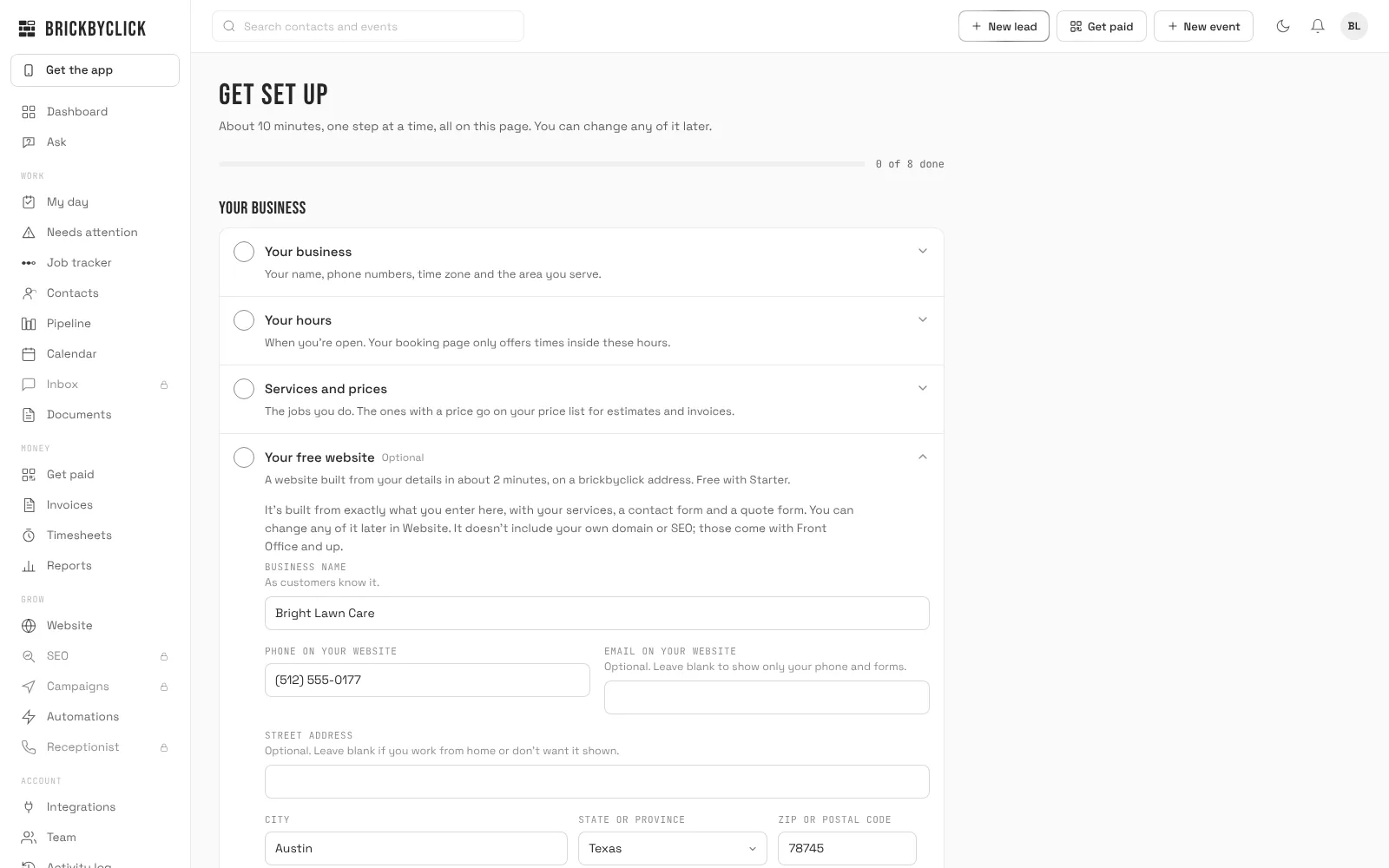
HVAC is one of the six trades with a ready-made Starter site. In Get set up, open "Your free website", enter your name, phone, city and the towns you serve, and it builds in about 2 minutes.
It lives on a brickbyclick address like yourname-yourtown.brickbyclick.pages.dev, and you edit it yourself. Starter has no own domain and no website changes by our team.
Moving from your old site
The Move your site tab scans up to 15 pages of your old site for contact details, towns, tagline, warranty and license line, logo and photos. You tick what to keep. It does not copy your old design or wording.
What can I change on my HVAC website myself?
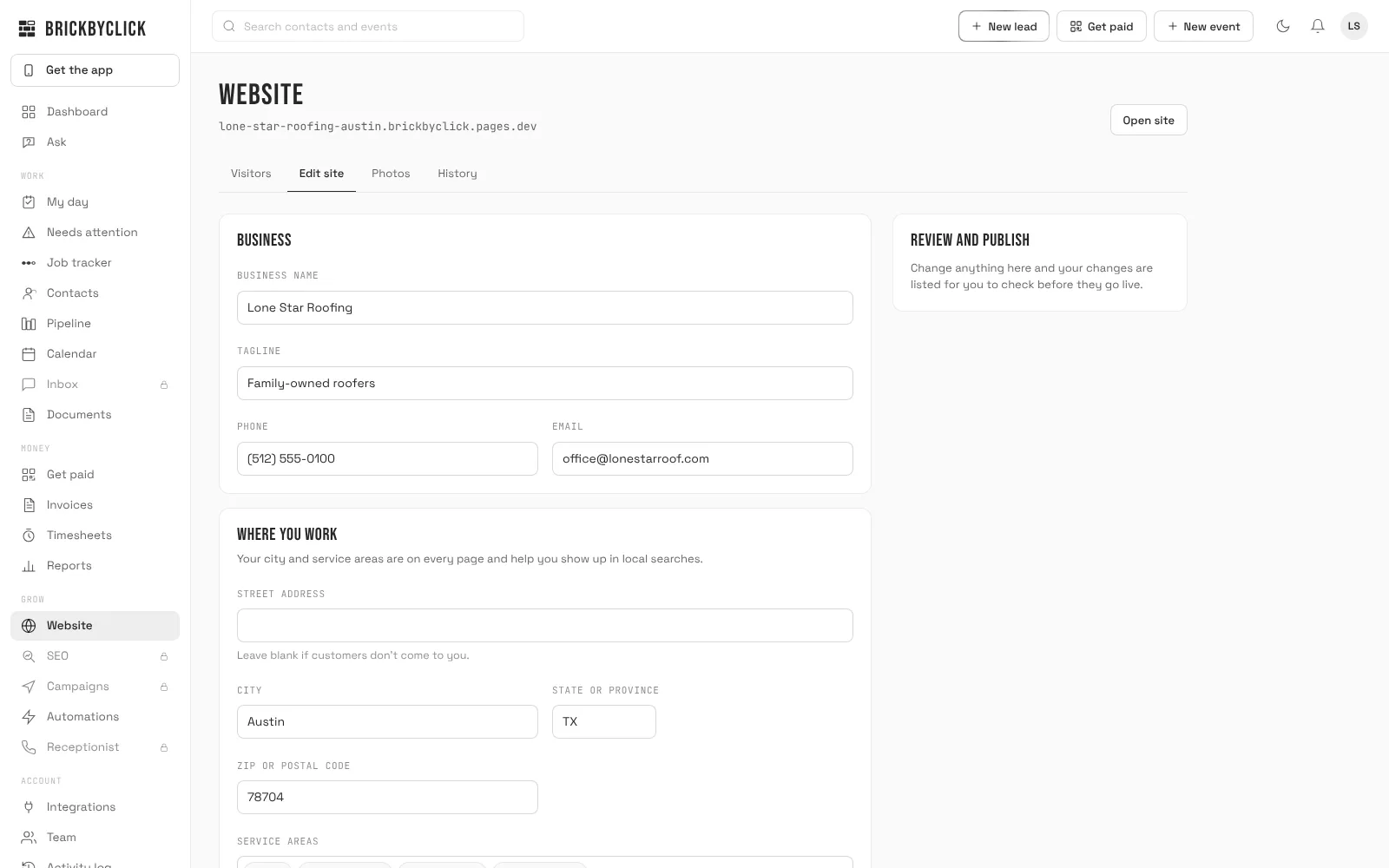
The Edit site tab has 20 fixed details. You change them, review them, and press Publish. It normally takes about a minute.
- Business name, tagline, phone, email, address, city, state or province and ZIP or postal code.
- Up to 7 service-area towns besides your city.
- Years in business, warranty in years, and a license or insurance line.
- Google rating and review count, and links to your Google Business Profile, Facebook, Instagram and Yelp.
- An announcement bar with an end date.
Photos of real jobs
In Photos you add a logo, a main photo, up to 12 "Our work" photos with captions, and one photo per service page. They stay drafts until you press "Publish photos", and location data is removed.
Undo
History keeps the last 10 versions. "Put back" makes an older one live. If a publish fails its own check, the previous site goes back up by itself.
How do I track calls and leads from my HVAC website?
A website is only working if you can see what it brings in. The Visitors tab in Website shows four numbers over 7, 30 or 90 days.
- Visits: one person on one day counts once.
- Tapped to call: taps on your number. It counts taps, not calls answered.
- Filled out a form: messages from your contact form, each one a contact in the CRM.
- Opened booking: people who opened your online booking page.
You also see where visitors found you and which pages they read, so you know whether the furnace page or the AC page earns its keep. Counting uses no cookies and ignores known robots.
On the dashboard, "Brought in" shows money paid this month by customers who came through the website form, online booking or the receptionist.
Keeping a site built elsewhere
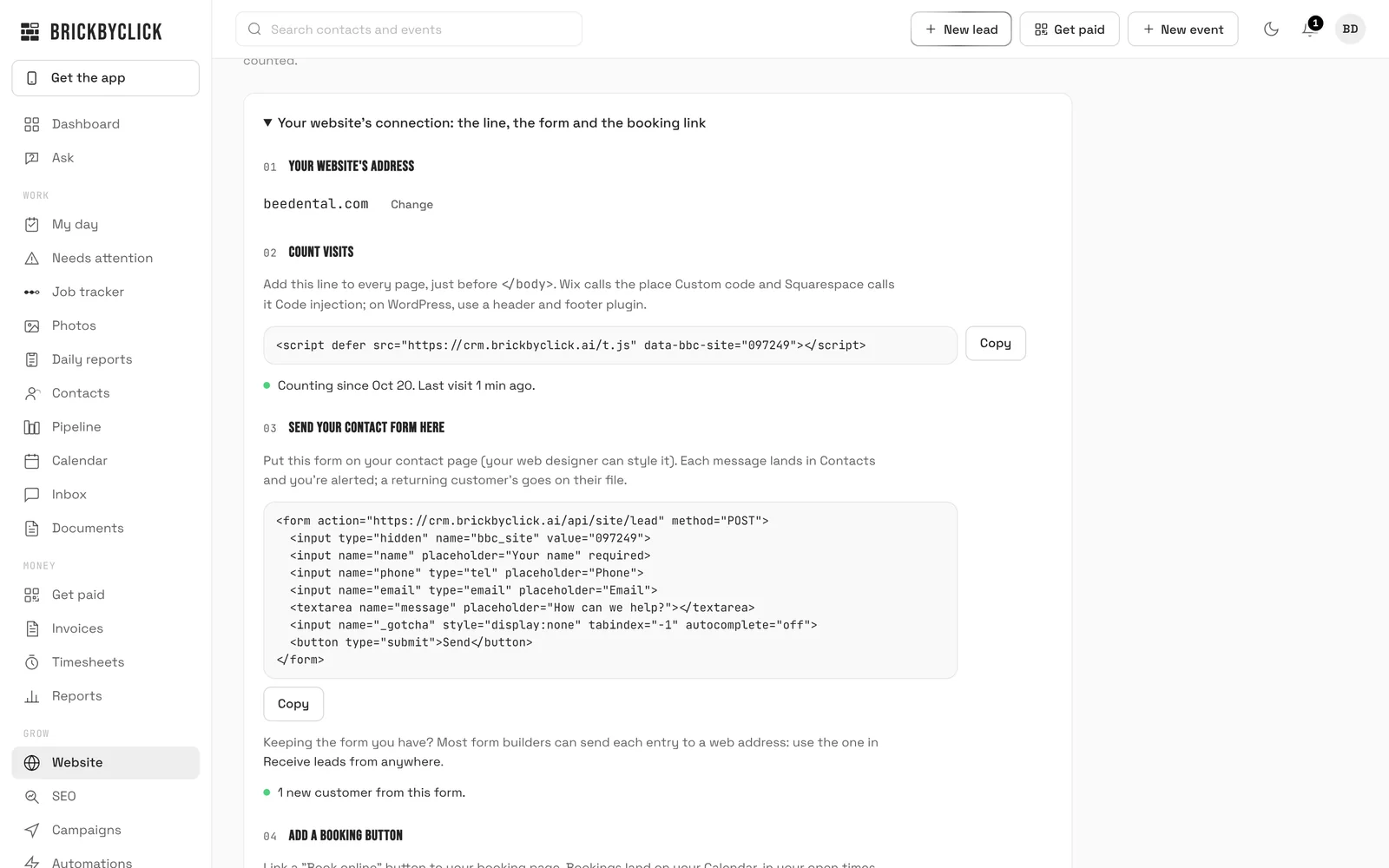
If you like your current HVAC site, keep it. Paste one counting line on its pages and, if you want, our form code, and its visits and form messages show up here too.
Websites for HVAC contractors: which option fits?
| Option | Who makes changes | Where leads go | Hosting and SSL | Usually fits when |
|---|---|---|---|---|
| Do-it-yourself builder | You, on your own time | Usually an email inbox | Part of the builder plan | You have evenings to spend on it |
| Freelance designer | The designer, by request or invoice | Wherever they set it up | Often separate; ask who owns it | You want a one-off custom design |
| Marketing agency | The agency, often under contract | An agency form or inbox | Often the agency's | You want managed ads and marketing |
| BrickByClick Starter | You, in the Website page | Contacts in your CRM | Included, brickbyclick address | You want a simple HVAC site today |
| BrickByClick Front Office and up | You for details, our team for the rest | Contacts in your CRM | Included, your own domain | You want it built and tied to calls and jobs |
The trade-off: our sites are built from a fixed structure, so design options are narrower than a fully custom build.
How much does HVAC contractor website design cost here?
The website comes with the plan, with no separate setup fee or hosting bill. Prices are in US dollars, month to month.
| Plan | Price | Website |
|---|---|---|
| Starter | $99 a month | Free HVAC site on a brickbyclick address, edited by you. |
| Front Office | $399 a month | 10+ pages built by our team, own domain, hosting, SSL, change requests, AI receptionist. |
| Growth | $599 a month | Front Office plus monthly SEO work. |
| Total Growth | $999 a month | Growth plus unlimited website pages. |
See website design and hosting for the full details and plans compared for every feature.
What this HVAC website service does not do
- No ranking promise. Nobody can honestly guarantee one. SEO work starts at Growth.
- No design editing from the CRM. You change 20 details and photos; wording, pages and layout go through a request (Front Office and up).
- No own domain, receptionist, texting or changes by our team on Starter.
- No texting on day one. It turns on once your business number is registered with the phone carriers; we handle it during setup.
- No financing of its own. We can put your financing provider on a page; we do not offer financing.
- No invented reviews or numbers. A blank rating stays off the site.
Is this the right HVAC website for you?
A good fit if
- You run a residential or light commercial HVAC company and get work by phone and form.
- You miss calls while on jobs and want them answered.
- You want the site, the calls and the jobs in one place.
- You would rather not deal with hosting, SSL and renewals.
Not the right fit if
- You want a fully custom design with animations.
- You need an online store for parts or filters.
- Your current site already brings leads you see and answer: connect it instead.
- You want a ranking guarantee.
Questions people ask
How much does an HVAC contractor website cost?
What pages should an HVAC company website have?
How do I build an HVAC website?
What makes good web design for HVAC contractors?
Should my HVAC website have a page for every city I serve?
How should an HVAC website handle after-hours emergency calls?
Can I use my own domain for my HVAC website?
Can I update my HVAC website myself?
Do I need a website if I already have a Google Business Profile?
How do I know if my HVAC website brings in calls?
Will a new HVAC website rank on Google?
Can I keep my current HVAC website and use BrickByClick?
See what your HVAC website would look like
Take fifteen minutes with us. We will show you the website, the receptionist and how a form message becomes a booked visit.